Legal tech used to mean the software that kept a firm running in the background. Time and billing, a document repository, a case management system. Useful, but not something a lawyer thought much about during the actual practice of law.
That line has blurred. The tools a legal team picks now shape how fast a matter moves, how much of an associate's day goes to review instead of judgment, and whether the firm can take on work it would have turned away two years ago. AI sits underneath most of that change, less as a standalone product and more as a layer running through the tools legal teams already open every day.
This guide covers what legal tech includes in 2026, the categories worth knowing, how the better tools ground their answers in real sources, how teams use them by role, and the questions that matter when you evaluate any of it.
What Legal Tech Means in 2026
From Standalone Tools to a Connected AI Layer
Legal tech is the set of software, data, and AI systems that legal teams use to deliver and manage legal work. It spans research, drafting, review, matter management, evidence handling, and client communication. The category is broad because the work is broad.
What shifted recently is where the intelligence lives. For years each tool did one job and handed off to the next. Now AI runs across them. A reviewer can ask a question in plain language and get an answer pulled from the case file, with a citation back to the source. Work that once needed a separate research request, a separate review platform, and a separate person now happens closer to where the lawyer already sits.
Why Verifiable Citations Are Now the Baseline
The early experiments with general-purpose chatbots taught the profession a hard lesson. The tools produced confident, fabricated case citations, and lawyers who filed them were sanctioned, with Mata v. Avianca the case most people remember. Stanford RegLab's research put numbers to the problem, finding that general-purpose models invented legal citations in a large majority of test queries, and that even purpose-built legal tools still hallucinated a meaningful share of the time.
The result is that verifiable sourcing is now the price of entry. A tool that cannot show where an answer came from is not usable for filing, and serious buyers treat that as a hard line rather than a preference. The rest of this guide assumes that baseline and builds on it.
eDiscovery and Litigation Support Software
The Traditional eDiscovery Workflow
eDiscovery is the process of preserving, collecting, processing, reviewing, and producing material as part of a dispute or investigation. Each stage has established platform support. Processing tools parse text, deduplicate, and build an index. Review tools display documents with a coding interface. Production tools apply redactions and package files in the required format.
Where Document-Centric Platforms Fail on Video
The model assumes the evidence is text, and a modern case file is not. Body camera footage, recorded interviews, surveillance video, and call audio now make up the bulk of evidence in many matters. A document-centric platform can read a filename but cannot tell you what is happening inside the file. So teams fall back on watching footage by hand and tracking it on spreadsheets, which introduces audit gaps and does not scale on a multi-party matter with large volumes of video.
What a Video-Ready Workflow Looks Like
A workflow built for modern evidence searches inside the footage itself, transcribes audio automatically, redacts video and audio rather than only documents, and produces an exportable chain-of-custody record with tamper detection. Our guide to video e-discovery walks through each stage and where the document-centric approach falls short.
AI Evidence Analysis Across Documents, Video, and Audio
How Multimodal Evidence Processing Works
This is the category that has moved fastest. Instead of treating each file type as a separate tool, one platform processes documents, audio, video, and images on the same backend. OCR pulls text from image-based PDFs and ICR reads handwritten content. Speech recognition with speaker diarization turns audio and video into attributed transcripts. Object and person detection scans video frame by frame. Entity extraction runs across all of it, and the results land in a single searchable index a reviewer can query.
How the AI Intelligence Hub Delivers Sourced, Cited Answers
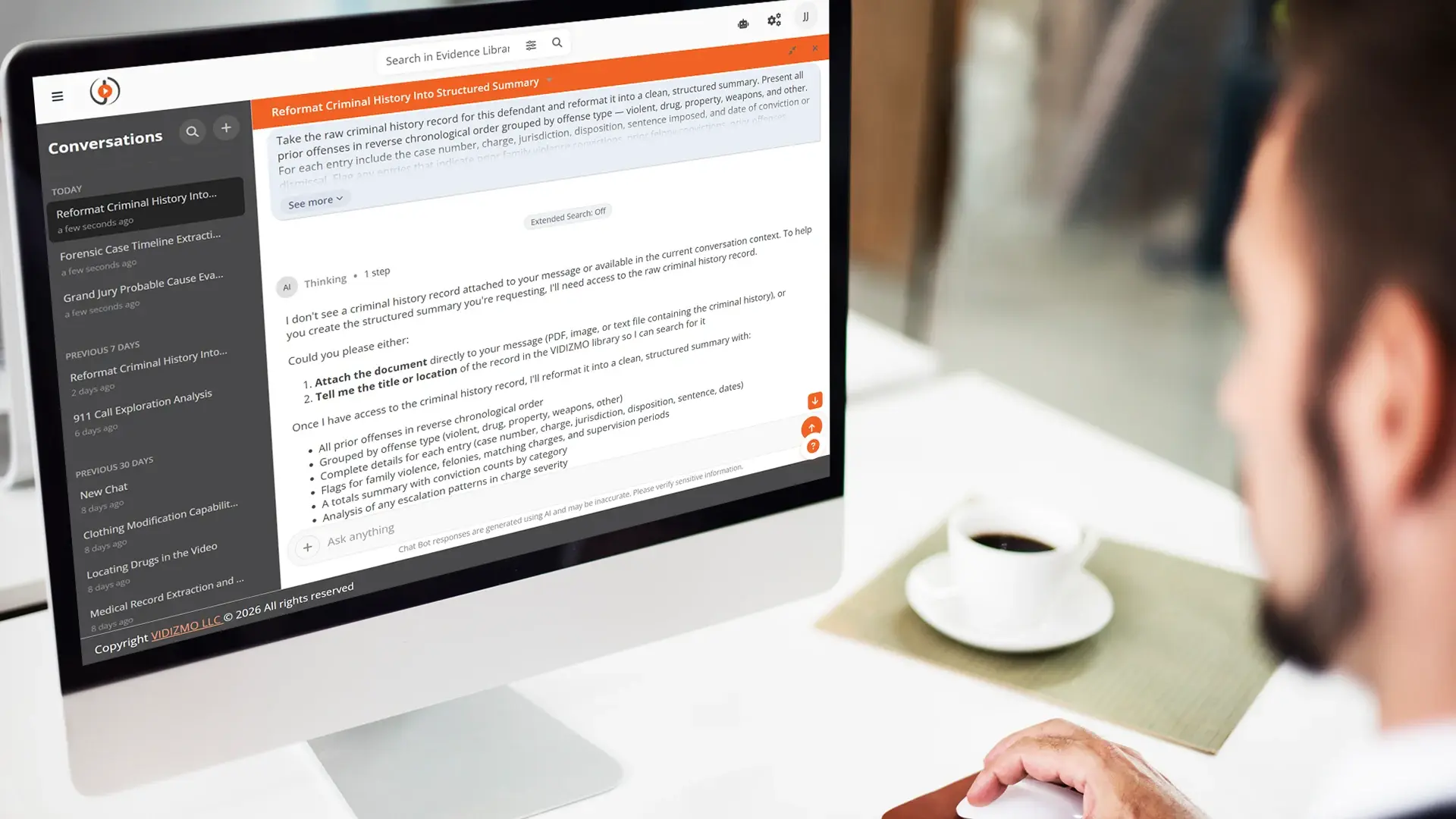
The capability that makes any of this usable in a legal setting is grounding. When a reviewer asks a question, the answer should be built only from passages retrieved out of the team's own evidence, with the source shown next to it. VIDIZMO AI Intelligence Hub works this way. Its assistant composes each answer from retrieved passages of the matter's own files and shows the citation beside it, whether that is a page in a deposition transcript or a moment in body camera footage. The reviewer clicks through and verifies in one step.
Because the assistant generates only from retrieved evidence, it does not invent a witness statement, a fact pattern, or a citation from a training set. When the evidence does not support an answer, it says so. That property is what lets a team rely on the output, since every claim traces back to something concrete in the file. The grounding is how the assistant produces output at all, rather than a check bolted on afterward.
The Review-Time Payoff for Litigation Teams
The practical effect is that the lawyer stops doing the finding and keeps the judgment. A review that ran across mixed media in roughly two hundred hours can run in a fraction of that once the evidence is indexed and queryable. We go deeper on multimodal evidence analysis and why text-only tools leave part of the record unread.
Conversational AI for Searching a Case File
Why Natural-Language Search Fits Legal Work
The questions a litigation team actually has are rarely keyword shaped. "Show me every contradiction between the deposition video and the surveillance footage" is not something you type into a search box. "List every reference to the supervisor's name across the recorded interviews and the personnel file" is another. A conversational interface translates that intent into retrieval, runs it across the indexed evidence, and returns a sourced answer, so the reviewer gives up the scrubbing and keeps the analysis.
How Grounding Prevents Fabricated Answers
The same discipline from the section above applies here. The assistant answers from retrieved passages of the team's own evidence, shows the cited source, and runs inside the organization's own tenant so privileged work product and protected data stay under the team's control. We cover the mechanics in our piece on asking questions across a case file.
How Legal Teams Use AI by Role
Different teams put the same underlying capability to different work. The examples below show the shape of the queries each one runs.
Prosecutors and District Attorneys
A line prosecutor carrying eighty to a hundred active matters, each arriving with body camera footage and recorded interviews, uses the platform to query across the full case file. A typical question is every reference to a specific firearm across the recordings and reports, answered with timestamp citations the team can drop straight into a trial exhibit. The same search can run across years of prior office matters to surface earlier cases with a similar fact pattern, which supports charging and plea decisions.
Criminal Defense and Public Defenders
A defender with a four-hour body camera clip and a written statement claiming a verbal warning was given uses a single query to find the moment, rather than scrubbing the video. Defense teams also ask for every body camera segment showing an officer's interaction with their client, and check a complaining witness's current account against prior testimony for inconsistencies. The tool finds the material and cites it, and the attorney decides what it means.
Civil Litigation and Discovery Teams
Discovery teams use multimodal analysis to triage what matters before attorney review begins. They ask for every contradiction between a deposition video and the surveillance footage, or for each place a key term appears across documents, audio, and video at once. The result is that a supervising attorney reviews a structured, cited overview and spends close attention only where it is warranted.
Mass Tort and Class Action
Firms running high-volume litigation cross-reference thousands of plaintiff records, medical histories, and deposition transcripts to build consistent narratives across a claimant pool. A partner drafting a motion can ask for the primary mechanisms of injury argued across specific expert reports and the master complaint, and receive an answer quoted from those documents. Our piece on the legal data intelligence platform covers this workflow for mass tort and class action in depth.
In-House and Corporate Legal
Corporate teams run internal investigations that span email, chat exports, recorded interviews, and personnel files. They ask for every reference to a named individual across those sources, or reconstruct what happened on a given day from the documents, messages, and any recorded material tied to it. The same grounding applies, so the findings trace back to the underlying record.
Redaction Software and Data Protection
Why Manual Redaction Is a Liability
Before anything is disclosed, sensitive material has to come out. Names, faces, on-screen text, protected health information, and personal identifiers all have to be removed, and a single missed redaction can mean waived privilege or a court sanction. Manual redaction is slow and error prone, and the risk climbs with video and audio, where the sensitive content is spread across thousands of frames and minutes of speech.
How Automated Redaction Works Across Formats
Modern tools detect faces, speech, and on-screen text automatically and apply redactions across documents, video, audio, and images, with a review step so a second person approves the work before it leaves the building. For teams handling video and audio at volume, the ability to automate redaction is often where the first real time savings show up.
Deployment, Security, and Defensible AI Use
What the Courts Have Ruled on AI and Privilege
Every legal tech decision is also a confidentiality and privilege decision, and the case law is now specific. In United States v. Heppner, a court found that documents a litigant generated through a consumer AI platform, after retaining counsel but without attorney direction, were not protected by privilege or the work product doctrine, partly because the content was routed through a third party's servers. The same week, in Warner v. Gilbarco, a different court found that work product protection did apply to a self-represented litigant's AI-assisted materials on different facts. Read together, the rulings point to a consistent standard: defensible AI use depends on confidential infrastructure, attorney or supervisory direction, and a documentable audit trail.
CJIS and Regulated Data Requirements
Teams handling criminal justice information face an added constraint. Cloud-only tools can conflict with the controls CJIS requires, which pushes serious buyers toward on-premises or in-tenant deployments where the data stays inside the agency's network perimeter under its own control.
Evidence Authenticity
Authenticity is now part of the job too. In Mendones v. Cushman & Wakefield, a judge watched a video exhibit submitted as a witness statement, noticed the face barely moved and the voice was disjointed, and the court identified it as an AI-generated deepfake submitted as authentic evidence. Evaluating a modern exhibit increasingly means weighing video, audio, and the documents around it together.
What to Require From a Platform
The practical checklist is short. Look for in-tenant or on-premises deployment for sensitive matters, a complete audit trail, tamper detection such as SHA-256 hashing with an exportable chain of custody, and integration through SSO and provisioning so access tracks the team.
How to Evaluate Legal Tech Before You Buy
The center of gravity has moved from standalone tools to how well AI runs through the systems your team already uses. Three things separate a good fit from a poor one.
Start with the workflow rather than the feature list, because a tool that solves the wrong bottleneck is the most expensive purchase you can make. Confirm the tool covers the formats your matters actually contain, since a platform that only reads text will leave most of a modern file unindexed. And treat citation grounding and deployment controls as requirements rather than nice-to-haves, because both are hard to retrofit after you have signed.
Hold any platform against that frame and the shortlist gets shorter fast. VIDIZMO Intelligence Hub was built for the part of this picture that document-only tools leave behind, reading and reasoning across video, audio, documents, and images as one cited record, inside your own infrastructure. Book a demo to see it work on a matter from your own practice.