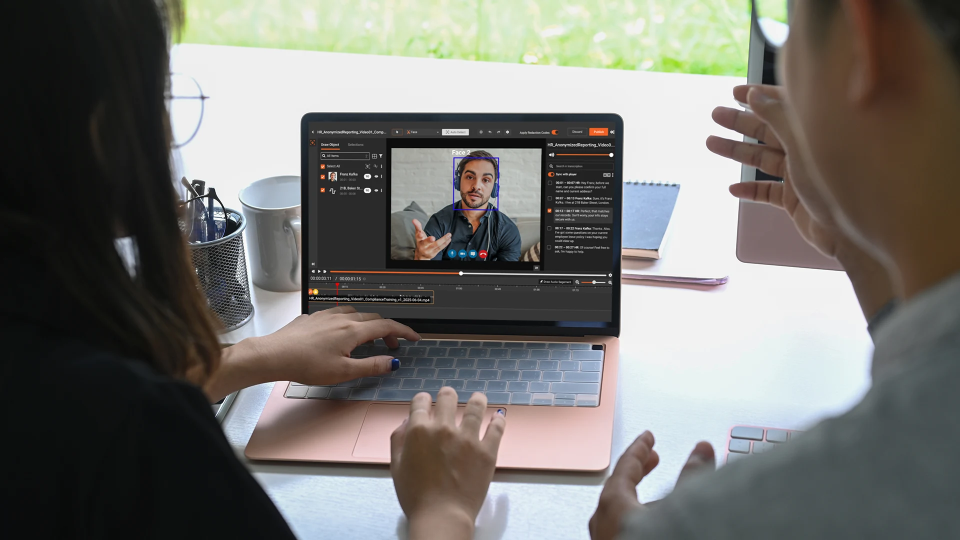
Every consulting engagement produces video. System walkthrough recordings, client demo sessions, onboarding screen captures, and presentation playbacks are standard deliverables and internal documentation tools. The problem is that those videos almost always capture live systems, and live systems contain real data.
Account numbers scroll across dashboards. Customer names appear in CRM interfaces. Social Security numbers surface in HR systems during a software demo. A screen recording of a financial platform walkthrough might capture dozens of identifiable records before the presenter even realizes it. Redacting PII from demo videos is not a niche compliance task. It is a core operational requirement for any consulting firm that handles client environments.
Why Consulting Videos Are a PII Risk
The nature of consulting work creates a specific exposure pattern. Unlike call recordings or surveillance footage, consulting videos are often created intentionally, meaning they are saved, distributed, and referenced over time.
They are shared broadly, across internal teams, client stakeholders, and sometimes partner organizations. And they are recorded in live environments, where test data and sanitized environments are not always available.
A systems integrator recording an ERP deployment walkthrough will capture employee records. A management consultant creating a process documentation video may inadvertently show client financial data. A software implementation firm demoing a configured CRM will expose the client's contact database on screen.
These are not edge cases. They are the default condition of video-based consulting work.
What Client Data Typically Appears in Demo and Presentation Videos
Understanding what needs to be redacted is the first step. In consulting video workflows, the most common sensitive content types span several categories.
On-screen PII in dashboards and applications includes full names, email addresses, and phone numbers visible in CRM or ERP interfaces, account numbers and financial identifiers in accounting systems, employee IDs and Social Security numbers in HR platforms, and patient record details in healthcare IT demos.
Document content visible during screen recordings includes spreadsheets with customer or employee data, contracts or agreements opened on screen during a walkthrough, and reports with named individuals, addresses, or financial figures.
Faces and identifiable individuals include client stakeholders on camera during recorded video calls and participants visible in presentation room recordings.
Spoken information in audio includes names, phone numbers, or account details referenced verbally during a demo, and PII mentioned in passing during a walkthrough narration.
Each of these requires a different redaction approach: visual object detection, OCR-based document scanning, and audio transcript analysis. For a deeper look at how modern platforms handle all three layers in a single workflow, see How Video Redaction Software Handles Audio, Faces, and PII Together.
Why Manual Redaction Does Not Scale
The instinctive response is to handle this manually: scrub through the video, pause on sensitive frames, and blur or cut the relevant sections. For a single short recording, this is feasible. For a consulting firm producing dozens of client-facing videos per month, it breaks down quickly.
Manual redaction has three consistent failure points.
First, it is inconsistent. Different reviewers apply different standards. Data that one person considers sensitive, another overlooks. There is no systematic coverage of PII types. Second, it does not catch audio. A reviewer watching a video may redact what they see but miss a name spoken in the narration.
Spoken PII in demo audio is frequently left unredacted. Third, it does not scale. A 45-minute system walkthrough video may contain hundreds of frames with client data. Frame-by-frame manual review is not a realistic production workflow.
Consulting firms that rely on manual redaction typically end up with one of two outcomes: content that still contains client PII, or a bottleneck so severe that video assets are simply not shared at all. Neither is acceptable. This scalability problem is one of the core reasons organizations shift to automated PII redaction software.
How VIDIZMO Redactor Handles PII in Consulting Videos
VIDIZMO Redactor is AI-powered redaction software that automatically detects and redacts sensitive information across video, audio, and documents. For consulting workflows specifically, the relevant capabilities are:
Screen and Dashboard Content Detection
Redactor's object detection tracks screens as a detectable object class, meaning it can identify and redact the content displayed on monitors and application interfaces visible in a recording. Combined with OCR-based text detection, it reads and redacts identifiable text appearing on screen, including names, numbers, and structured data fields.
PII Detection Across 40+ Data Types
The platform detects more than 40 PII types across visual, audio, and document content. This covers the full range of identifiers that surface in consulting demos: names, phone numbers, email addresses, Social Security numbers, credit card numbers, account numbers, national IDs, and more. Custom patterns using regex allow firms to add organization-specific identifiers that standard PII models do not cover. For teams that need granular control over which data types get redacted, selective PII redaction makes it possible to target specific categories without over-redacting content that needs to remain visible.
Audio Redaction for Spoken PII
Redactor's audio redaction processes speech in 82 languages, identifying 33+ spoken PII categories including names, addresses, phone numbers, and financial identifiers. For demo videos where narrators reference client data verbally, spoken PII is automatically muted or bleeped without requiring manual editing. More detail on this capability is covered in the audio redaction software guide.
Document Redaction Within Video
When a presenter opens a document, spreadsheet, or report on screen during a recording, Redactor's OCR pipeline reads the visible content and applies redaction to detected PII within those documents as they appear in the video frame. This covers the common scenario where a walkthrough briefly shows a populated spreadsheet or contract.
Bulk Processing for High-Volume Output
Consulting firms do not produce one video at a time. Redactor supports bulk redaction across hundreds of files simultaneously, with queue-based automation that allows overnight or off-hours processing. Firms can submit a batch of recordings and receive redacted outputs ready for distribution without manual review of each file.
Split-Screen Review
A split-screen comparison view lets reviewers check the original against the redacted version side by side. This allows a final quality review without requiring a full manual pass. The reviewer confirms the AI's work rather than performing it.
Ready to see it in action? Start your free trial of VIDIZMO Redactor or request a demo to see how it handles your consulting video workflow.
Practical Workflow for Consulting Firms
A repeatable redaction workflow for consulting video assets looks like this:
- Upload recordings to VIDIZMO Redactor, individually or in bulk via the desktop watch folder app
- Apply a redaction template configured for consulting content (faces, screens, PII text, spoken identifiers)
- Run AI redaction: the platform processes video, audio, and visible documents automatically
- Review in split-screen: a single pass to confirm coverage and make any manual adjustments
- Export the redacted file: a separate output file is generated; the original unredacted recording is preserved
The original is never modified. Redactor generates a clean output copy, meaning firms retain full originals for internal reference while distributing the redacted version to clients, partners, or for training archives. This same workflow applies to adjacent use cases, including PHI redaction in healthcare SaaS demo videos and PII compliance for BPO firms producing high volumes of client-facing recordings.
Key Takeaways
- Consulting videos routinely capture live client data, including account numbers, names, and sensitive system content, that cannot be shared as-is.
- Manual redaction is inconsistent, misses audio, and does not scale to production volume.
- VIDIZMO Redactor detects and redacts PII across video frames, audio narration, and on-screen document content in a single automated pipeline.
- Bulk processing and redaction templates make it practical for firms producing high volumes of client-facing video.
- The original recording is always preserved; only the output copy is redacted.
Start Redacting Client Data from Your Demo Videos
If your firm produces system walkthrough videos, client demos, or presentation recordings in live client environments, every file is a potential data risk until it is redacted. VIDIZMO Redactor automates that process across video, audio, and on-screen content, so your team spends minutes reviewing, not hours scrubbing.
Start your free trial of VIDIZMO Redactor or request a demo to see how it handles your specific video format.

FAQ
Frequently Asked Questions
Can AI automatically redact sensitive information from screen recordings?
Yes. AI-powered redaction tools like VIDIZMO Redactor use object detection and OCR to identify and redact PII visible in screen recordings, including text in application interfaces, open documents, and dashboards.
What types of PII appear in consulting demo videos?
Common PII in consulting videos includes full names, account numbers, email addresses, phone numbers, Social Security numbers, and financial identifiers that appear in live client system environments during demos or walkthroughs.
Does video redaction software also handle spoken PII in audio?
Yes. VIDIZMO Redactor includes AI audio redaction that detects spoken PII, including names, phone numbers, addresses, and financial identifiers, in 82 languages and automatically mutes or bleeps those segments.
How do consulting firms protect client data in shared video recordings?
The standard approach is AI-powered video redaction, which automatically detects and removes sensitive data before sharing. This covers visual PII on screen, spoken PII in audio, and text visible in open documents during a recording.
Is it possible to redact video without losing the original file?
Yes. VIDIZMO Redactor generates a separate redacted output file while preserving the original unredacted recording. The original is never modified.
You may also like
What CJIS Actually Requires When AI Touches Criminal Justice Data
The CJIS Security Policy does not use the word AI. No section tells you whether a transcription model, a retrieval ...
The Security Questionnaire: What to Ask Any AI Vendor
Most AI vendor security questionnaires are a SaaS questionnaire from several years ago with the word AI added to the ...
Sovereign AI Compliance Architecture: CJIS, FedRAMP, and Air-Gapped
Designing an AI system to a named authorization is a different exercise from designing it securely. Security ...