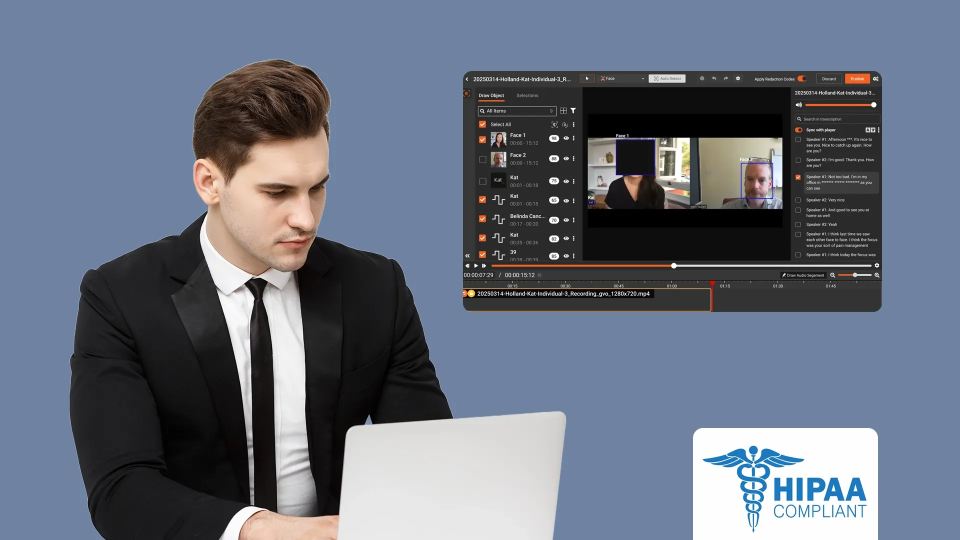
A sales engineer at a healthcare SaaS company finishes recording a platform demo. The walkthrough is clean — good pacing, solid feature coverage, clear narration. Product marketing uploads it to the asset library. Sales enablement adds it to an outbound sequence. Two weeks later, a compliance officer flags it: a claims dashboard visible at the 4:32 mark shows real member IDs, diagnosis codes, and dates of service.
This is not a rare scenario. Healthcare SaaS platforms are built to display, process, and manage Protected Health Information (PHI). Every screen recording captured inside these platforms carries a risk of exposing patient data, and sharing that recording externally without redaction is a HIPAA violation, regardless of intent.
This post walks through the specific PHI risks in product demo videos, the HIPAA rules that apply, and a practical approach to redacting demos before they reach prospects, partners, or public channels.
Why Demo Videos Are a Unique PHI Risk
Product demos are not the same as webinars or training recordings when it comes to PHI exposure. Demos carry a distinct set of risks because of how and where they are recorded.
The Demo Environment Problem
Most healthcare SaaS companies record demos in one of three environments:
- Production clones. A copy of the live environment, refreshed periodically with real data. This is the highest-risk scenario — every patient record, claim, and identifier in the demo is real PHI.
- Staging environments with seeded data. Test data that looks realistic but was generated synthetically. The risk here is subtler: if the seeded data was derived from production records (anonymized incompletely, or patterned after real patients), it may still qualify as individually identifiable health information under HIPAA.
- Dedicated demo tenants. Purpose-built environments with fictional data. These are the safest option, but even here, risks exist — team members sometimes import real data for a specific prospect demo and forget to clean it up.
Regardless of which environment a team uses, the same UI elements that make a demo compelling — populated dashboards, realistic patient records, functional workflows — are the same elements that create PHI exposure.
What Shows Up on Screen
In a typical healthcare SaaS demo recording, PHI can appear in dozens of places across the interface:
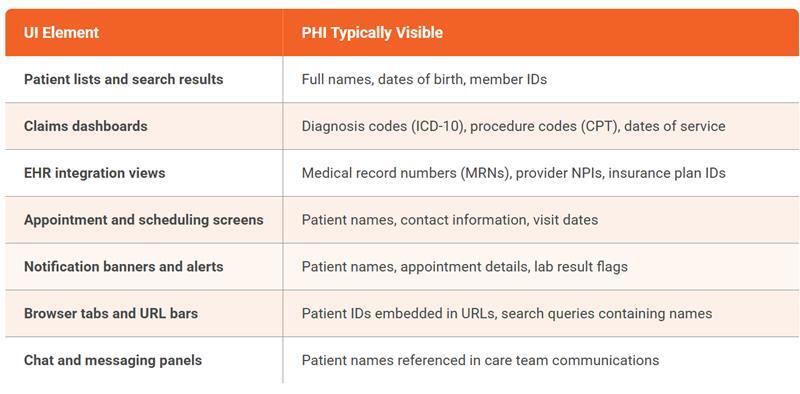
The challenge is that most of this PHI is incidental — it appears in the background or periphery of the screen while the presenter focuses on a specific feature. A reviewer watching the demo at normal speed will focus on the narration and the feature being demonstrated, not on a notification banner that flashes a patient name for two seconds.
Spoken PHI in Demo Narration
Visual PHI on screen is not the only exposure vector. Sales engineers and product marketers often narrate demos using scenario-based language:
- "Let's look at this patient, John Martinez, who has a pending claim..."
- "You can see the diagnosis code here for this member's visit on March 15..."
- "This is a real example from one of our customers showing how they process claims for..."
Even when the on-screen data is fictional, the narration may reference real patient scenarios, real customer workflows, or identifiable details that constitute spoken PHI. Audio-level redaction is the only way to catch these exposures. Learn more about how spoken PII redaction works across audio and video content.
The HIPAA Rules That Apply to Demo Videos
HIPAA does not explicitly mention "demo videos" or "screen recordings." But two rules create binding obligations for any healthcare SaaS company sharing product demos that contain PHI.
The Privacy Rule: Minimum Necessary Standard
The Privacy Rule requires covered entities and business associates to limit PHI disclosures to the minimum necessary for the intended purpose. A product demo shared with a prospect is a disclosure. If that demo contains PHI — patient names, diagnosis codes, member IDs — that is not minimized to what the recipient needs, the organization has violated the minimum necessary standard.
The critical point: intent does not matter. Whether the PHI was included deliberately or appeared accidentally in a screen recording, the disclosure is the same under HIPAA. For a deeper look at how the Privacy Rule applies to redaction workflows, see Navigating the HIPAA Privacy Rule Through Redaction.
The Security Rule: Safeguards for Electronic PHI
The Security Rule requires administrative, physical, and technical safeguards for electronic PHI (ePHI). A demo video containing patient data that is uploaded to a public hosting platform, emailed to a prospect, or stored in an unsecured asset library is ePHI without adequate safeguards.
Breach Notification Implications
If PHI in a demo video is exposed to unauthorized recipients, it may trigger the Breach Notification Rule. Under this rule, the organization must:
- Assess whether the exposure constitutes a breach (using the four-factor risk assessment)
- Notify affected individuals within 60 days if the breach is confirmed
- Report to the Department of Health and Human Services (HHS)
- For breaches affecting 500 or more individuals, notify prominent media outlets
The reputational and financial cost of a breach notification triggered by a marketing video is disproportionate to the effort required to redact the video before distribution. For a full breakdown of HIPAA redaction requirements and penalties, see HIPAA Redaction: Protecting Patient Data Under the Privacy Rule.
How to Redact PHI from Product Demo Videos: A Practical Approach
Redacting PHI from demo videos requires addressing three layers: visual PHI on screen, spoken PHI in narration, and PHI in any supplementary materials distributed alongside the video.
Layer 1: Visual PHI Detection and Redaction
AI-powered visual redaction scans each frame of the video to detect and redact on-screen PHI:
- Text detection (OCR) identifies patient names, dates of birth, member IDs, diagnosis codes, and other text-based identifiers displayed in UI fields, dashboards, tables, and notification banners
- Face detection identifies and redacts patient faces visible in telemedicine views, profile photos, or clinical imaging displayed during the demo
- Object tracking follows detected PHI across frames as the presenter scrolls, navigates, or resizes windows, ensuring redaction persists even when the UI element moves on screen
The key advantage of AI-powered detection over manual review: it processes every frame systematically, catching PHI that appears for fractions of a second in peripheral UI elements that a human reviewer would likely miss. See how AI redaction software handles audio, faces, and PII together for a more detailed look at this unified approach.
Layer 2: Audio PHI Detection and Redaction
Audio redaction analyzes the demo's narration track to identify and mute or bleep spoken PHI:
- Patient names, dates of birth, and ages
- Social Security numbers and member IDs spoken aloud
- Diagnosis names, procedure descriptions, and medication names when linked to identifiable individuals
- Provider names and facility names in patient-specific contexts
- Addresses, phone numbers, and email addresses
AI-powered audio redaction detects 33 or more categories of spoken PII/PHI and applies automated mute or bleep treatments. This catches the scenario-based narration that makes demos realistic but creates compliance exposure. For more on bulk audio redaction workflows, see Bulk Audio Redaction Software for Data Privacy.
Layer 3: Supplementary Materials
Demos rarely travel alone. They are typically distributed with:
- Slide decks containing annotated screenshots with visible PHI
- PDF leave-behinds showing sample reports, dashboards, or workflow outputs
- One-pagers with screenshots pulled from the demo environment
Each of these materials needs the same redaction treatment as the video itself. A platform that handles video, audio, images, documents, and PDFs in a single workflow eliminates the gap where a redacted video ships with an unredacted screenshot deck.
Configuring Redaction for Different Distribution Channels
Not every demo recording needs the same level of redaction. The sensitivity should match the distribution channel and audience:
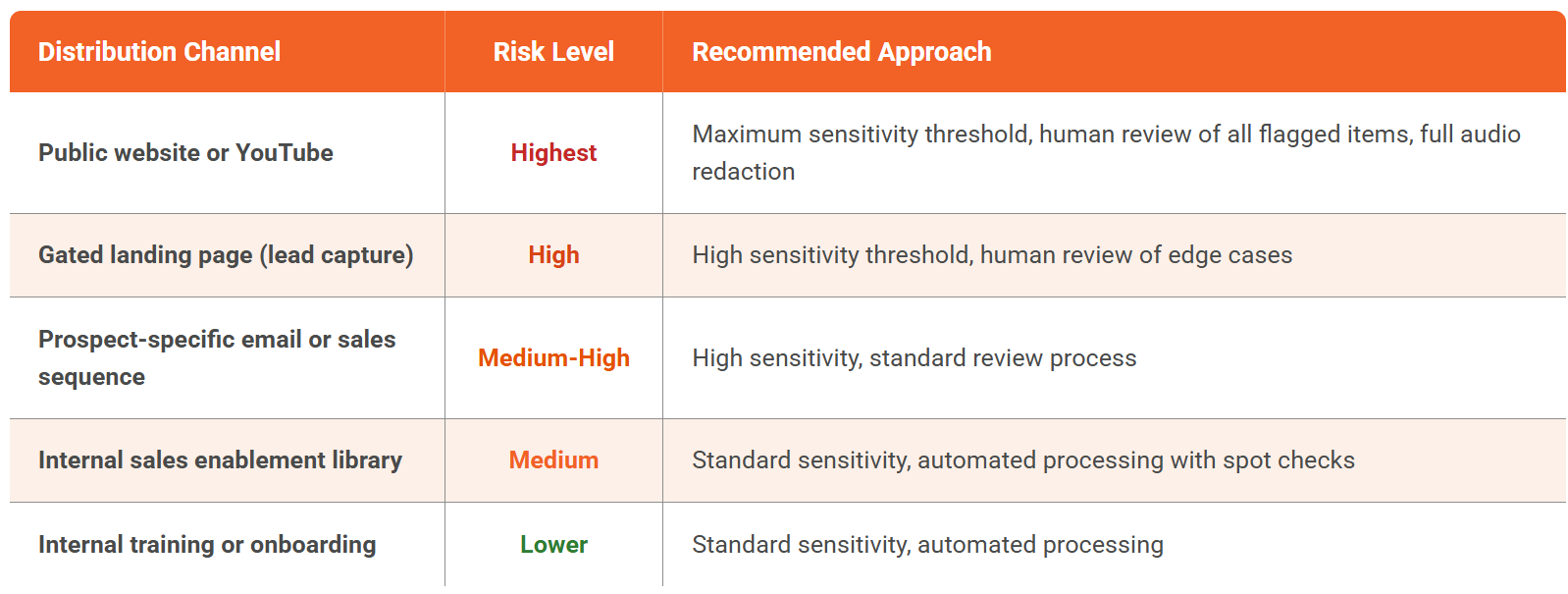
Configurable confidence thresholds make this practical. Teams can set detection sensitivity between 25% and 90%, running at higher thresholds for public-facing content (catching more potential PHI at the cost of some false positives) and lower thresholds for internal content (reducing false positives while still catching clear PHI).
Building a Repeatable Demo Redaction Workflow
The goal is not to redact one demo — it is to build a process that handles every demo the team produces, without creating a bottleneck.
Before recording:
- Use a dedicated demo tenant with verified fictional data whenever possible
- If using a staging or production clone, document which data sets are present and their PHI status
- Brief presenters to avoid using real patient names or identifiable scenarios in narration
After recording, before distribution:
- Run the recording through AI-powered redaction (visual and audio)
- Apply the sensitivity threshold appropriate for the intended distribution channel
- For public or high-stakes content, assign a human reviewer to validate flagged items
- Redact any supplementary materials (slides, PDFs, screenshots) through the same platform
After redaction:
- Store the redacted version as the distribution master
- Preserve the original with access controls limited to authorized personnel
- Log the redaction audit trail — what was detected, what was redacted, who reviewed, when approved
Ongoing:
- Audit the demo asset library quarterly to catch recordings that were distributed before the redaction process was established
- Update redaction policies when new PHI types are added to the platform (new data fields, new integrations)
For a step-by-step walkthrough of the redaction process itself, see How to Redact a Video Using Video Redaction Software.
How VIDIZMO Redactor Handles Demo Video Redaction
VIDIZMO Redactor is an AI-powered redaction platform purpose-built for the multi-layer PHI detection that demo videos require. Here is how it maps to each layer:
Visual PHI redaction:
- Detects 40 or more PII/PHI types in on-screen text, including patient names, MRNs, dates of birth, diagnosis codes, member IDs, and health plan beneficiary numbers
- Uses both pattern matching and contextual AI (NLP/LLM-based) recognition to catch PHI that rule-based systems miss
- Object tracking follows detected elements across frames as the presenter navigates the UI
- Redaction styles include blur, pixelate, and black box, applied consistently across all frames where PHI appears
Audio PHI redaction:
- Identifies 33 or more spoken PII categories including names, dates, SSNs, medical record numbers, and diagnosis references
- Applies automated mute or bleep redaction to spoken PHI
- Supports 82 or more languages for organizations with multilingual content
Supplementary materials:
- Redacts PDFs, DOCX, XLSX, PPTX, and images in the same platform — no separate tool needed for the slide deck or leave-behind
- OCR handles scanned documents and screenshots embedded in presentations
- 255 or more file formats supported
Workflow and compliance:
- Configurable confidence thresholds (25% to 90%) matched to distribution channel risk
- Split-screen comparison lets reviewers verify redactions against the original
- Audit trails log every detection and redaction decision
- Redaction copy generation preserves the original recording untouched
- Bulk processing tested with 1.1 million or more recordings for teams with large demo libraries
- Supports HIPAA-compliant deployments with BAA/DPA available
Redactor supports SaaS, government cloud, on-premises, and hybrid deployment — so PHI in demo recordings never leaves the organization's approved data environment during the redaction process. Learn more about VIDIZMO's PHI redaction software for healthcare and the HIPAA-compliant video platform built to support it.
Conclusion
Product demo videos are one of the most effective assets in a healthcare SaaS company's go-to-market toolkit. They are also one of the most common sources of accidental PHI exposure. Every claims dashboard, patient list, and diagnosis code visible on screen — and every patient scenario referenced in narration — is a potential HIPAA violation waiting to be shared with the wrong audience.
Redacting PHI from demo videos before distribution is not optional for organizations handling health data. The practical approach is a three-layer process: visual redaction for on-screen PHI, audio redaction for spoken PHI, and document redaction for supplementary materials. AI-powered automation makes this scalable. Configurable thresholds make it adaptable. And audit trails make it defensible.
See how Redactor handles PHI redaction across your demo video workflow — request a demo.

FAQ
Frequently Asked Questions
What types of PHI most commonly appear in SaaS product demos?
The most frequent types are patient names and dates of birth in list views and search results, medical record numbers and member IDs in detail screens, diagnosis and procedure codes in claims dashboards, and provider identifiers (NPI numbers, physician names) in care coordination views. Browser tabs and notification banners are also common but frequently overlooked sources.
Is it enough to use fictional data in our demo environment?
Fictional data significantly reduces risk, but does not eliminate it. Team members may import real data for specific demos, seeded data may be derived from production records, and narrators may reference real patient scenarios verbally. A redaction step before distribution provides a safety net regardless of the data source.
Can we redact just the visual PHI and skip audio redaction?
No. Spoken PHI, a narrator saying a patient name, date of birth, or diagnosis, is an independent exposure that visual redaction does not address. Any demo with narration, commentary, or live Q&A needs both visual and audio redaction to be HIPAA compliant.
How do we handle demos already distributed without redaction?
Conduct an audit of your existing demo library. Identify recordings that contain potential PHI, redact them retroactively, and replace the distributed versions. Document the audit and remediation actions in case of a compliance inquiry. Going forward, make redaction a required step before any demo enters the distribution pipeline.
Does the redaction process degrade video quality?
AI-powered redaction applies targeted treatments (blur, pixelate, or black box) only to the specific regions where PHI is detected. The rest of the video remains untouched. For audio, mute or bleep is applied only to the specific segments containing spoken PHI. The overall video and audio quality outside redacted regions is preserved.
You may also like
Fire and Smoke Detection as a Second Set of Eyes in Schools
Let the first sentence of this article do the compliance work: nothing described here replaces, modifies, or competes ...
Weapon Detection in Schools: Detection, Verification, Response
No school safety technology carries more emotional weight than weapon detection, and no school safety technology is ...
School Safety Grants: What the Money Can Buy
School safety improvements have a funding problem that is really a sequencing problem: the need is continuous, the ...