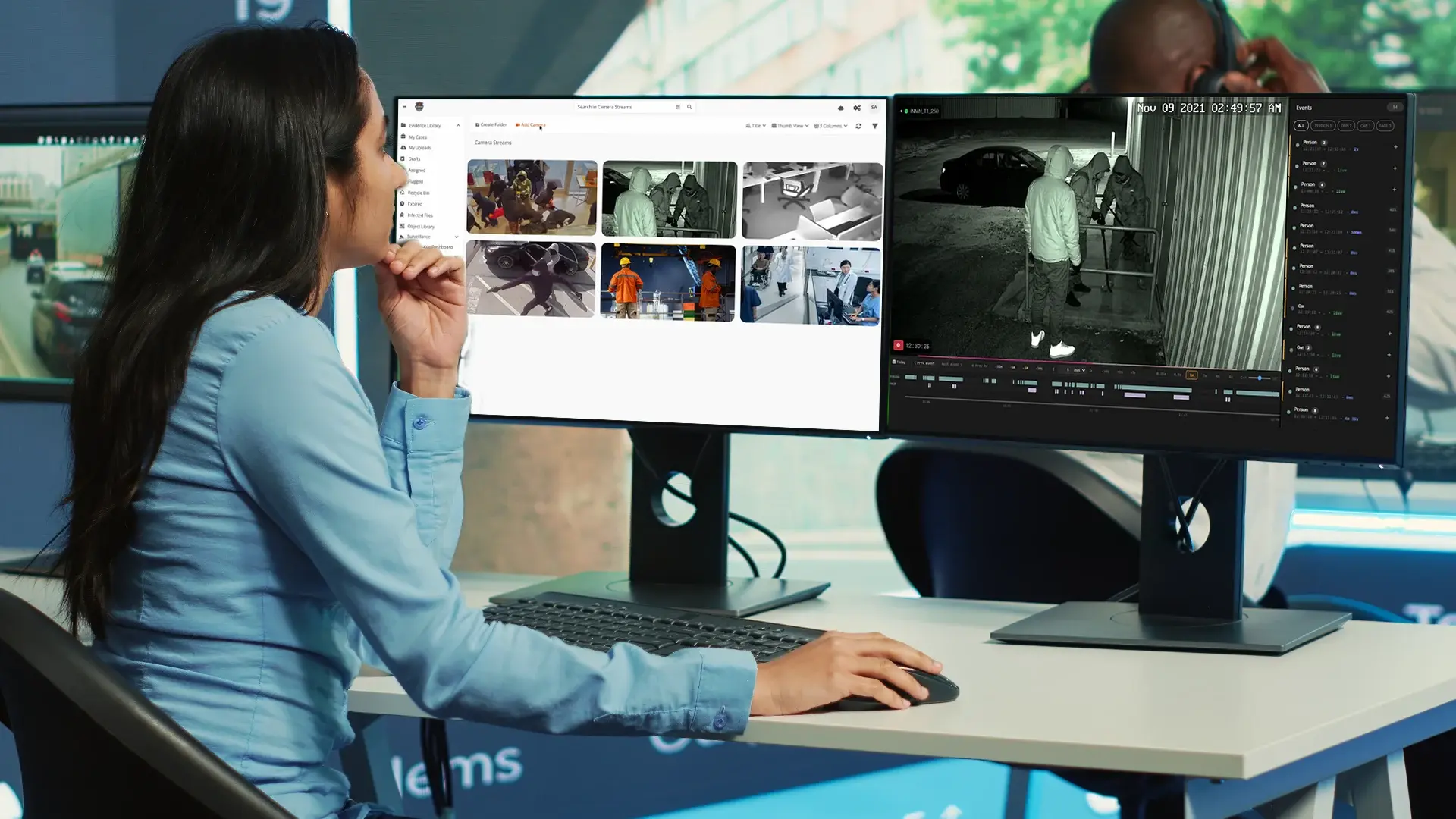
Walk through almost any operation that runs at size and you find the same imbalance. A manufacturing plant covers its lines, docks, and perimeter with a couple of hundred cameras; a mall runs several hundred more; a city simply never stops counting. Every camera was installed for a reason, and in every one of these places the number of cameras outran the number of people who could ever watch them years ago.
Stand in the control room and the arithmetic is brutal: a person can hold maybe two dozen tiles in their attention before the wall turns into wallpaper, so three hundred cameras behind a two-person night shift means each operator is nominally responsible for a hundred and fifty feeds and really watching almost none. The footage is all recorded, faithfully, around the clock. It simply is not being seen by anyone while it still matters.
This is the gap AI was brought in to close, and on a slide the idea is almost too simple to argue with: instead of a person choosing which tile to watch, a model watches all of them at once, never tires on hour six of a shift, and raises its hand the moment it sees the thing you told it to care about: a weapon in the parking lot, a PPE violation on the line as it happens, a bag left untouched by the entrance. The fleet you already paid for stops being a passive recorder and becomes something that can notice an incident while there is still time to act.
That is where the slide ends and the engineering begins, because watching three thousand feeds at once is not three thousand times harder than watching one, it is a different kind of problem. Every stream has to be pulled off the network without choking it, decoded, and run through a model quickly enough to still count as real time; the GPUs have to be sized so inference keeps pace; a detection has to reach a human who can act on it without burying them in false alarms; and the whole thing has to stay standing when a server dies at 2 a.m., because a surveillance system that is quietly down is worse than none.
What happens between the lens and the alert
The path from lens to alert begins at a camera that already exists and is not about to change: an ordinary IP camera speaking RTSP for the video and ONVIF for discovery, very likely already wired into a VMS that records it around the clock. The analytics layer replaces none of that: it taps the stream the way any authorized client would, reads its own copy, and leaves the recording and the VMS exactly as they were. That is what makes "no rip-and-replace" an architectural fact here rather than a marketing line.
The stream lands on a server with a GPU, where the least glamorous step is quietly the most consequential: the video is decoded, then sampled. The system does not run the model on every frame; it looks at every third to fifth, which is plenty to catch a worker stepping across a zone edge, and that sampling choice is the single largest lever over how many cameras one GPU can carry.
Two kinds of model run on those frames. Pretrained, general detectors already know what a person, a vehicle, a weapon, or a missing hard hat looks like. Fine-tuned models are taught on an operation's own labeled footage to catch what no general model could: a specific unsafe behavior, a part out of place, a step done out of order. For a worker entering a hazard zone without a hard hat a general model is plenty, and what comes back is not the vague label "person" but something specific: a person, in the marked zone, without a hard hat, with a confidence score, a camera, and a timestamp.
That output is where a surprising amount of the design lives, because it is not a picture, it is a record: every detection a structured event holding the time, the camera and location, the type, the severity, and the confidence. That shape is what lets everything downstream treat a detection as data rather than an image someone has to sit and look at, which makes the moment both routable now and findable later.
Routable now is the alert. Not every detection deserves to interrupt a human, so thresholds on confidence and severity decide what rises to attention, and whatever clears the bar is sent where it needs to go: an operator's console, an email, or another system through a webhook or the REST API. The hard-hat violation lands on the supervisor's screen while the worker is still in the zone, which is the point; the hard part is restraint, sending so few false alarms that people keep trusting the ones that arrive.
Findable later is the afterlife. The event, and the short clip around it kept by event-based recording, is retained, and because it is structured it becomes searchable in plain language through the AI Intelligence Hub, so weeks later someone can ask for every PPE violation in that bay last month and get an answer in seconds instead of scrubbing days of footage.
Every one of those stations (the tap, the GPU, the models, the event, the alert, the search) is a decision with real trade-offs, and each is a section of this guide. The diagram below is that same journey drawn as a system, with the two directions it grows marked on it.
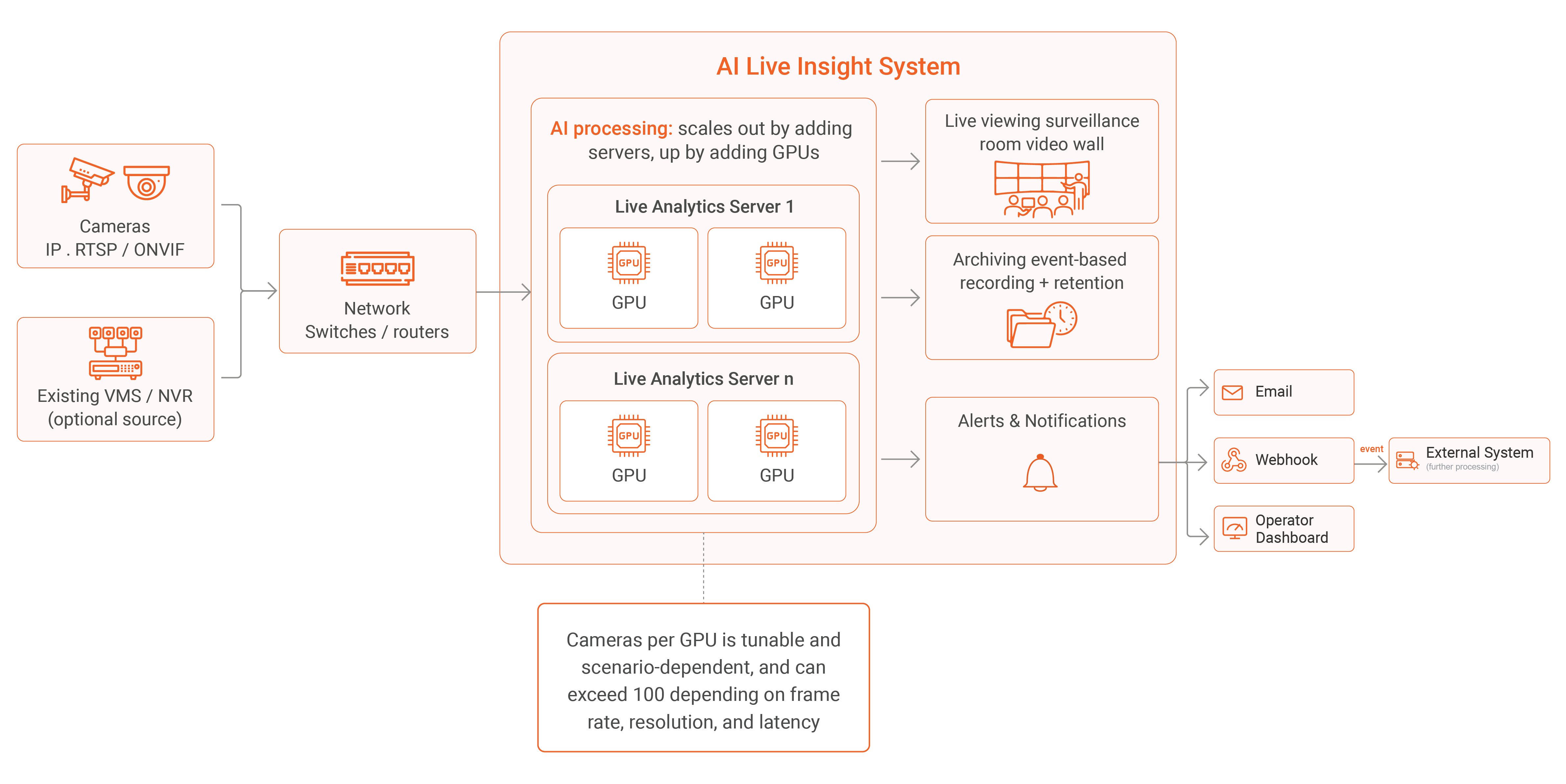
The path runs left to right: cameras, and optionally the existing VMS or NVR, reach the AI processing tier over the ordinary network, and the results fan out to live viewing, to archiving, and to alerting. The system grows in two directions: up by adding GPUs inside a server, out by adding servers, which is how the same design serves a single plant or a whole city.
Tapping existing infrastructure
Everything downstream depends on one unglamorous thing: getting a copy of the video out of the cameras you already own and into the analytics tier without disturbing anything. It works because the industry standardized long ago: almost any IP camera made in the last decade speaks RTSP, which carries the stream, and ONVIF, which lets devices discover and describe one another. AI Live Insight reads those same standards, so it does not much care who made the camera or which VMS is recording it: Milestone, Genetec, an AXIS recorder, or a mixed estate assembled over fifteen years all present video the same way to something that knows how to ask.
That asking is a read-only act: the analytics layer pulls its own copy of the stream, either directly from the camera or from the recorder already re-streaming it, and leaves the recording, the retention policy, and the operator's live wall exactly as they were, which is what makes adding AI a low-risk decision rather than a migration. It is not friction-free: ONVIF conformance varies between manufacturers, a few older cameras expose their streams grudgingly, and where you pull the stream from is a real choice with consequences for camera load and bandwidth. Because that is exactly where an integration quietly succeeds or stalls, it gets its own treatment in pulling live streams from your VMS into AI, with the no-lock-in case made in camera-agnostic AI video analytics.
Where the inference runs
There are two honest ways to put AI on a camera feed: at the edge, on a chip inside a smart camera, or on a server that pulls the video back and analyzes many cameras at once. AI Live Insight is built around the second, its models running centrally on GPUs you control, though it can also take in the detections a smart camera produces at the edge, over the ONVIF analytics profile, and fuse them with the central processing.
The edge case is real: vendors like Axis, with its AXIS Object Analytics cameras, Hanwha Vision, and i-PRO ship capable edge-AI cameras, often from allied-country makers clear of the components banned under Section 889 of the National Defense Authorization Act, and inference next to the lens keeps bandwidth low and latency minimal, which suits a greenfield deployment scattered across places the network barely reaches.
For most people, though, the edge quietly takes away more than it gives. Putting the intelligence inside the camera makes the camera the thing you must replace to change the intelligence, turning "add AI" back into "rebuild the estate," and the models are whatever the chip can hold: usually one or two fixed detectors.
Server-based inference keeps the cameras ordinary and interchangeable, runs several models against one feed, swaps or fine-tunes them without touching a camera, and loads larger and more accurate models than a chip has room for, so the multi-stage pipelines that detect, then track, then classify, then correlate across cameras become possible at all. The cost is that you carry the streams across the network and size the GPUs to keep pace, both subjects that follow.
On-premises, cloud, or hybrid
The next question is where that server sits, and for real-time video at scale the answer leans harder toward on-premises than for most software, for two reasons that have nothing to do with taste. The first is bandwidth: processing in the cloud means continuously shipping every camera's stream out of the building, around the clock, and several hundred streams is a permanent, metered torrent your uplink may not even carry. Keep the analytics on-premises and the heavy video never leaves the local network (only the events and alerts travel), which at fleet scale tends to settle the question before anyone raises security.
The second reason is sovereignty: for a government agency, a hospital, or anyone under a regime like CJIS, where the video physically lives is a hard compliance requirement, and on-premises keeps it inside your own infrastructure, fully air-gapped for the most sensitive environments. None of which makes the cloud wrong: Azure deployment is genuinely useful at modest camera counts or when you would rather not run hardware, and hybrid arrangements keep the video and inference local while using the cloud for lighter management and search. The point is only that real-time video at scale changes the default, and the default it changes to is on-premises. The trade-offs in full are in on-prem vs cloud for real-time AI video analytics.
Right-sizing the GPU
How many cameras a single GPU can carry is the question everyone asks first, and the honest answer is a range you tune, not a number you quote. On a consumer card like the NVIDIA RTX 5090, a realistic range runs from roughly thirty-two cameras to well over a hundred, depending on how many frames per second you actually analyze (the biggest lever by far), the resolution you feed the model, and how much latency you will accept. A weapon-detection corridor might process more frames at higher resolution and carry fewer cameras; a parking-occupancy deployment can sample sparsely and carry many times more on the same card.
One misconception steers a lot of budget the wrong way: more VRAM does not make inference faster; throughput comes from the GPU's compute and its video decode and encode engines, which is why a consumer card with strong compute and full video engines beats an expensive datacenter card that skimps on encoders for this workload. The full method for benchmarking streams per card, and which card to actually buy, are in GPU capacity planning and choosing a GPU for real-time video analytics.
The network is the other bottleneck
The GPU gets the attention, but on a large deployment the network is just as likely to run out first. A single 1080p camera is a few megabits per second, trivial until you multiply by five hundred cameras pushing continuously, all day, straining links sized for the occasional playback rather than a machine watching everything at once.
The way out is placement: because the system scales horizontally, you put an AI Live Server close to each cluster of cameras, so the heavy video stays on the local segment and only the detections and alerts cross the backbone. Event-based recording works the same angle on storage, keeping the clips around detections rather than every second of every camera. The bandwidth arithmetic, server placement, and recording policy are in network and bandwidth design for large camera fleets.
What actually breaks as you grow
Scaling is not one smooth curve but a series of walls hit at different sizes. At a few dozen cameras almost anything works. In the low hundreds the first wall is usually the GPU or the network, which is why those earned their own sections. Push past that by adding servers and the next wall is often not technical at all. It is the humans: a system watching six thousand cameras can raise more alerts in an hour than an operations center can act on in a day, and without discipline about thresholds and routing, scale multiplies noise as fast as it multiplies detections.
The rest is operational: storage held in check by event-based recording, availability that demands redundancy and failover so a dead node quietly hands its cameras to another instead of opening a blind spot no one notices, and isolation where several tenants share one infrastructure. None of these are reasons not to scale; they are what a deployment that grew without planning finds out the hard way. The field guide to the walls, in the order you tend to hit them, is in scaling live surveillance to thousands of cameras.
The engineering is the product
Everything here circles one idea. The model that recognizes a weapon, a fallen worker, or an abandoned bag is real and genuinely useful, and it is the part you can more or less take for granted, because it is the part everyone has. What separates a demo on one camera from a system that works across a city is all the engineering wrapped around that model: getting the video in without replacing the cameras, deciding where the inference runs, sizing the GPUs honestly, keeping the network from becoming the ceiling, scaling out when a single box runs dry, turning detections into responses people actually trust, and keeping the archive searchable long after the moment has passed.
Get those right and the AI simply works, quietly, at scale; get them wrong and the best model in the world sits behind a wall of monitors nobody is watching. Which is why the honest way to judge real-time AI video analytics is to ask less about the model and more about the system around it.
Real-time video AI at scale comes down to a series of decisions: pulling video off the cameras you already own, choosing where inference runs, sizing GPUs and the network, scaling out, and routing alerts people trust. Talk to our team and we will work through each one for your deployment.

FAQ
Frequently Asked Questions
How many cameras can one GPU handle for real-time AI video analytics?
It depends on frame sampling rate, resolution, and latency tolerance more than raw hardware specs. On a consumer card like the RTX 5090, a realistic range is roughly 32 to over 100 cameras, and the trade-off between accuracy and camera count is tunable per use case.
Do I need to replace my existing cameras to add AI video analytics?
No. AI Live Insight reads standard RTSP and ONVIF, so it works with cameras already installed and any VMS recording them, including Milestone, Genetec, AXIS, or a mixed estate. The analytics layer only pulls a read-only copy of the stream.
Should real-time AI video analytics run on-premises or in the cloud?
On-premises is the default for most deployments at scale, mainly because shipping every camera's stream to the cloud continuously is a bandwidth problem, and many industries such as CJIS and healthcare require the video to stay on-site. Cloud and hybrid work well at smaller camera counts.
What's the difference between edge AI cameras and server-based video analytics?
Edge AI runs inference inside the camera itself, which keeps bandwidth low but limits you to whatever model the chip can hold. Server-based analytics keeps cameras simple and interchangeable while running larger, swappable, multi-stage models centrally.
What actually breaks first as a video analytics deployment scales up?
Usually the GPU or the network first, in the low hundreds of cameras. Past that, the bottleneck often shifts to humans: operators getting more alerts per hour than they can act on, which is a discipline problem, not a hardware one.
TopicsAI Live Insight

About the author
Farooq Khan is the co-founder and CTO of VIDIZMO, where he leads the engineering, product, and AI strategy behind its platform for making sense of unstructured media. He builds applied and generative AI that turns organizations' video, audio, images, and documents into searchable, governed, and usable intelligence at enterprise scale. Over the past 20 years, he has built systems that capture, scale, and now understand media, from voice logging platforms to large scale commerce to VIDIZMO's AI platform. He leads the product team that builds every VIDIZMO product, including Redactor, AI Intelligence Hub, AI Live Insight and the platform they all run on.
You may also like
What Is a Real-Time Crime Center? A Guide for Cities and Counties
Somewhere in the last two years, someone probably asked your department whether it should have a real-time crime ...
Staffing a Real-Time Crime Center When Software Does the Watching
Most chiefs who hear a pitch for a real-time crime center ask the same question before any other, which is whether they ...
RTCC, EOC or Situational Awareness Center: What Each Room Is For
Walk into a real-time crime center, then into a city's emergency operations center, and you will see much the same ...