The GPU gets all the attention in a real-time video analytics deployment, and the network quietly runs out first. It is an easy oversight, because a single camera stream is trivially small and a lab test with four of them shows no strain at all. Then the fleet grows into the hundreds, every camera is pushing continuously and around the clock rather than being watched occasionally, and the aggregate turns into a river that the backbone was never sized to carry. This piece is about seeing that river coming and designing so it never becomes the thing that caps your deployment.
Start with the bitrate math
Everything begins with how much data one camera actually produces, because the whole design is that number multiplied by the fleet. A camera's bitrate depends on its resolution, its frame rate, the amount of motion in the scene, and the codec it uses to compress the video. The figures below are typical working ranges for a moderately busy scene, useful for planning, not a substitute for measuring your own cameras.
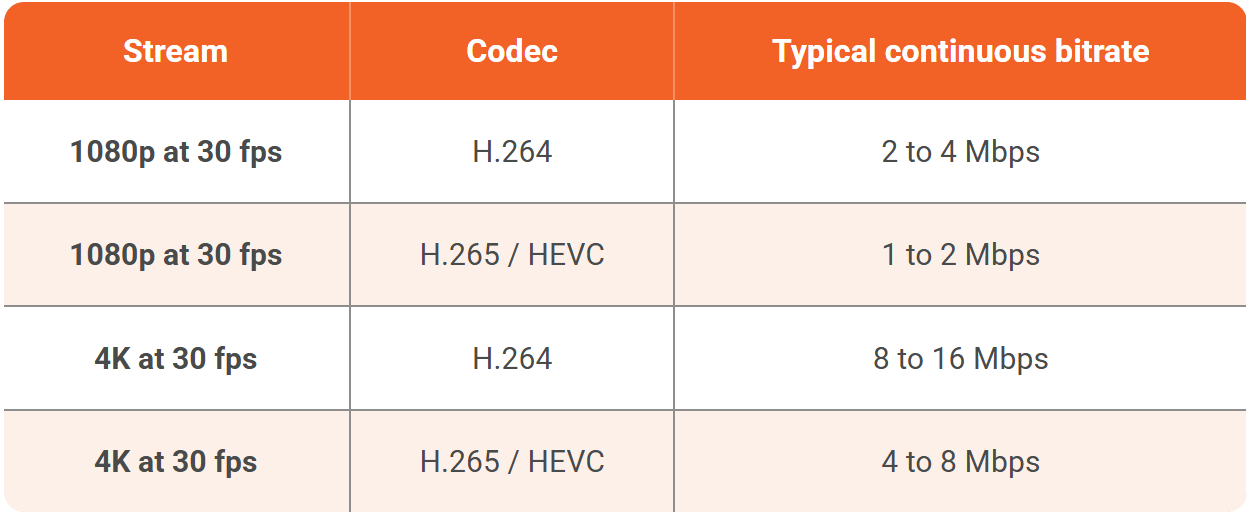
The single most useful lever in that table is the codec. H.265 delivers roughly the same picture as H.264 at about half the bitrate, so a fleet that standardizes on it moves half as much data for the same coverage, and the newer AV1 pushes that further still where cameras and decoders support it. Choosing the codec is a network decision as much as an image-quality one.
Then multiply by the fleet
The aggregate is where planning either happens or doesn't. Take a middle-of-the-road figure of 4 Mbps per 1080p H.264 camera and the picture becomes concrete quickly.
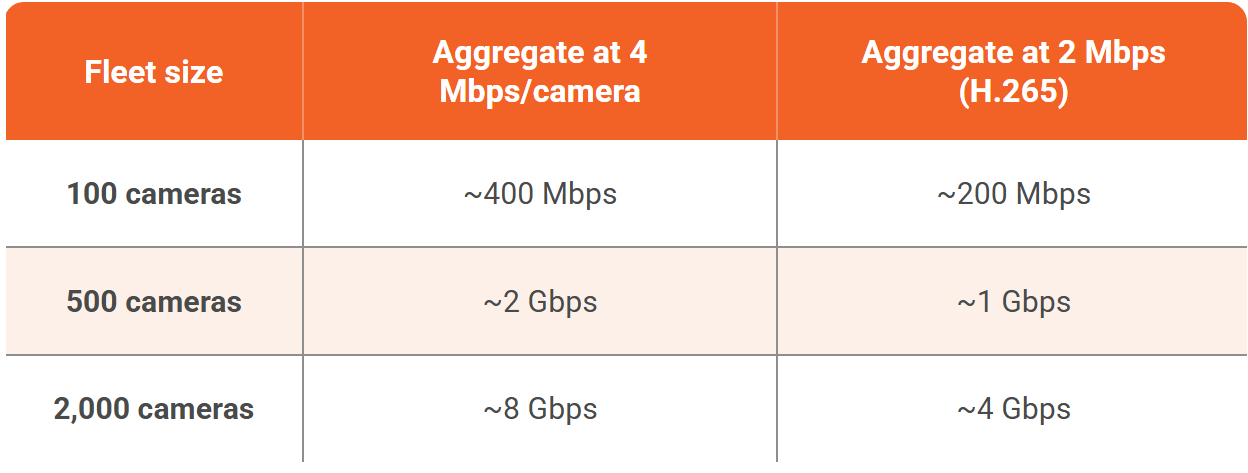
Two thousand cameras at H.264 is eight gigabits per second, flowing continuously, forever. That is not a spike you can absorb, it is a sustained load, and it is the number that decides whether your links, your switches, and your uplinks hold up. The most common failure is not that the network cannot physically carry the video, it is that the links were sized for people occasionally pulling up a playback, not for a machine watching every camera every second of every day.
The real lever is where you put the servers
The instinct is to haul every camera stream back to one central room full of GPUs, and for a few hundred cameras on a healthy local network that is fine. Past that, the far better move is to stop moving the heavy video at all.
Because a server-based analytics platform scales horizontally, you can place an analytics server close to each cluster of cameras, one per district, per building, or per corridor, so the full-bitrate video only ever travels across the local segment it was already on. What leaves that segment and crosses the backbone to a central operations center is not video, it is the output, the detections, the events, and the alerts, which are tiny by comparison. A camera producing four megabits a second of video produces a few kilobits a second of events, so distributing the processing turns a backbone problem into a local one and shrinks the long-haul traffic by orders of magnitude.
This is the same distributed, phased shape that makes a rollout manageable in the first place, and it is the single most effective thing you can do to keep bandwidth from becoming your ceiling. It also has a happy side effect for resilience and for data residency, because the video never has to leave the site it came from.
Where you pull the stream from matters too
There is a quieter design choice inside the ingest itself. An analytics server can pull a camera's stream directly from the camera, or it can pull it from the recorder that is already receiving and re-streaming that camera. Pulling directly means a second connection to the camera, which some cameras limit and which doubles that camera's outbound load. Pulling from the recorder avoids adding load to the camera but leans on the recorder's capacity to re-stream. Neither is universally right, but on a large fleet the choice compounds across every camera, so it is worth deciding deliberately rather than by accident.
Recording is a bandwidth decision, not just a storage one
It is tempting to think of recording as purely a storage question, but writing every second of every camera to disk continuously is also a sustained write load on the network path to storage, and at fleet scale it is large.
Event-based recording changes both numbers at once. Instead of retaining everything forever, the system keeps the clips around detections, with a configurable buffer before and after, which cuts what you store and what you move to storage to a fraction of the continuous figure. Continuous recording still has its place where regulation or policy demands it, but treating recording as a dial rather than an always-on default is often the difference between a storage tier that is affordable and one that is not.
Storage is the other big number
Bandwidth's close cousin is storage, and the same bitrate figures drive it. Retaining a camera's video means writing its bitrate to disk for as long as the retention policy demands, and the totals climb fast. A single 1080p H.264 camera at 4 Mbps produces roughly 40 to 45 GB a day of continuous recording, so the arithmetic across a fleet and a retention window looks like this:
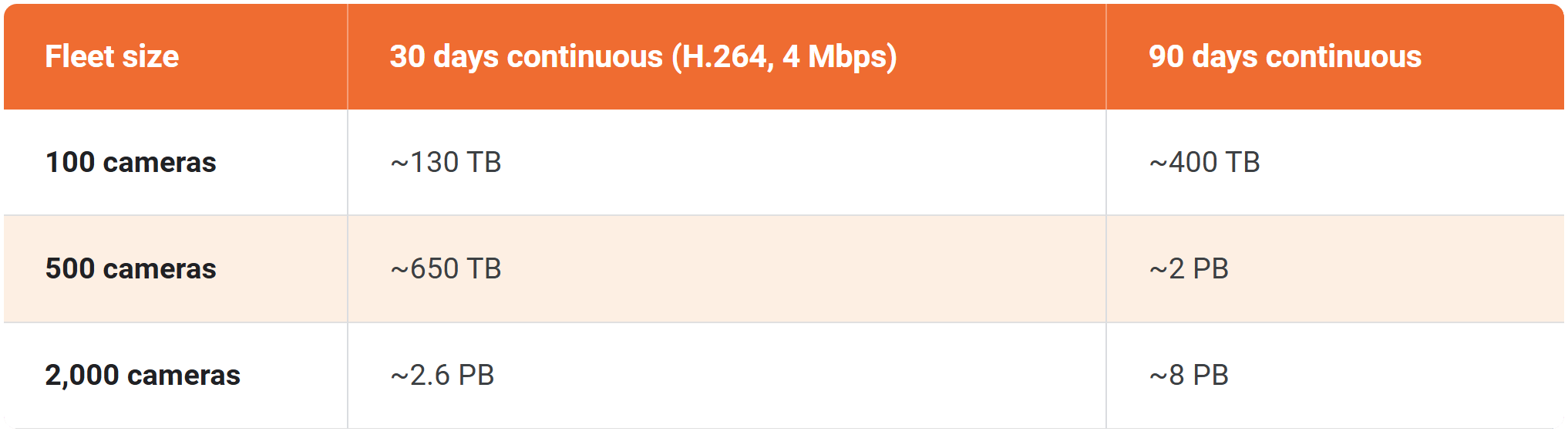
Those are the numbers that make retain-everything recording expensive at scale, and they are exactly what event-based recording deflates, because keeping the minutes around detections rather than every hour of every day cuts the total by whatever fraction of the day actually contains something worth keeping. Efficient codecs help here in the same proportion they help bandwidth, so the H.265 column is roughly half of what you see above.
Live viewing is its own load
The analytics ingest is not the only traffic on the network. The surveillance room pulling live feeds to a video wall is a second, separate load, and it flows the other way, from the servers or cameras out to the operators' screens. A wall showing dozens of live tiles is dozens of streams in flight, and if several operators watch overlapping sets of cameras, unicast delivery sends a separate copy to each of them.
Where many viewers watch the same feeds, multicast delivers one copy that many clients share, which can sharply cut that outbound load. It is a smaller number than the ingest in most deployments, but it is real, it is easy to forget when sizing links, and it lands on the segment between the servers and the operations room rather than on the camera side.
Keeping the feeds clean, not just present
Bandwidth is about whether the video fits, but real-time analytics also cares whether it arrives cleanly. Packet loss on a congested or marginal link corrupts frames, and a corrupted frame is worse than a missing one because the model may still try to read it. Jitter, the variation in how packets arrive, forces a choice between buffering, which adds latency, and dropping late packets, which sacrifices frames to stay current.
On a well-designed, segmented camera network with headroom, none of this bites. On an oversubscribed link shared with other traffic, it shows up as flickering detections and dropped events that look like a model problem but are really a network one. Giving the camera traffic its own segment and its own headroom is what keeps the feeds not just present but clean enough to analyze.
The design checklist
Pulling it together, a large-fleet network design usually wants to get the following right:
-
Segment the cameras. Put the camera fleet on its own VLANs or a dedicated physical network, so continuous video traffic never competes with, or exposes itself to, the general corporate network.
-
Standardize on an efficient codec. H.265 over H.264 roughly halves the load for the same image, across the entire fleet.
-
Distribute the processing. Place analytics servers near camera clusters so full video stays local and only events cross the backbone.
-
Size uplinks for sustained load, not peaks. The relevant number is continuous aggregate bitrate, not an average that assumes cameras are idle.
-
Use event-based recording where policy allows. Keep the clips that matter rather than every second of everything.
-
Apply quality-of-service. Where video shares a link, mark and prioritize it so a burst of other traffic cannot starve the analytics feeds.
-
Build in redundancy where a blind spot is unacceptable. For critical coverage, redundant switches and uplinks keep a single failure from taking a whole segment of the fleet dark, and remember that cameras powered over Ethernet depend on the switch's power budget and its own uptime.
A worked example
Suppose a city wants analytics on five hundred existing 1080p cameras spread across four districts. Centralized, at 4 Mbps each, that is roughly two gigabits per second converging on one facility, continuously, which is a serious and permanent backbone commitment.
Distribute instead: an analytics server in each district handles its own hundred and twenty-five or so cameras, the two gigabits stays local to the four districts as four smaller local flows, and what reaches the central operations center is the combined event stream from all five hundred cameras, a few megabits per second at most. The same cameras, the same analytics, and a backbone requirement that just fell by a factor of a hundred or more. That is the whole argument for designing the network before the fleet grows into it.
.png?width=1855&height=849&name=Diagram%20(2).png)
Where the stream physically ends up, and whether the compute lives on-premises, in the cloud, or in between, is closely tied to this bandwidth question and is covered in On-prem vs cloud for real-time AI video analytics. The wider systems view, where the network sits alongside GPU sizing, ingestion, and everything else that has to hold at scale, is in Real-Time AI Video Analytics at Scale: The Systems Engineering Guide.
TopicsAI Live Insight

About the author
Farooq Khan is the co-founder and CTO of VIDIZMO, where he leads the engineering, product, and AI strategy behind its platform for making sense of unstructured media. He builds applied and generative AI that turns organizations' video, audio, images, and documents into searchable, governed, and usable intelligence at enterprise scale. Over the past 20 years, he has built systems that capture, scale, and now understand media, from voice logging platforms to large scale commerce to VIDIZMO's AI platform. He leads the product team that builds every VIDIZMO product, including Redactor, AI Intelligence Hub, AI Live Insight and the platform they all run on.
You may also like
What Is a Real-Time Crime Center? A Guide for Cities and Counties
Somewhere in the last two years, someone probably asked your department whether it should have a real-time crime ...

Staffing a Real-Time Crime Center When Software Does the Watching
Most chiefs who hear a pitch for a real-time crime center ask the same question before any other, which is whether they ...

RTCC, EOC or Situational Awareness Center: What Each Room Is For
Walk into a real-time crime center, then into a city's emergency operations center, and you will see much the same ...