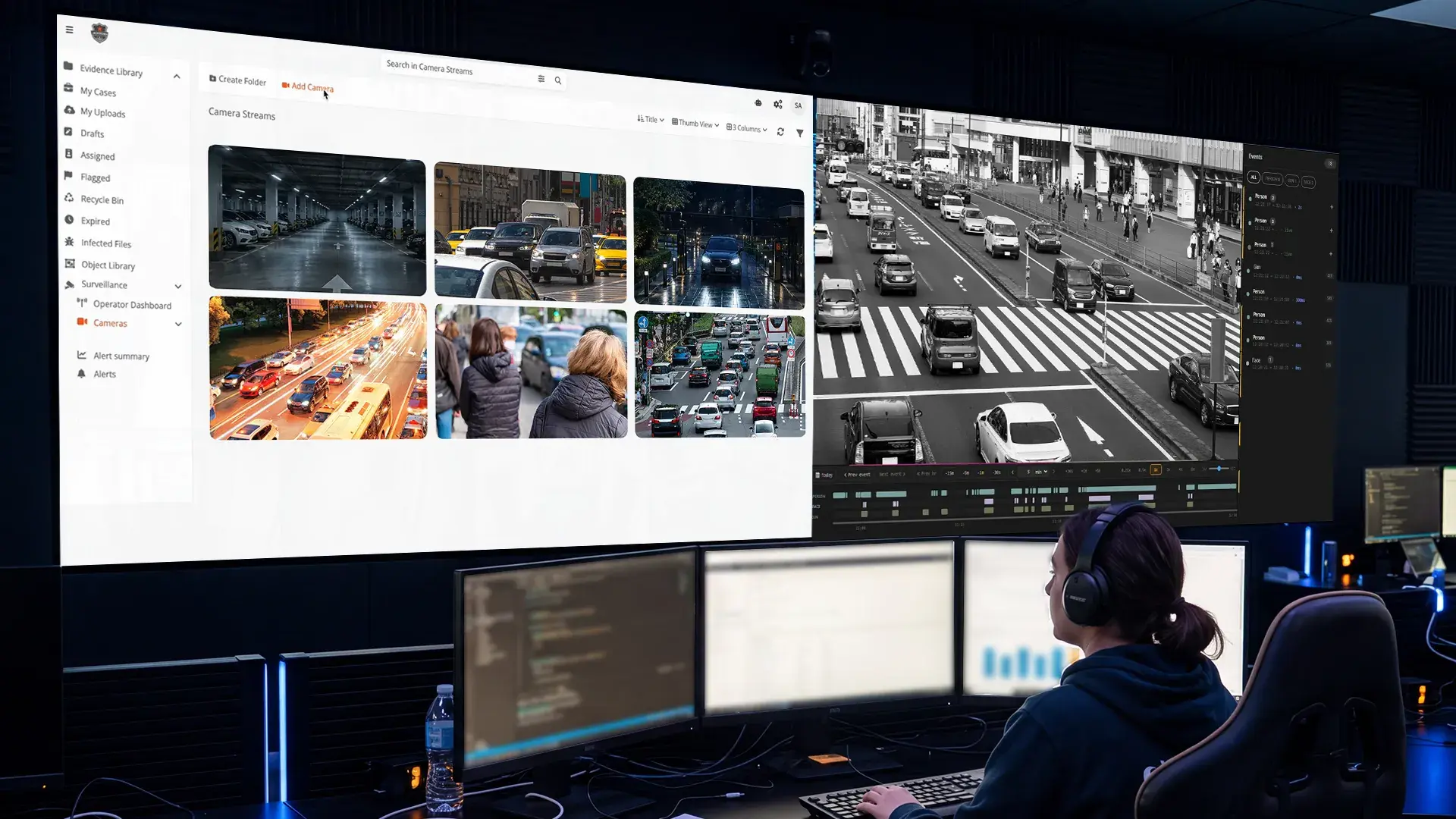
Adding AI to an existing camera estate comes down to one unglamorous problem: getting a copy of the video out of the video management system you already run and into the analytics layer, without disturbing anything that is already working. Get this right and the whole retrofit is low-risk. Get it wrong and you spend the project fighting camera limits, credentials, and flaky streams. This is a practical guide to the patterns that work and the ones that quietly cause trouble later.
The principle: a read-only tap
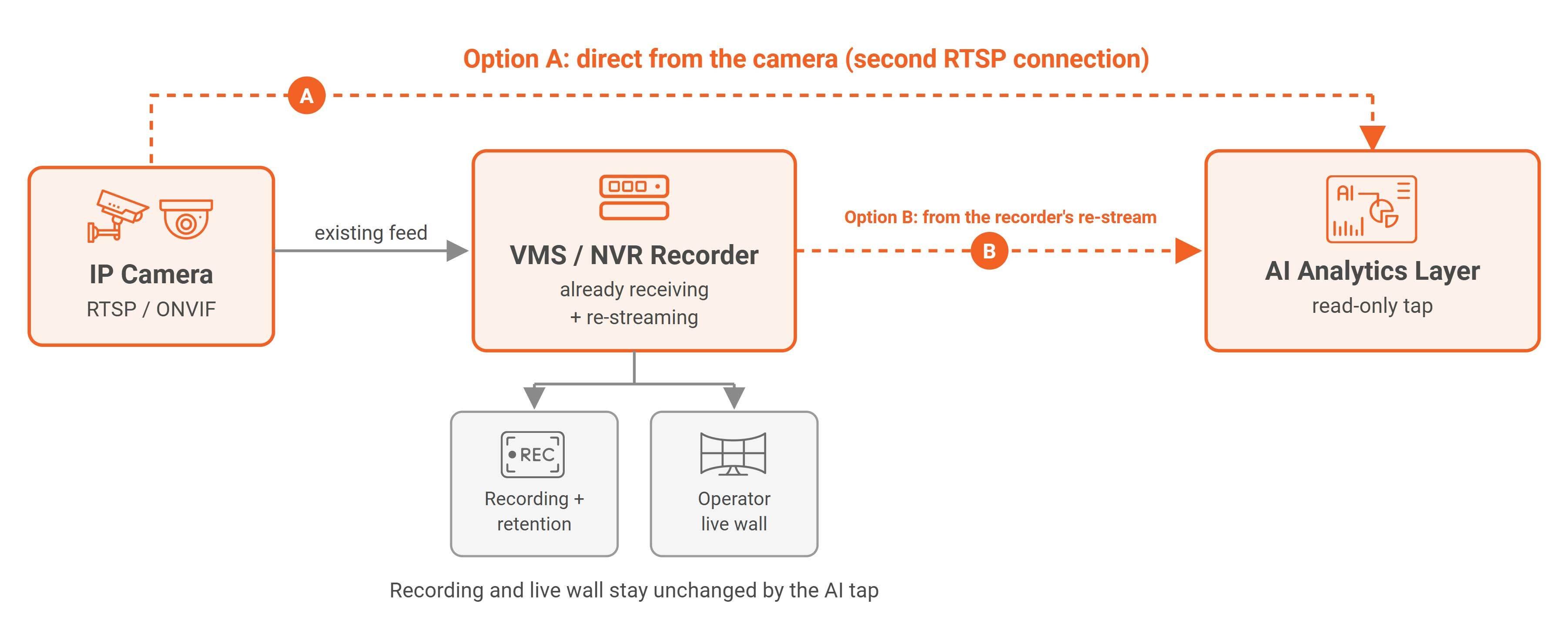
The safest way to think about the integration is as a read-only tap rather than a change to your system. The analytics layer connects the way any other authorized client would, pulls its own copy of the stream, and leaves the recording, the retention policy, and the operator's live wall exactly as they were. It does not reconfigure cameras, it does not write anything back, and it does not sit in the path of the existing recording. Because nothing about how the current system runs has to change, adding AI becomes a low-risk addition rather than a migration, which is the entire reason a retrofit onto a live environment is feasible at all.
RTSP and ONVIF, and what each one does
Two open standards make this possible, and it helps to be clear on the division of labor. RTSP is the protocol that actually carries the video stream, the pipe the frames travel down. ONVIF is the standard that cameras and recorders use to describe and discover one another, so a client can ask a device what it offers and how to connect to it, with Profile S being the part that covers live streaming specifically. Almost any IP camera made in the last decade speaks both, which is what lets an analytics layer read from a mixed estate of different manufacturers assembled over many years, because they all present video the same way to something that knows how to ask.
Where to pull the stream from
There is a real design choice hiding inside the ingest, and on a large fleet it compounds across every camera. You can pull a camera's stream directly from the camera, or you can pull it from the recorder that is already receiving and re-streaming that camera.
- Directly from the camera means opening a second connection to it, which is clean and independent, but many cameras limit how many simultaneous streams they will serve, and each extra connection adds load and outbound bandwidth at the camera.
- From the recorder's re-stream avoids touching the camera at all and leans on infrastructure that is already pulling the feed, but it depends on the recorder's capacity to serve additional streams and on it exposing them in a usable way.
Neither is universally correct. The right choice depends on your cameras' stream limits, your recorder's headroom, and where you have bandwidth to spare, and the honest move is to decide it deliberately rather than discover it under load.
Patterns that work
A few habits separate integrations that come up cleanly from ones that limp.
-
Use a dedicated, least-privilege account for the analytics layer's access, so its connection is easy to audit, easy to revoke, and cannot do more than read the streams it needs.
-
Standardize the sub-stream you analyze. Many cameras publish both a full-resolution main stream and a lower-resolution sub-stream, and analyzing the sub-stream where the resolution is sufficient saves both bandwidth and inference cost across the whole fleet.
-
Put the camera traffic on its own network segment so the analytics pulls never compete with, or expose themselves to, general traffic.
-
Reach the archive the same way. The same style of authorized access that reads live feeds can reach recorded footage through the recorder's integration layer, which is what lets past video become searchable rather than only the live stream being analyzed.
What quietly causes trouble
The failures are rarely dramatic, which is why they are easy to miss until they bite. ONVIF conformance varies between manufacturers, so "ONVIF compliant" does not always mean "behaves identically," and a few older or proprietary cameras expose their streams grudgingly or not at all. Over-subscribing a camera's stream limit shows up as intermittent drops that look like a network fault.
Credential and certificate handling, especially where cameras enforce their own security, trips up more integrations than any exotic problem does. And a mismatch between the codec or resolution a camera emits and what the pipeline expects can force an unnecessary transcode that costs resources across the fleet. None of these are hard once named, which is exactly why naming them early is worth doing.
Beyond the VMS
The same integration approach is not limited to fixed cameras behind a traditional recorder. Any source that can present a standards-based stream can be tapped the same way, including newer inputs like drone feeds, which means the analytics layer is not tied to a single kind of camera or a single vendor's ecosystem. The camera-agnostic, standards-based approach is what keeps the door open to whatever the estate looks like now and whatever it grows into later.
Where this ingestion sits alongside the network design, the GPU sizing, and everything else that has to hold at scale, is in Real-Time AI Video Analytics at Scale: The Systems Engineering Guide. The bandwidth consequences of where you pull streams from are worked through in network and bandwidth design for large camera fleets.
Contact us and see AI Live Insight pull streams from your actual camera and VMS mix, whatever vendors you're running.

FAQ
Frequently Asked Questions
How do you connect an existing VMS to an AI video analytics system?
The analytics layer connects as a read-only tap using standard RTSP and ONVIF protocols, pulling its own copy of the stream without reconfiguring cameras or touching the existing recording. Nothing about how the current VMS runs has to change.
Should you pull a live stream from the camera or from the VMS recorder?
Both are valid, and the right choice depends on your setup. Pulling directly from the camera is clean and independent but limited by how many simultaneous streams the camera allows, while pulling from the recorder's re-stream avoids touching the camera but depends on the recorder's own capacity to serve additional streams.
Does adding AI analytics require replacing existing cameras or VMS software?
No. As long as the cameras and VMS support RTSP for video and ONVIF for discovery, which almost any IP camera made in the last decade does, AI analytics can be added as a read-only integration rather than a migration.
What causes AI video integrations to fail or drop streams?
The most common causes are inconsistent ONVIF conformance between camera manufacturers, exceeding a camera's simultaneous stream limit, credential or certificate handling issues, and codec or resolution mismatches that force unnecessary transcoding.
Can AI video analytics work with a mixed-vendor camera estate?
Yes. Because RTSP and ONVIF are open, vendor-neutral standards, an analytics layer can read from cameras and recorders from different manufacturers the same way, without depending on a single vendor's ecosystem.
Is AI video analytics limited to fixed security cameras?
No. Any source that presents a standards-based stream can be tapped the same way, including newer inputs like drone feeds, so the analytics layer isn't tied to a single kind of camera.
TopicsAI Live Insight

About the author
Farooq Khan is the co-founder and CTO of VIDIZMO, where he leads the engineering, product, and AI strategy behind its platform for making sense of unstructured media. He builds applied and generative AI that turns organizations' video, audio, images, and documents into searchable, governed, and usable intelligence at enterprise scale. Over the past 20 years, he has built systems that capture, scale, and now understand media, from voice logging platforms to large scale commerce to VIDIZMO's AI platform. He leads the product team that builds every VIDIZMO product, including Redactor, AI Intelligence Hub, AI Live Insight and the platform they all run on.
You may also like

What Is a Real-Time Crime Center? A Guide for Cities and Counties
Somewhere in the last two years, someone probably asked your department whether it should have a real-time crime ...

Staffing a Real-Time Crime Center When Software Does the Watching
Most chiefs who hear a pitch for a real-time crime center ask the same question before any other, which is whether they ...

RTCC, EOC or Situational Awareness Center: What Each Room Is For
Walk into a real-time crime center, then into a city's emergency operations center, and you will see much the same ...