
by Farooq Khan, Last updated: July 15, 2026
Ask a vendor how many cameras their AI runs on one GPU and you will usually get a single confident number with no conditions attached, which is the surest sign the number is close to meaningless. The honest answer is a range, and more useful than the range is the method that produces it, because the same GPU can carry thirty cameras or well over a hundred depending on choices you make, not on anything printed on the box. This piece is about how to actually work it out for your own model and your own cameras, so that when you size a fleet you are doing arithmetic rather than trusting a slide.
The one calculation that matters
Underneath all the detail there is a single relationship. A GPU can perform a certain number of inferences per second, and each camera demands a certain number of inferences per second, and the number of cameras you can run is simply the first divided by the second.
The demand side is the easy half. A camera producing thirty frames a second does not need thirty inferences a second, because you rarely run the model on every frame. Analyzing every fifth frame, for instance, cuts the work to a fifth, so a thirty-frame-per-second camera asks for six inferences a second, no more. Thirty-two of those cameras ask for a hundred and ninety-two inferences a second between them, and that is the entire load the GPU has to keep up with. How aggressively you can sample without missing anything is a judgment call, and it is the first of the levers below.
The supply side, how many inferences a second the GPU can actually deliver, is the half that has to be measured rather than assumed, because it moves with the model, the resolution, and the precision you run at. But once you have it, the sizing is honest and mechanical. If a card sustains twelve hundred inferences a second on your model, then at six inferences per camera it carries two hundred cameras, and if you decide the scenario needs every third frame instead of every fifth, the same card carries fewer. Nothing about this is mysterious. It is division, and the only real work is measuring the number you divide by.
The levers, and how far each one moves the number
Five choices set where you land inside the range, and it is worth being concrete about how much each one is worth.
How many frames you analyze is the largest lever by a wide margin, because it scales the demand side directly. Most real detection survives sparse sampling comfortably, a person crossing a line, a vehicle entering a zone, and a car left where it should not be all persist across many frames, so you are rarely giving up anything real by looking less often. Occupancy and counting can often go sparser still. The rare case that genuinely needs every frame, some fast safety interlock, is exactly the case where you knowingly trade cameras for coverage.
The size of the frame you feed the model is the next lever, and it is quieter but real. Inference cost climbs with pixel count, so a model running at a thousand pixels on a side does noticeably more work per frame than one running at six hundred, and the cameras-per-card number moves accordingly. Higher resolution buys you small and distant detections, a face across a plaza, a plate at range, so this is a deliberate trade rather than free savings, but it is a trade you get to make per deployment.
The model itself matters in the obvious direction. A larger, more accurate detector costs more per inference than a smaller one, and running several models against the same feed multiplies the cost by the number of models. This is the price of the flexibility that server-based processing gives you, and it is worth paying when the scenario needs the accuracy, but it is a real line item in the capacity budget.
The precision you run at is a lever in its own right, and after frame sampling it is often the largest one. A detector quantized from fp16 down to int8 does its arithmetic in a smaller number format that the GPU's tensor cores chew through faster, which roughly doubles throughput and halves memory use, in exchange for a small drop in accuracy that careful calibration usually recovers most of. For many detection tasks int8 is close to free capacity, and for a few precision-sensitive ones it is not worth the accuracy cost, so the honest move is to measure accuracy on your own data before committing to it. fp16 is the sensible default, and int8 is the lever you reach for when you need more cameras out of the same card.
How much latency you will accept is the subtlest lever. Batching more frames together before the GPU processes them improves how efficiently the hardware runs, which raises total throughput, at the cost of each result arriving a little later. For a live safety alert you keep batches small and latency low, for after-the-fact indexing you can batch aggressively and let throughput climb. The batch size is not a fixed property of the system, it is a dial you set against the latency the use case can tolerate.
To put rough numbers on it, changing one lever at a time from a baseline of a single detector at a thousand pixels, fp16 precision, analyzing every fifth frame of a thirty-frame-per-second stream:
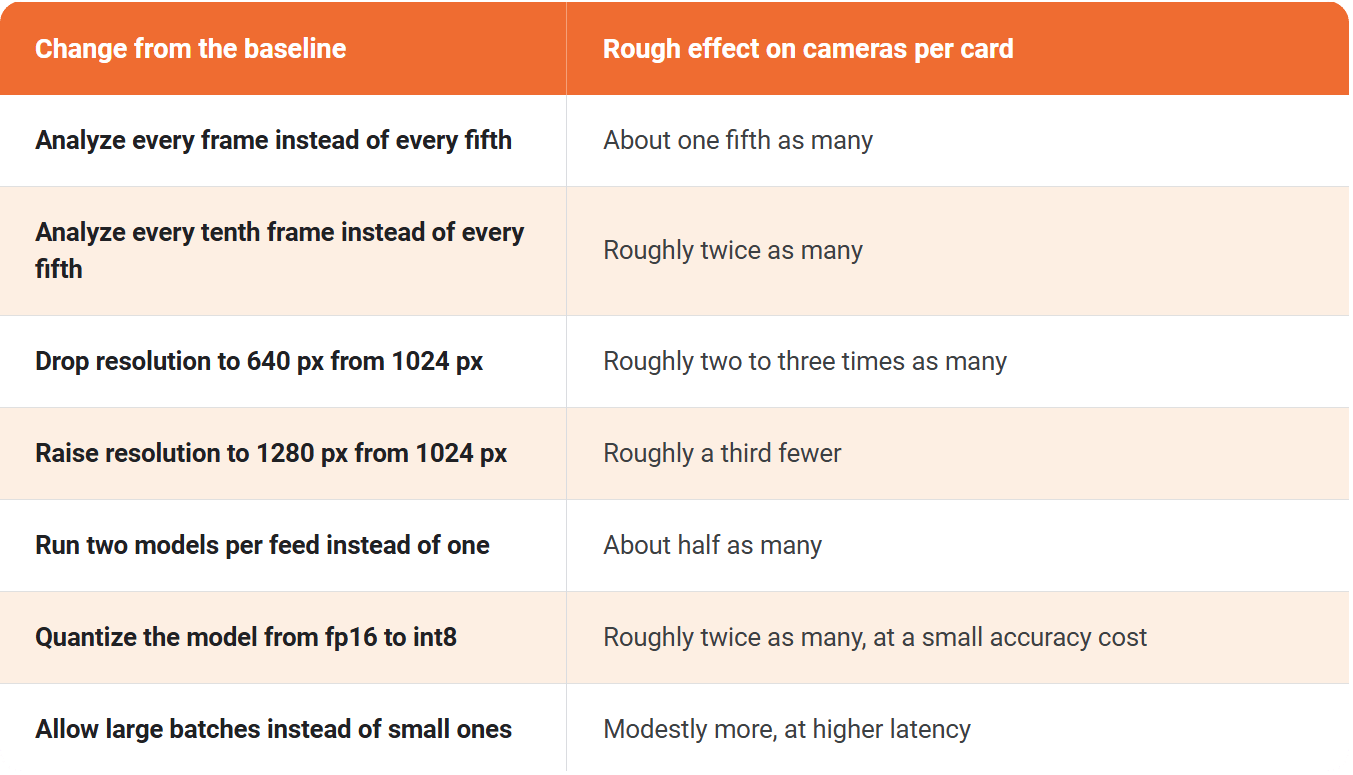
These are planning approximations, not promises. The important property is in the next section: they compound.
The knobs compound, and that is the whole point
The reason any of this matters is that the levers multiply rather than add, so the distance between a careless configuration and a considered one on the same card is not a few percent, it is often more than tenfold. Here is a single GPU, running a single model, walked from an untuned starting point to a tuned one, one knob at a time.
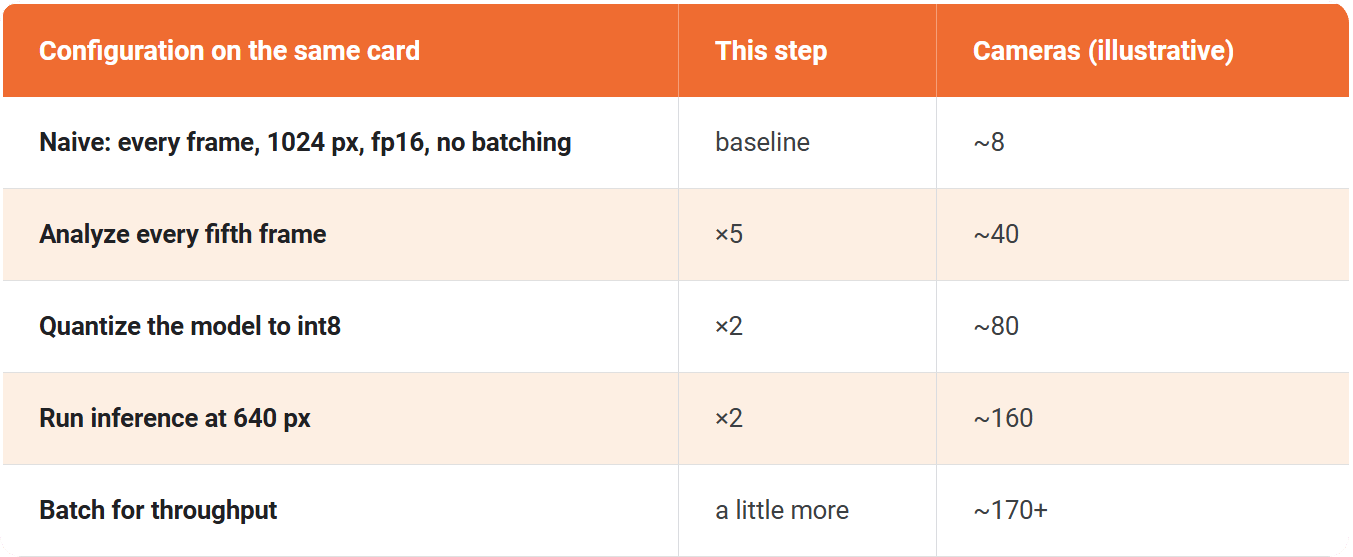
Read down that last column and the argument makes itself. The same physical card carries a handful of cameras configured carelessly and well over a hundred configured thoughtfully, without a dollar of extra hardware. That is the case for tuning before buying: a considered configuration routinely does the work of several naively configured cards, so the first answer to "we need more capacity" should be to check the knobs, not the purchase order. It is also why a single confident streams-per-GPU number from a vendor is close to meaningless, because it silently bakes in a particular set of these choices and hides the rest.
The discipline is that every one of those multipliers is also a trade. Sampling sparser can miss a fast event, lower resolution loses small and distant detections, int8 costs a little accuracy, and larger batches add latency. A parking-occupancy deployment can take all of them and run well over a hundred cameras on one card. A weapon-detection corridor might take none of them and run thirty, deliberately. The skill is not in maxing the knobs, it is in knowing which ones the scenario can actually afford, which is a judgment about the use case at least as much as about the hardware.
Why you have to measure the supply side
The reason no honest vendor hands you a universal streams-per-GPU number is that the number is specific to a combination of model, resolution, precision, and card, and the only trustworthy way to know it for your combination is to run it. This is not hard to do, and it is worth doing before you buy hardware for a large fleet.
The measurement itself is straightforward. Take the detection model your deployment will run, compiled into an optimized inference engine for the specific card, and drive it with a growing number of camera streams while watching the frame rate it sustains. Point the pipeline at one video source, replicate that source into more and more streams, set the frame-sampling interval and the resolution to the values your deployment will actually use, discard the output so that nothing but the real work is being timed, and watch the frames per second it holds per stream and in total.
Raise the stream count until the per-stream rate can no longer keep pace with real time, and the last count that held is your answer for that card and that configuration. Do it once for each GPU model you are considering and you have replaced every vendor claim with a measured number you can size against.
It is worth taking two readings rather than one. The end-to-end measurement above tells you how many cameras the whole pipeline carries, decoding and all. A second measurement of the model on its own, driven at a fixed batch size with no decoding in the way, tells you the raw inferences per second the card delivers, which is the supply number from the calculation earlier. Comparing the two tells you whether your ceiling is the model or something else in the pipeline.
As a concrete anchor, a single NVIDIA RTX 5090 running a detector of this kind at a thousand pixels and fp16, analyzing every fifth frame, comfortably carries several dozen cameras, and relaxing the sampling and the resolution pushes the same card past a hundred. Those settings are the range this piece keeps quoting, and the precise figures for your own model belong right here, measured rather than asserted.
That second possibility, something other than the model running out first, is worth understanding on its own.
When it is not the model that runs out first
Inference is usually the binding constraint, but not always, and assuming it always is has surprised people. Every stream also has to be decoded from its compressed form back into frames before the model ever sees it, and that decoding runs on dedicated video hardware on the GPU with its own finite capacity. At high camera counts with sparse sampling, where inference demand is modest but the number of streams to decode is large, the decoders can become the ceiling instead of the compute. This is one more reason to measure the whole pipeline and not just the model.
One related point is worth clearing up here because it steers a lot of budget in the wrong direction: capacity is set by the card's compute and its video decode and encode engines, not by how much memory it carries. More VRAM lets you hold a larger model and keep more streams in flight, but it does not make inference any faster, and past the point where memory is sufficient it buys nothing. Which specific card, and which vendor, actually fits this workload, and why the expensive datacenter GPU is often the wrong choice for it, is its own decision, covered in Choosing a GPU for real-time video analytics.
From one card to a fleet
Once you know a card's number, sizing the deployment is two kinds of addition. You scale up inside a server by adding GPUs, because a single server can hold several, and each one contributes its own share of cameras. Then you scale out by adding servers once a server is full, and there is no ceiling on that direction short of the network and the operations behind it. A deployment of several hundred cameras is a handful of GPUs across one or two servers, and a deployment of several thousand is a rack of them, built from the same unit repeated.
Planning a fleet at the settings discussed above, and assuming a few GPUs per server, say four, looks roughly like this:
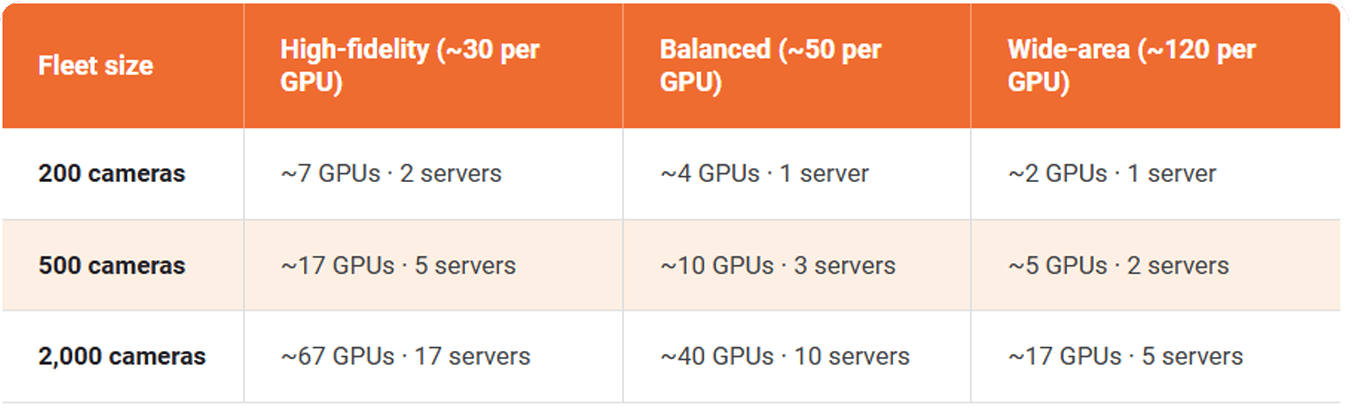
These are illustrative planning figures rather than a quote, and the per-GPU numbers across the top are exactly the ones you would replace with your own measurement. How many cards actually fit in a server depends on the chassis, its power, and its cooling, which is its own conversation. The point of the table is the shape of the thing: the same server, repeated, carries you from a single building to a whole city, and the sampling and resolution you choose move the count by several times in either direction.
The sensible way to reach either is not to buy for the final size on day one. Start with a phased pilot on a single corridor, district, or facility, a few dozen cameras on one server, and measure the real numbers in the real environment with the real cameras, because a parking lot at dusk and a factory floor under bright light do not stress a model the same way. Prove it, fill that first server with GPUs before you add a second, and introduce redundancy and failover once you are past the pilot and a node failing would actually matter. Sized this way, the capacity question stops being a leap of faith and becomes a measurement you extend.
The wider systems view, where this GPU sizing sits alongside the network, the ingestion, and everything else that has to hold at scale, is in Real-Time AI Video Analytics at Scale: The Systems Engineering Guide.
Contact us and we'll walk through sizing your specific fleet: cameras, GPUs, and servers, based on your actual numbers.
About the Author

Jump to
Deploying a Low-Latency Surveillance Pipeline: An Architecture Guide
Network and Bandwidth Design for Large Camera Fleets

No Comments Yet
Let us know what you think