
"Real-time" is one of those phrases that gets used loosely, and in a video analytics pipeline it hides a lot of engineering. A detection is not instant. It travels through a chain of steps, each of which adds a little delay, and the total is what determines whether the system reacts while an event is still unfolding or after it has passed. This is a walk through where that latency comes from, how to keep it down, and, just as important, how much of it you actually need to worry about.
First, what "real-time" honestly means here
It is worth being precise before optimizing anything, because a lot of wasted effort comes from chasing a latency target the use case never needed. For surveillance and situational awareness, "real-time" means a human or a downstream system reacts within a second or two of something happening, not within a millisecond. That is a comfortable target, and a well-built pipeline clears it easily. The millisecond-scale latency that edge processing brags about matters for a closed-loop control task that has to trigger a physical actuator, and it is close to irrelevant for watching a camera network. Knowing which world you are in tells you how hard to push.
It is also worth separating two different latencies that get conflated. There is the time from an event happening to an alert firing, which is what matters for reaction, and there is the time from an event happening to it appearing on the operator's live wall, which is a display concern. They are not the same number, they are tuned differently, and being honest that a live-view feed carries a small deliberate delay is part of setting expectations correctly.
The pipeline, stage by stage
Before optimizing latency it helps to have the whole pipeline in view, because each stage is both a place work happens and a place delay can hide. Every frame makes the same journey.

Ingest
The analytics layer opens an RTSP connection to each camera, discovered and described over ONVIF, and pulls its own copy of the compressed stream. It is a read-only tap on video the camera is already producing, so nothing on the camera or the recorder is reconfigured. The integration patterns for this are their own subject.
Decode
The compressed stream has to be turned back into raw frames before any model can look at it, and that decoding runs on dedicated video hardware on the GPU rather than on its compute cores. At high stream counts the decoders are a real and sometimes binding capacity limit, not an afterthought.
Sample and batch
The pipeline does not run the model on every frame, it selects every nth frame, and it groups frames from many cameras into a batch the GPU processes together. Both choices are latency levers: sampling sets how fresh a detection can be, and batch size trades throughput against how long each frame waits for the batch to fill.
Inference
The batch runs through the detection model, which returns what it found in each frame, a person, a vehicle, a weapon, a plate, a PPE violation, each with a location on the frame and a confidence.
Tracking
Raw detections are per-frame; tracking is what stitches them across frames into a single moving object with a stable identity, so one person walking through a scene is one tracked entity rather than fifty unrelated detections. This is what makes "a person loitered for two minutes" or "a vehicle crossed this line" expressible at all, collapses a flood of frame-by-frame hits into a handful of meaningful events, and gives the alerting something stable to reason about instead of firing on every frame.
Post-process and event
The tracked result becomes a structured event, carrying time, camera, location, type, severity, and confidence, which is the shape everything downstream depends on.
Alert and route
Whatever clears the thresholds is sent onward to wherever it will be seen and acted on. Keeping that last hop fast matters as much as keeping the detection accurate, since a late alert and a missed one cost about the same.
Each of these stages appears in the latency table below, because each one adds a little delay. Knowing what a stage is for is what tells you whether its delay is worth attacking.
Where the latency accumulates
Follow a single frame from the lens to the alert and the delay adds up in identifiable places.
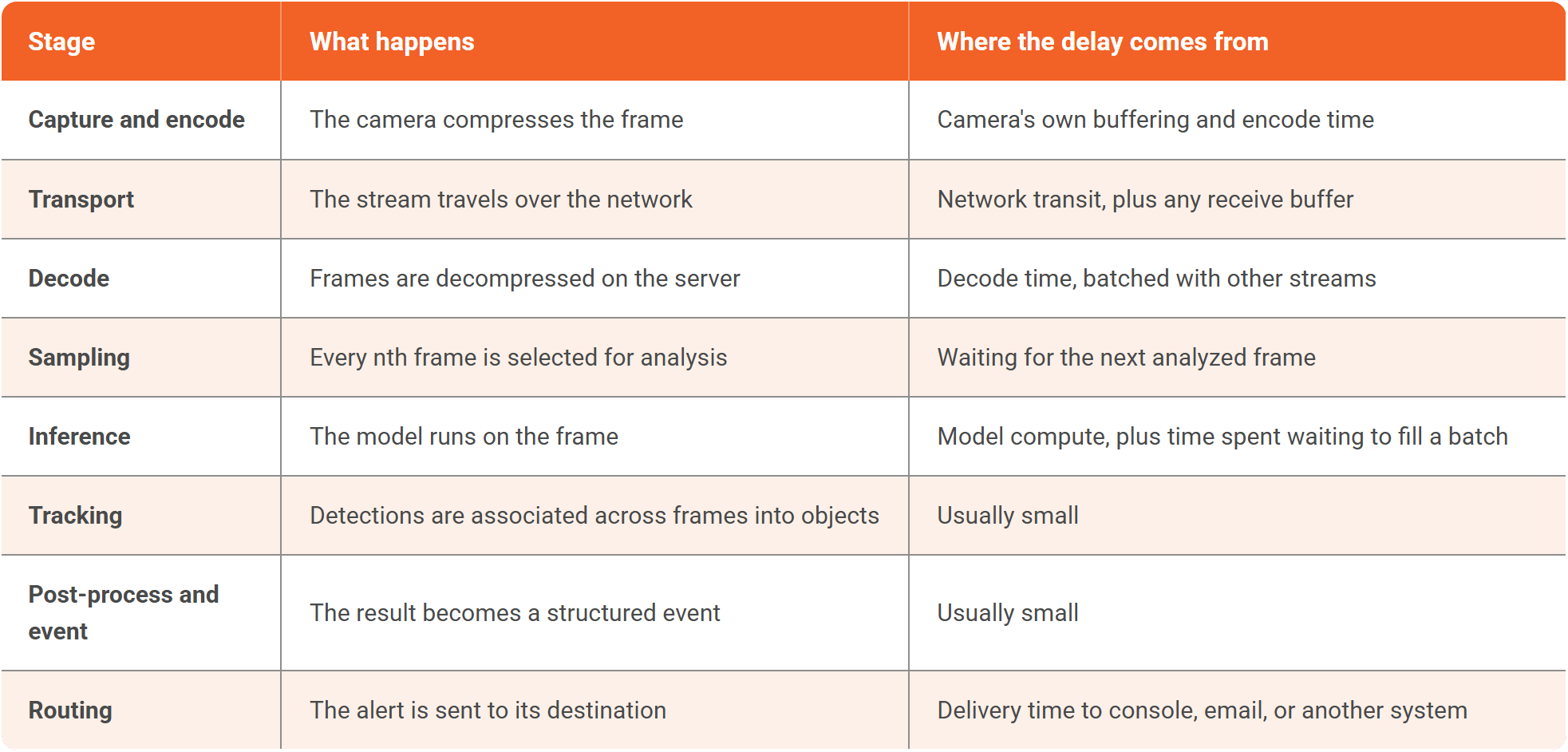
No single stage is usually the villain. The total is the sum, and the two biggest, most controllable contributors are the receive buffering on transport and the batch wait on inference.
The levers that bring it down
A few choices trade directly against latency, and the right settings depend on which of the two latencies you are optimizing.
Buffering versus dropping
A receive buffer smooths out network jitter but adds delay by definition. A pipeline can instead be told to drop frames that arrive late rather than wait for them, which keeps it current at the cost of the occasional skipped frame. For a live, reactive system, staying current usually beats being complete.
Batch size
Grouping more frames before the GPU processes them raises throughput but makes each result wait for the batch to fill. For low-latency alerting you keep batches small; for after-the-fact indexing you let them grow. This is the same batch-size dial that appears in GPU capacity planning, seen from the latency side.
Frame sampling
Analyzing every nth frame means a detection can only be as fresh as the next analyzed frame. At every fifth frame of a thirty-frame stream that is a fraction of a second, which is fine for surveillance, but it is a real contributor to worry about if you are chasing the tightest latencies.
Keeping the GPU from falling behind
The subtle one. If a card is oversubscribed and cannot keep pace, latency does not stay constant, it grows without bound as a backlog builds, and the live picture drifts further and further behind reality. Sizing the GPUs so inference comfortably keeps up, the subject of GPU capacity planning, is therefore also a latency requirement, not only a throughput one.
Staying on-premises
Every kilometre the video travels is latency and risk. Keeping the inference local, next to the cameras, removes the round trip to a distant datacenter entirely, which is one more reason fleet-scale real-time analytics tends to live on-premises.
The operator's live view
The live wall is its own small latency problem, separate from alerting. Delivering many live feeds to operators with low delay is a streaming challenge, and it is solved with low-latency streaming techniques and encoder settings tuned for speed rather than maximum compression efficiency. The honest framing here is that a surveillance live view is typically a second or two behind true real time, deliberately, because a small, stable delay that never stutters is more useful to an operator than a jittery feed chasing zero latency. The alert path, meanwhile, does not wait on the display and can be faster.
Do not over-optimize
The most useful piece of advice in this whole subject is to match the effort to the need. Shaving latency has a cost, in dropped frames, in smaller batches that waste GPU capacity, and in engineering time, and for the vast majority of surveillance deployments the comfortable second-or-two target is reached without paying much of it. Spend the optimization budget where the use case genuinely demands tight latency, and let the rest of the fleet run at the relaxed, efficient settings that let a single GPU carry many more cameras. Low latency is a requirement to be met, not a score to be maximized.
Where this pipeline sits alongside the GPU sizing, the network, the ingestion, and everything else that has to hold at scale, is in Real-Time AI Video Analytics at Scale: The Systems Engineering Guide. The trade between latency at the edge and on a server is examined in camera edge processing vs server-based processing.
Talk to our team about the latency your deployment actually needs, not the lowest number on a spec sheet.

TopicsAI Live Insight

About the author
Farooq Khan is the co-founder and CTO of VIDIZMO, where he leads the engineering, product, and AI strategy behind its platform for making sense of unstructured media. He builds applied and generative AI that turns organizations' video, audio, images, and documents into searchable, governed, and usable intelligence at enterprise scale. Over the past 20 years, he has built systems that capture, scale, and now understand media, from voice logging platforms to large scale commerce to VIDIZMO's AI platform. He leads the product team that builds every VIDIZMO product, including Redactor, AI Intelligence Hub, AI Live Insight and the platform they all run on.
You may also like
What Is a Real-Time Crime Center? A Guide for Cities and Counties
Somewhere in the last two years, someone probably asked your department whether it should have a real-time crime ...
Staffing a Real-Time Crime Center When Software Does the Watching
Most chiefs who hear a pitch for a real-time crime center ask the same question before any other, which is whether they ...
RTCC, EOC or Situational Awareness Center: What Each Room Is For
Walk into a real-time crime center, then into a city's emergency operations center, and you will see much the same ...