Capacity planning tells you how many GPUs a deployment needs. This is the other half of the question: which GPU to actually buy. It deserves its own answer because the instinct almost everyone brings to it, that the more expensive and more powerful-sounding card must be the better choice, is frequently wrong for this particular workload. Real-time video analytics leans on a specific combination of hardware, and some of the priciest GPUs on the market are built around a different combination entirely. Knowing what the workload actually uses is what keeps you from overpaying for the wrong thing.
One scoping note first, because it prevents a costly mistake. Everything below is about the real-time video analytics workload specifically, the one behind AI Live Insight, where the job is to decode and run detection across many live camera streams at once. It is not sizing guidance for VIDIZMO's other AI workloads, which have different priorities and should be sized on their own terms.
Agentic AI and large-language-model reasoning, as in the AI Intelligence Hub, are memory-bound and lean heavily on VRAM, which is the reverse of the advice here. PII detection and redaction, on-demand (rather than live) object detection, transcription, and similar batch jobs run on their own schedules and stress the hardware differently again. Read this as the answer for live video analytics, and do not borrow these numbers to size those other workloads.
What actually drives performance, and what does not
The single most expensive misconception in GPU buying is that more memory means more speed. It does not. A GPU with more VRAM does not, on its own, run inference any faster. Throughput is set by the card's compute, its tensor cores and its memory bandwidth, together with its video decode and encode engines. Memory is capacity, not speed. What the extra gigabytes buy you is room, room to load a larger and more accurate model, and room to keep more camera streams and larger batches in flight at once. So more memory lets you attach more cameras in parallel, but only up to the point where the compute can still process them in real time. Past that point, adding memory changes nothing at all.
The part that surprises people is the video engines. A real-time analytics pipeline does not just run a model, it has to decode dozens or hundreds of incoming compressed streams back into frames before the model ever sees them, and often re-encode them for live viewing and recording. That decoding and encoding happens on dedicated blocks of silicon on the GPU, separate from the compute cores, and their capacity is a real and sometimes binding limit. A card with enormous compute and no video engines is, for this workload, missing a wheel.
Put those two facts together and the priorities for choosing a card become clear: you want strong compute, generous video decode and encode capacity, and enough memory to hold your model and your streams, in that order. Memory beyond "enough" is money spent on the wrong axis.
Consumer, workstation, or datacenter
GPUs sort roughly into three classes, and the expensive end is not automatically the right one here.
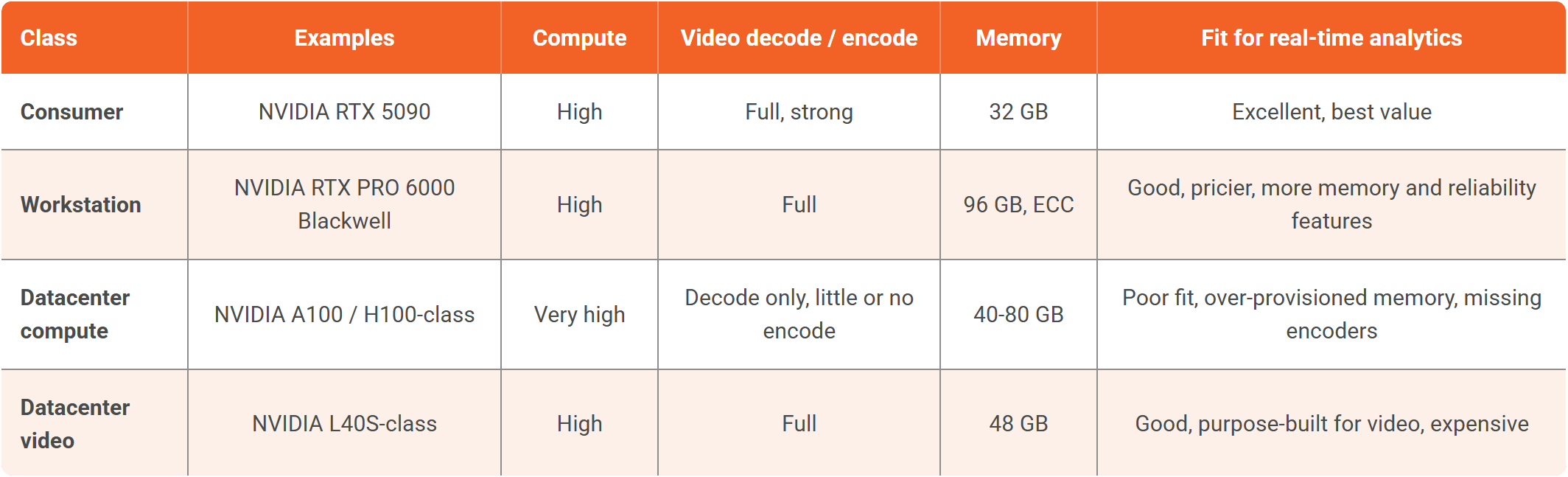
The trap is the datacenter compute row. Those cards are the most expensive and the most powerful-sounding, and they are magnificent at what they were built for, which is training enormous models. But they were never meant to touch video, so they carry a great deal of memory and frequently ship with few video encoders or none at all, exactly the hardware a real-time pipeline depends on. Spending several times the price of a consumer card to get a part that is missing the encoders you need is the most common and most expensive mistake in this whole exercise.
A consumer card like the NVIDIA RTX 5090 pairs strong compute with a full set of video engines at a fraction of the price of the datacenter parts, which makes it a genuinely serious platform for this work rather than a budget compromise. There are still good reasons to move up to workstation or purpose-built datacenter video cards at large scale, rack density, cooling, error-correcting memory, longer warranties, and around-the-clock duty cycles among them, but raw capability for real-time video analytics is not one of them.
The one honest catch with consumer cards
There is a single caveat to the consumer-card recommendation, and it is specific to video, so it is worth naming plainly. Consumer GeForce cards have historically carried a driver-imposed limit on how many simultaneous video encode sessions they will run, a cap that professional and datacenter cards do not have. For the analytics ingest itself this rarely matters, because decoding incoming streams is not limited in the same way, and decoding is the heavy lifting on the way in.
But if your deployment also re-encodes many streams at once, for a low-latency live wall or for recording, you can run into that ceiling on a consumer card where a workstation or datacenter card would not. It is not a reason to avoid consumer cards, most deployments stay within the limit or handle encoding in a way that sidesteps it, but it is exactly the kind of detail worth checking against your own encode load before you standardize a whole fleet on one card.
The vendor landscape
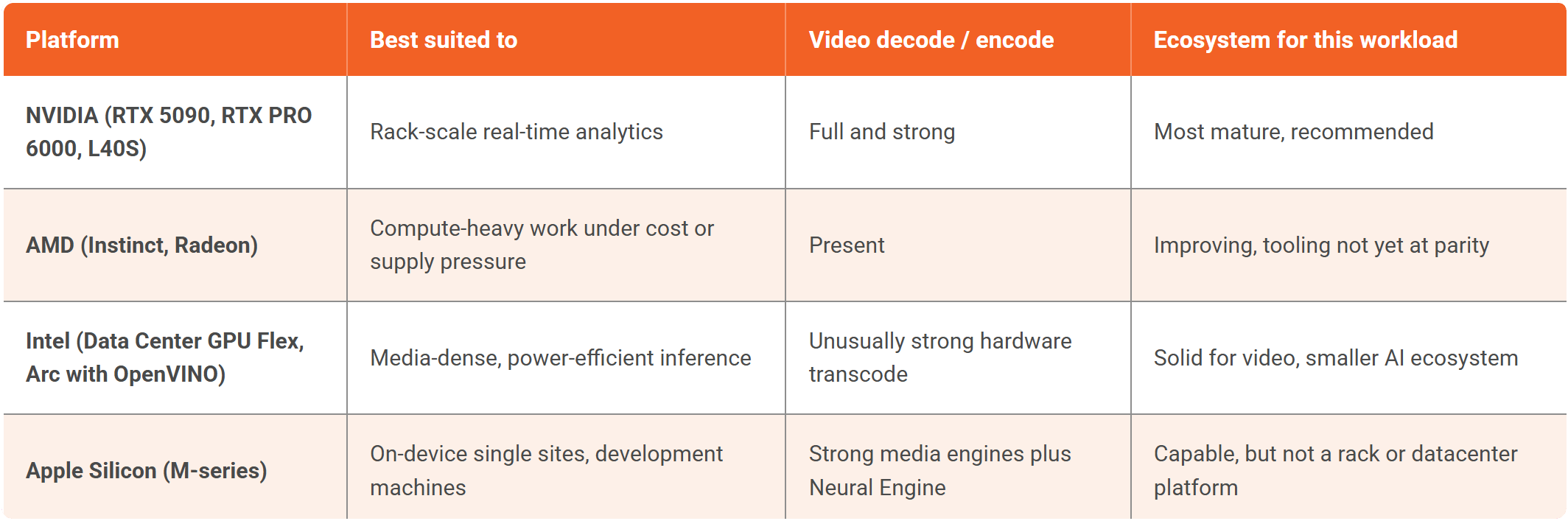
Within that picture you are choosing among a small field of vendors, and it is worth being straight about where each one sits today.
Why NVIDIA, honestly
NVIDIA is the recommended platform, and not merely out of habit. Its compute stack for inference is the mature one, with years of tooling behind it. The integration between that compute and the on-die decode and encode engines is tight, which matters enormously for a workload that is half video handling. The range of cards runs unbroken from a consumer RTX up to datacenter parts built expressly for video inference, so you can start small and scale without changing platforms. And its support and availability are well ahead of the field. It is also, plainly, the platform VIDIZMO AI Live Insight is built and validated on, so it is the path with the least friction.
That recommendation is more credible for being honest about the alternatives. AMD's GPUs are genuinely capable and its software has improved steadily, so it is a reasonable choice where cost or supply pushes you toward it, but the tooling and integration around it are not yet at parity for this particular workload. Intel is the one most people overlook and worth knowing about, because its data-center GPUs are built expressly for media plus inference and carry unusually strong hardware transcode, which suits stream-dense deployments, even if its AI ecosystem is smaller.
Apple's silicon earns a mention because its media engines and neural accelerator are genuinely strong, which makes a Mac an excellent place to develop or to run analytics for a single site, but it is not a rack-scale server platform and was never meant to be, so it belongs at the edge rather than in the plan for a city.
What to actually buy
Stripped to a recommendation: for most real-time video analytics deployments, a consumer NVIDIA card with strong compute, full video engines, and enough memory to hold your model and streams is the best value on the market, and it is not close. Move up to workstation or purpose-built datacenter video cards when scale, density, cooling, error-correcting memory, or duty-cycle warranties genuinely require it, which is a real threshold but a higher one than most people assume.
Steer clear of pure-compute datacenter cards unless you have a specific reason that has nothing to do with video, because you will pay the most to get a part missing the encoders the workload needs. And whatever you shortlist, confirm the number the way the capacity planning guide describes, by measuring streams per card on your own model, before you commit a purchase order to it.
Where this sits in the larger picture, alongside GPU sizing, the network, ingestion, and everything else that has to hold at scale, is in Real-Time AI Video Analytics at Scale: The Systems Engineering Guide.
TopicsAI Live Insight

About the author
Farooq Khan is the co-founder and CTO of VIDIZMO, where he leads the engineering, product, and AI strategy behind its platform for making sense of unstructured media. He builds applied and generative AI that turns organizations' video, audio, images, and documents into searchable, governed, and usable intelligence at enterprise scale. Over the past 20 years, he has built systems that capture, scale, and now understand media, from voice logging platforms to large scale commerce to VIDIZMO's AI platform. He leads the product team that builds every VIDIZMO product, including Redactor, AI Intelligence Hub, AI Live Insight and the platform they all run on.
You may also like

What Is a Real-Time Crime Center? A Guide for Cities and Counties
Somewhere in the last two years, someone probably asked your department whether it should have a real-time crime ...

Staffing a Real-Time Crime Center When Software Does the Watching
Most chiefs who hear a pitch for a real-time crime center ask the same question before any other, which is whether they ...

RTCC, EOC or Situational Awareness Center: What Each Room Is For
Walk into a real-time crime center, then into a city's emergency operations center, and you will see much the same ...