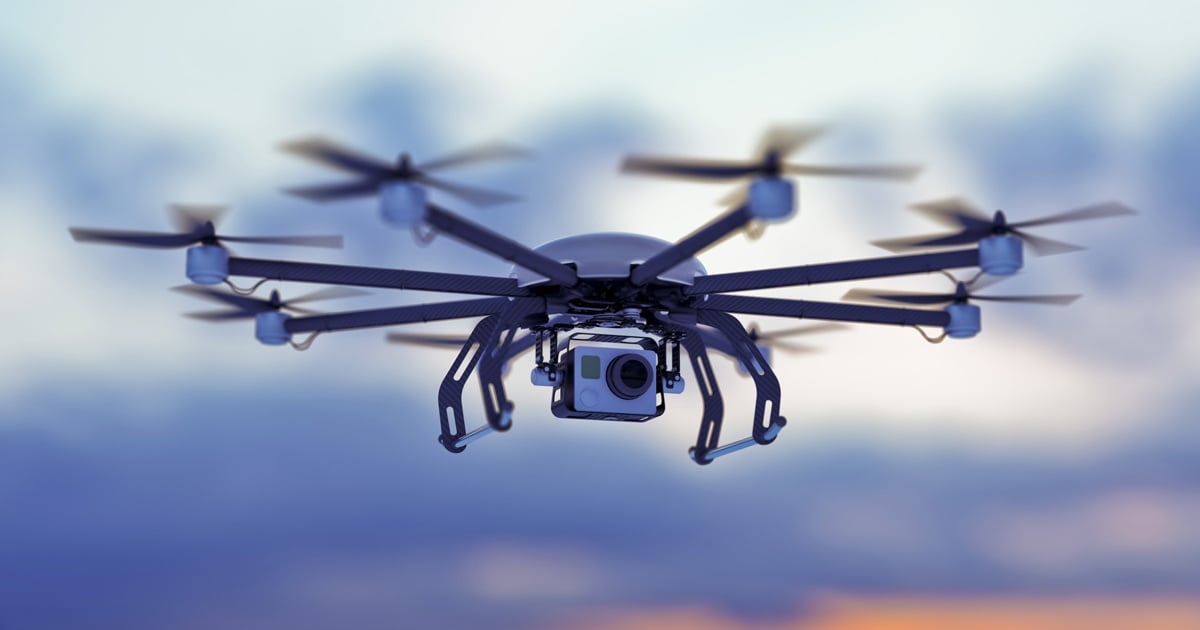
A growing number of industries are adopting unmanned aerial vehicles (UAVs) and drone footage live streaming for a broad range of business applications to facilitate transportation, agriculture, construction, mining, live events, law enforcement, search & rescue, disaster relief, and much more. Drones are making the transition from a novelty technology to an integral business tool. The commercial drone market is projected to reach roughly $28 billion in 2026 and to keep climbing through the early 2030s.
However, the growing use of drones has brought about a variety of business challenges related to the incorporation of live and recorded drone video into mainstream business operations, as well as dilemmas associated with video storage, security, management, accessibility and distribution.
In this article, we will explore the major challenges faced while managing drone live stream footage and how VIDIZMO, an enterprise video platform, helps you in efficiently managing this footage.
Use Cases of Drone Live Video Streaming
Modern developments in video streaming technology, together with the needs of contemporary use cases have made drones a popular tool across multiple industries. Here are some critical use cases of drone live streaming:
- The transportation industry utilizes drones to inspect and monitor remote or hard-to-reach maintenance sites, which not only reduces internal staffing requirements but also prevents workers from being in harm’s way, not to mention the faster turnaround times and reduced traffic closures.
- The agricultural industry utilizes drones in a variety of ways, including aerial surveying and assessment, hazard identification, feed budgeting, and much more.
- Drone surveillance is a huge assistance in enabling remote monitoring and inspection of sites in the mining and energy sector.
- In public health and emergency response, drones assist with monitoring of restricted zones, thermal and aerial assessment, and delivery of medical supplies to hard-to-reach areas.
Other compelling applications now go beyond simple inspections, such as the use of larger drones to assist in installations, precise spraying, and even repairs. Drones are also gaining prominence in last-mile delivery services for e-commerce giants like Amazon, medicinal response for disaster relief efforts, and surveillance and tracking of fleeing suspects in the law enforcement industry.
Challenges of Drone Live Video Streaming
Of course, the rising proliferation of drones across industries is not without any problems. Adoption of drones not only raises challenges for the incorporation of live drone streaming in particular or specific business operations but also challenges for effectively and appropriately storing, managing, viewing and sharing the large video files of recorded drone live stream footage in a secure and reliable manner.
Employing drones for day-to-day business activities creates massive amounts of video. Not only that, but the footage also needs to be securely stored and sometimes retained for several years, depending on your organization's data retention policies. Furthermore, it needs to be made accessible for viewing and sharing by the relevant employees. These tasks can be difficult to accomplish in an efficient or reliable manner without a proper video streaming and management solution.
VIDIZMO | An End-To-End Drone Video Management Solution
VIDIZMO provides a comprehensive video content management system for recorded drone live video streaming, capture, ingestion, encoding, transcription, indexing, and storage in a centralized video repository. This is a YouTube-like video library from where all authorized users can conveniently search, view, manage, edit, analyze, and share video files with internal and external stakeholders.
With detailed analytics reports and audit trails, VIDIZMO maintains records of all activities performed by users on the platform and fulfills chain of custody requirements, detailing who exactly accessed or shared a video, the time and date of activity, alongside other details. Moreover, VIDIZMO provides single sign-on integration with enterprise active directory for authentication, secure access controls and seamless interoperability through integrations with a broad range of existing business applications, including video conferencing solutions (like Zoom & MS Teams), CMS (like SharePoint), LMS, or IT systems like encoding tools, cloud services, and content delivery networks.
How VIDIZMO helps stream video from drones?
VIDIZMO supports any top-of-the-line drone devices, including DJI, Yuneec, Parrot, 3DR and Blade, which have a built-in onboard camera or video capturing device and built-in encoders that support RTMP (& RTSP) stream. For ones that do not have built-in encoders or ones that do not generate RTMP stream, we support external mobile encoders that could either be attached to a drone or operated from a drone’s ground control station.
Stream Video From Drones With Built-In Encoders
Drones with built-in encoders possess their own mechanisms to stream video using Wi-Fi, mobile broadband technologies, such as LTE, 4G or 3G, or a SIM attached to the drone. In this case, the drone encoder generates an RTMP stream for the drone video and uses the cellular network support and the internet to transmit that RTMP stream to the VIDIZMO streaming server. From there, any live video is available on VIDIZMO's video streaming platform for VIDIZMO users to access from any device, browser, location, and under varying bandwidth conditions.
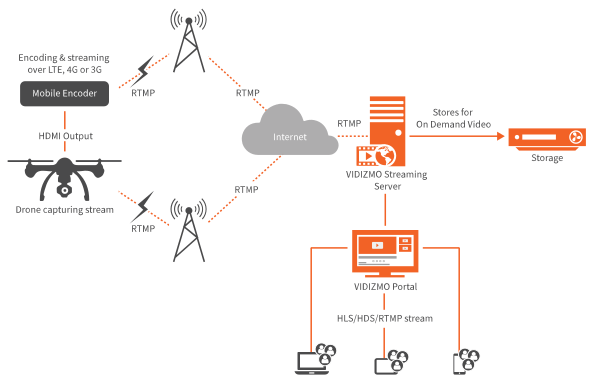
Upon receiving the live stream, the VIDIZMO streaming server also archives and stores all live drone video in its storage servers for on-demand viewing at any time, from anywhere on any device. Recorded videos are securely stored in VIDIZMO’s repository for an indefinite amount of time. Hence, users can download, edit, manage and play the videos at a later time if they are assigned access to do so.
Stream Video from Mobile Encoders Attached to the Drone
Many contemporary professional drones do not come with built-in encoders and they only stream drone video in proprietary formats that cannot be streamed and broadcasted to the web. To resolve this, VIDIZMO supports two solutions.
The first is to attach a portable mobile encoder such as Soliton’s smart-telecaster Zao-S or Streambox AVENIRDrone Encoder Pro to the drone. These miniature encoding devices, weighing about 350 to 400 grams, are mounted directly onto drone cameras to enable full live HD video transmission of live drone video using a variety of mobile networks, including 3G, 4G, LTE, Wi-Fi, Ethernet, WCDM, among others.
The mobile encoder converts the drone's HDMI output to an RTMP stream. Following this, the encoder uses the best possible pathway from the available networks to transmit live stream to VIDIZMO streaming server from where VIDIZMO captures, transcodes and further processes the stream for high-quality live or on-demand video output with minimal latency via VIDIZMO's video streaming platform to all user devices.
For drones that do not have a built-in encoder or ones that don't provision a mobile encoder attached to their surface, VIDIZMO supports a second solution shown below.
Stream Drone Video Using on-Ground Encoders in Ground Control Stations
In many cases, professional drones cannot support a mobile encoder attached to their surface. This is because professional drones often have a lot of sophisticated features and functionalities like improved elevation, durability, GPS plotting accuracy, battery life, weight carrying capacity, camera resolution, or a number of attached cameras even sensors to pick up detailed sensory information along with the video stream. For such reasons, these drones depend on ground control stations to take care of all streaming needs.
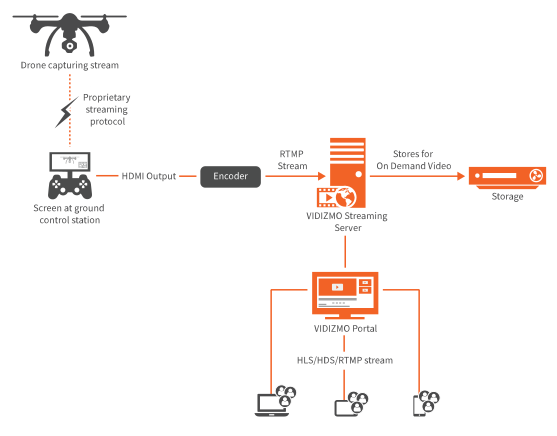
In such scenarios, the drone captures the video stream in a proprietary streaming protocol, which is received on a screen in the ground control station that displays the video being captured by the UAV. The drone video’s HDMI output from the ground station is then input through an encoder attached to the screens in the ground station, which then converts the HDMI output to an RTMP stream that is pushed to the VIDIZMO streaming server.
From there, the drone video is streamed live through VIDIZMO's video streaming platform to all user devices or it is recorded and stored in VIDIZMO’s video repository for on-demand playback later on.
Similarly, for drones that do not support RTMP stream, their proprietary stream is encoded using on-ground encoders at ground control stations that convert the HDMI output from the proprietary stream to RTMP for further processing and streaming through VIDIZMO.
Show KLV Metadata from Drone on a Map!
VIDIZMO goes one step ahead and even allows you to map KLV metadata collected from drones on a map, during the stream.
Hence, your team can seamlessly analyze geospatial data through VIDIZMO's geospatial drone mapping feature that utilizes your recorded drone footage's KLV metadata to sync up the geospatial map with your drone video.
Read More: Geo Map Your Drone Video on VIDIZMO's Drone Mapping Software
To learn more about how VIDIZMO can help manage your drone videos, contact us today or visit our website for more details.

FAQ
Frequently Asked Questions
How do you live stream from a drone?
The drone's camera feed is turned into a streaming format (usually RTMP or RTSP) and sent to a streaming platform over a network. There are three common paths: a drone with a built-in encoder streams directly over Wi-Fi or cellular; a mobile encoder attached to the drone or its controller converts a proprietary feed to RTMP; or an on-ground encoder in the ground control station does the same. The platform then makes the live feed viewable, and can archive it for on-demand playback.
What do you need to live stream from a drone?
You need a drone with a camera, a way to produce an RTMP or RTSP stream (a built-in encoder or an external mobile or ground encoder), a network connection such as Wi-Fi, LTE, or 5G, and a streaming platform to receive, distribute, and store the feed. For enterprise and public-safety use you also want secure access control, archiving, and geospatial KLV metadata support.
How much latency does drone live streaming have?
It depends on the method. App or RTMP streaming to a public platform is typically 2 to 5 seconds end to end. Dedicated encoders and bonded-cellular transmission can bring that down toward sub-second for professional broadcast, while ultra-low-latency protocols can reach a few hundred milliseconds for real-time control and situational awareness.
Which drones support live streaming?
Many professional drones from makers such as DJI, Yuneec, Parrot, 3DR, and Blade include a built-in camera and encoder that can output an RTMP or RTSP stream. Drones without a built-in encoder, or that only output a proprietary feed, can still stream through an external mobile encoder attached to the drone or an encoder in the ground control station.
TopicsEnterpriseTubeSecurity and ComplianceCIO and IT Leadership
About the author
Rafay Muneer is a Senior Product Marketing Strategist at VIDIZMO with deep expertise in data protection, AI redaction, and privacy compliance. He covers how public safety agencies, legal teams, and enterprise organizations build defensible, technology-driven approaches to sensitive data management.
You may also like
What Is a Real-Time Crime Center? A Guide for Cities and Counties
Somewhere in the last two years, someone asked your department whether it should have a real-time crime center. Maybe a ...
Staffing a Real-Time Crime Center When Software Does the Watching
Most chiefs who hear a pitch for a real-time crime center ask the same question before any other, which is whether they ...
RTCC, EOC or Situational Awareness Center: What Each Room Is For
Walk into a real-time crime center, then into a city's emergency operations center, and you will see much the same ...