Screen recordings have quietly become one of the most common content types in the modern enterprise. Teams record product demos, internal SOPs, customer support sessions, training walkthroughs, and async updates every day. What most organizations do not realize is that each of those recordings is a high-resolution capture of whatever was on the screen at the time: dashboards, customer records, internal tools, email threads, account numbers, and in regulated industries, protected health information or payment card data.
Screen recording redaction is the process of systematically removing that sensitive information from video recordings before they are shared, archived, or distributed. In 2026, it is no longer a niche need. It sits at the intersection of privacy regulation, enterprise video governance, and AI-assisted compliance workflows.
This guide explains what screen recording redaction is, what typically gets exposed when teams record their screens, how modern redaction tools actually work, the compliance frameworks that apply, and what to look for when evaluating an approach.
What Screen Recording Redaction Is and Why It Exists
Screen recording redaction refers to the detection and masking of sensitive visual information within a video recording of a computer screen. That information can include personally identifiable information (PII), protected health information (PHI), payment card data (PCI), credentials, confidential customer records, internal system data, or any other content an organization has decided should not leave a particular audience.
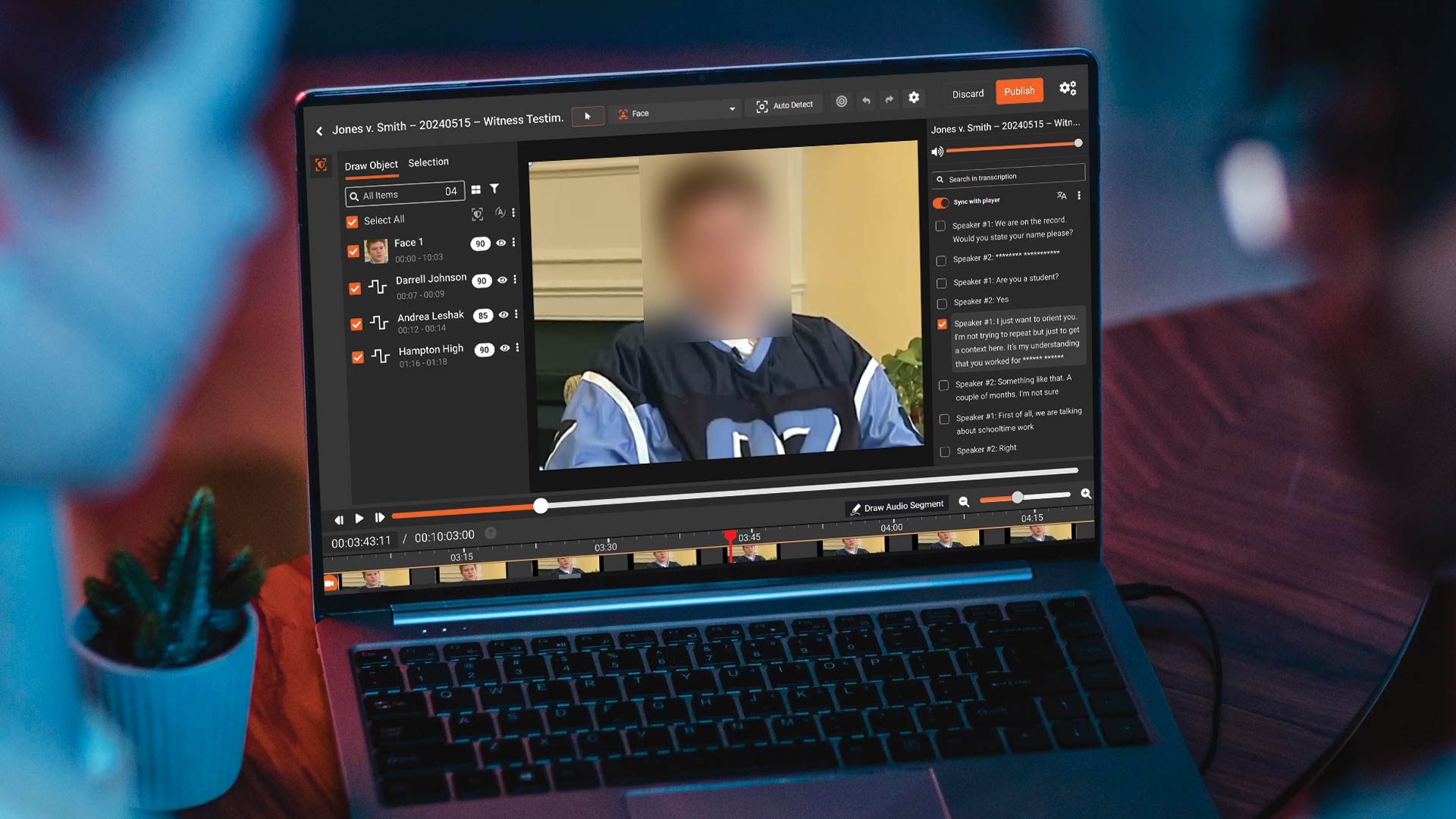
The redaction itself can take several forms: pixelation, blurring, black boxes, or full-frame masking. The underlying task, though, is the same. A reviewer or an AI model identifies which pixels, regions, or frames contain sensitive content and applies a visual treatment that renders them unreadable in the published version of the recording.
This practice exists because screen recordings behave differently from other enterprise content. A document has structured fields. An audio file contains words that can be transcribed and scanned. A screen recording is a pixel stream that can contain anything the operator happened to have open at the time. Standard data loss prevention (DLP) tools, which inspect files and network traffic, do not read what is inside a video frame. That blind spot is what screen recording redaction was built to close.
What Typically Gets Captured in Screen Recordings
The content captured during a screen recording depends on the tool, the workflow, and the person hitting record. In practice, the recurring categories are remarkably consistent across industries.
Application dashboards and internal tools are a primary source. CRM views, admin consoles, analytics dashboards, support ticketing systems, and HRIS panels are often recorded for training or walkthrough purposes. These screens usually show live customer names, account identifiers, internal routing codes, and commercial data.
Customer records and case data appear constantly. Support, claims, and service teams routinely record how they work a ticket or claim, and the recording captures the customer's name, address, policy number, medical details, or transaction history.
Credentials and session data show up more often than people expect. URL bars, session tokens, account numbers in the corner of applications, password manager extensions, API keys in developer tools, and environment variables in terminals are all common incidental captures.
Payment and financial information also slip in. Recordings made in finance, e-commerce operations, and back-office workflows frequently contain card numbers, bank account numbers, routing information, or invoice totals tied to named parties.
Healthcare and clinical screens raise the stakes further. Electronic health record (EHR) panels, lab results, prescription information, imaging viewers, and patient schedulers all qualify as PHI the moment they appear on screen, regardless of whether the recording was intended to capture them.
Communication content closes out the list. Chat windows, email threads, and comment panes often sit in the background of a recording and capture conversations that were never meant to be shared outside a small group.
This is why the topic matters. The content in these recordings was usually not the point of the recording. It was captured incidentally, by virtue of being visible on the screen. Our piece on the hidden PII risks in screen recordings goes deeper into this pattern and why most teams overlook it.
How Screen Recording Redaction Works
Modern screen recording redaction combines several AI techniques to detect and classify sensitive content, then applies a masking treatment to the identified regions across the duration of the video.
Optical Character Recognition
Optical character recognition (OCR) converts text visible in video frames into machine-readable strings. In a screen recording context, this includes headings in a dashboard, field values in a form, text in a chat window, content in a document viewer, and captions on a web page. Once the text is extracted, it can be scanned for sensitive patterns.
Good OCR in video is harder than in static documents. Frames have compression artifacts, fonts change, overlays move, and UI elements animate. Effective screen recording redaction requires OCR that works reliably on rendered application UIs, not just scanned paper. Our deep dive on how OCR text redaction works in screen recordings covers the mechanics in detail.
Object and Region Detection
Not everything sensitive is text. Screen recordings can contain faces in video call tiles, license plates in map views, barcodes, signatures, or distinctive imagery within a document preview. Object detection models are trained to identify these visual elements and track them frame by frame as they move or change position.
Region detection also handles the structural side of the screen. A well-designed redaction engine can recognize the layout of common applications and isolate the panels that typically contain sensitive data, such as the row detail pane of a CRM or the patient header in an EHR screen.
Named Entity Recognition and PII Classification
Once text has been extracted, named entity recognition (NER) and pattern-based classifiers determine whether it is sensitive. NER models identify entities like names, addresses, and organizations in context. Pattern classifiers detect structured data such as Social Security numbers, credit card numbers, phone numbers, email addresses, and account identifiers. Contextual models combine both approaches to reduce false positives. A 16-digit number next to a label that reads "Card Number" is treated differently from the same digits in an order ID field.
Tracking and Temporal Consistency
A piece of sensitive information that appears in frame 45 is usually still sensitive in frame 46. Redaction engines track detected regions over time so that masking persists across consecutive frames, even if the content scrolls, shifts, or is briefly occluded. This prevents the common manual redaction failure where a single frame leaks content the rest of the clip successfully hides.
Masking and Output
Detected regions are then masked using the style the organization prefers. Blur is common for readability-adjacent cases. Pixelation is common where visual continuity matters. Black boxes are preferred where the redaction needs to be obviously visible, such as in legal or FOIA contexts. The output is a new video file, often with an accompanying log of what was redacted and why, so the redaction is auditable after the fact.
Manual Versus AI Approaches
Teams have historically handled screen recording redaction manually, using a video editor to locate sensitive frames and apply a blur or box by hand. This works for very small volumes. It breaks down quickly at anything beyond that, because a single hour of recording can contain thousands of frames, and a missed frame is a disclosure.
AI-driven redaction shifts most of the detection work to software. A human still reviews the output, but the model does the finding. We compare the two approaches in detail in AI vs. manual screen recording redaction, including where each approach fits and how hybrid workflows combine them.
The Compliance Landscape
Several regulatory frameworks influence how organizations handle screen recording redaction. None of them mention screen recordings by name, which is part of the governance challenge, but each sets expectations about how personal or sensitive data is handled regardless of the medium it lives in.
GDPR. The General Data Protection Regulation treats any content containing personal data of EU residents as in scope. A screen recording that shows a customer's name, email, or account information is a processing activity under GDPR. Organizations must be able to demonstrate a lawful basis, support data subject access requests, and apply appropriate safeguards before sharing.
HIPAA. In the United States, any screen recording that captures PHI is subject to HIPAA requirements. That includes training videos recorded by clinicians, demo recordings made by healthcare vendors, and support session recordings in healthcare SaaS environments. PHI must be redacted or de-identified before the recording is used outside the covered entity.
PCI-DSS. The Payment Card Industry Data Security Standard restricts the storage of cardholder data. A screen recording that captures a full card number or CVV is, in practice, a storage event. Recordings made by contact centers, payment operations teams, or QA teams can fall into scope quickly.
CCPA and CPRA. California's privacy regulations give consumers rights over their personal information, including the right to know, delete, and opt out of sale. Screen recordings containing consumer identifiers are covered, and redaction is one of the operational controls organizations use to respond to access or deletion requests.
Sector-specific rules. FERPA applies to recordings involving student records. FINRA rules touch on communications within broker-dealers. State-level privacy laws are expanding the set of consumer identifiers that must be protected. The direction is consistent: more recordings are in scope every year, not fewer.
Core Use Cases Across Industries
Screen recording redaction appears in almost every industry where recorded video is part of how work gets done.
Enterprise SaaS and product teams record customer support sessions, product walkthroughs, and internal tool demos. Redaction lets those recordings be shared with support, marketing, or customer success without exposing customer data.
Financial services and insurance record agent screens for QA and training. Redaction removes account numbers, SSNs, and card data so the recordings can be retained for training, analytics, or regulator review.
Healthcare providers and digital health vendors record clinician workflows, patient intake processes, and clinical trial sessions. Redaction is often the gating step before a recording can be used for training or shared with a vendor.
Legal and eDiscovery teams process screen recordings that arrive in production sets, internal investigations, or depositions. Redaction applies exemption codes and masks privileged content before the recording is produced.
Government agencies handle recordings produced under public records laws, body-worn camera programs, or municipal meetings, where a growing share of responsive content is now screen-based rather than camera-based.
Corporate learning and internal communications teams produce training and leadership content that captures internal tools and dashboards. Redaction lets the same raw recording serve both an internal audience and a broader one.
Call centers and BPOs record agent desktops as part of their QA process. Redaction is increasingly a contractual requirement from their enterprise customers. Consulting firms face a similar dynamic.
What to Look for in a Screen Recording Redaction Approach
Organizations evaluating a screen recording redaction approach tend to land on a similar short list of criteria.
Detection quality on rendered UIs is the first. Most general-purpose video AI was trained on natural-scene content. Screen recordings are rendered UIs with specific fonts, high contrast, dense information layouts, and rapid transitions. The detection pipeline has to be tuned for that.
Configurable confidence thresholds come next. One setting does not fit every use case. A legal export needs a very low miss rate. A marketing walkthrough can accept more false positives in exchange for speed. The tool needs to support both without requiring a different workflow for each.
Coverage of the data types that matter is non-negotiable. Generic PII coverage is table stakes. Coverage of PHI, PCI, credentials, custom patterns specific to the business, and domain-specific identifiers is what separates viable options from marginal ones.
Human review and audit trail is where defensibility lives. AI should do the finding. Humans should confirm the finding. The platform should log every decision so the redaction is defensible if the recording is ever produced in discovery, audited, or challenged.
Scale matters more every year. Screen recording volume grows as async work, training libraries, and automated capture tools expand. The platform should handle batch processing, watch folders, API ingestion, and queue-based workflows so redaction does not become the bottleneck.
Integration determines whether redaction fits into the actual stack. Recordings live in video hosting platforms, document management systems, evidence platforms, and learning management systems. The redaction step should fit into those pipelines rather than forcing a side workflow.
Deployment flexibility rounds out the list. Cloud, on-premises, and government cloud options matter for organizations with data residency, classification, or air-gapped requirements.
Putting It All Together
Screen recording redaction used to be a specialist topic, handled by legal operations teams and a few tools-aware video editors. That is changing. The combination of async video adoption, cross-functional collaboration, and regulatory expansion has pushed screen recording redaction into the same conversation as email DLP, document classification, and records retention.
Organizations that treat it as a governance problem first, then a tooling problem, tend to arrive at durable policies. Organizations that treat it as a tooling problem first usually end up revisiting their policies after the first incident. Either way, the category is now part of the enterprise privacy stack, and it will stay there.
Explore the VIDIZMO Redactor
For teams evaluating AI-powered redaction for screen recordings, VIDIZMO Redactor handles video, audio, image, and document redaction with configurable confidence thresholds and audit trails. Learn more about video redaction software or request a free trial.