
by Hassaan Mazhar, Last updated: April 1, 2026
You know video redaction software is non-negotiable. The problem is not awareness. The problem is the spreadsheet you keep to track which tool handled which part of the same incident file.
One tool for face redaction. Another for audio redaction. A manual pass in a video editor to blur a screen. A paralegal scrubbing spoken PII by hand. Then a late-night email from legal asking whether that child witness was fully anonymized in the copy sent to opposing counsel.
This is the pain point most teams do not say out loud. It is not that redaction is hard. It is that your redaction workflow is fragmented, brittle, and impossible to fully audit.
When video, audio, and other PII live in different tools, you live with constant low level risk. You worry that somewhere, in some frame or some spoken phrase, something slipped through.
That is the gap modern video redaction software is now expected to close. Not just detect faces. Not just mute names. Handle audio, faces, and all types of PII together, in one controlled workflow.
Why unified video redaction software is now a compliance necessity
Most organizations already use some form of video redaction software. Yet many still process the same file through two or three different systems to get a production they feel safe releasing.
This approach looked acceptable when volumes were low and deadlines were flexible. It no longer works in environments where:
- Body worn camera footage must be disclosed quickly
- Customer calls and screen recordings need rapid redaction
- Freedom of Information requests keep increasing every quarter
- Regulations demand demonstrable, repeatable privacy controls
Fragmented workflows introduce three systemic problems that compliance teams care about.
Hidden risk from incomplete PII coverage
Visual PII is only part of the exposure. Audio and contextual PII create just as much liability. For example:
- A face blurred on screen, but the person is still identified by name in the audio
- A license plate redacted, but the full address spoken out loud
- A victim anonymized visually, but a family member name left intact
When different tools handle face redaction, audio redaction, and text redaction, no system has a complete view of risk. You rely on humans to mentally stitch everything together under time pressure. This is not scalable or defensible.
Inconsistent standards across tools and teams
Each redaction tool typically has its own settings, controls, and output formats. This leads to:
- Different blur levels for similar cases
- Redacted audio that sounds cut in some clips and muted in others
- Mixed practices on what counts as PII in video versus audio
Over time, these inconsistencies turn into real problems. Legal teams struggle to prove that redaction followed a standard policy. Regulators see variability and question process maturity. External stakeholders experience uneven treatment in different productions.
Operational drag and manual effort
Siloed tools introduce handoffs and rework. Typical patterns include:
- Exporting and importing large video files multiple times
- Manual checks to confirm that every instance of PII was handled
- Version confusion across teams and matter folders
Every handoff is an opportunity for human error. Every manual step slows delivery. This operational debt becomes visible during high profile incidents when leadership wants fast, accurate disclosures and you cannot move faster without cutting corners.
How integrated face redaction, audio redaction, and PII redaction actually works
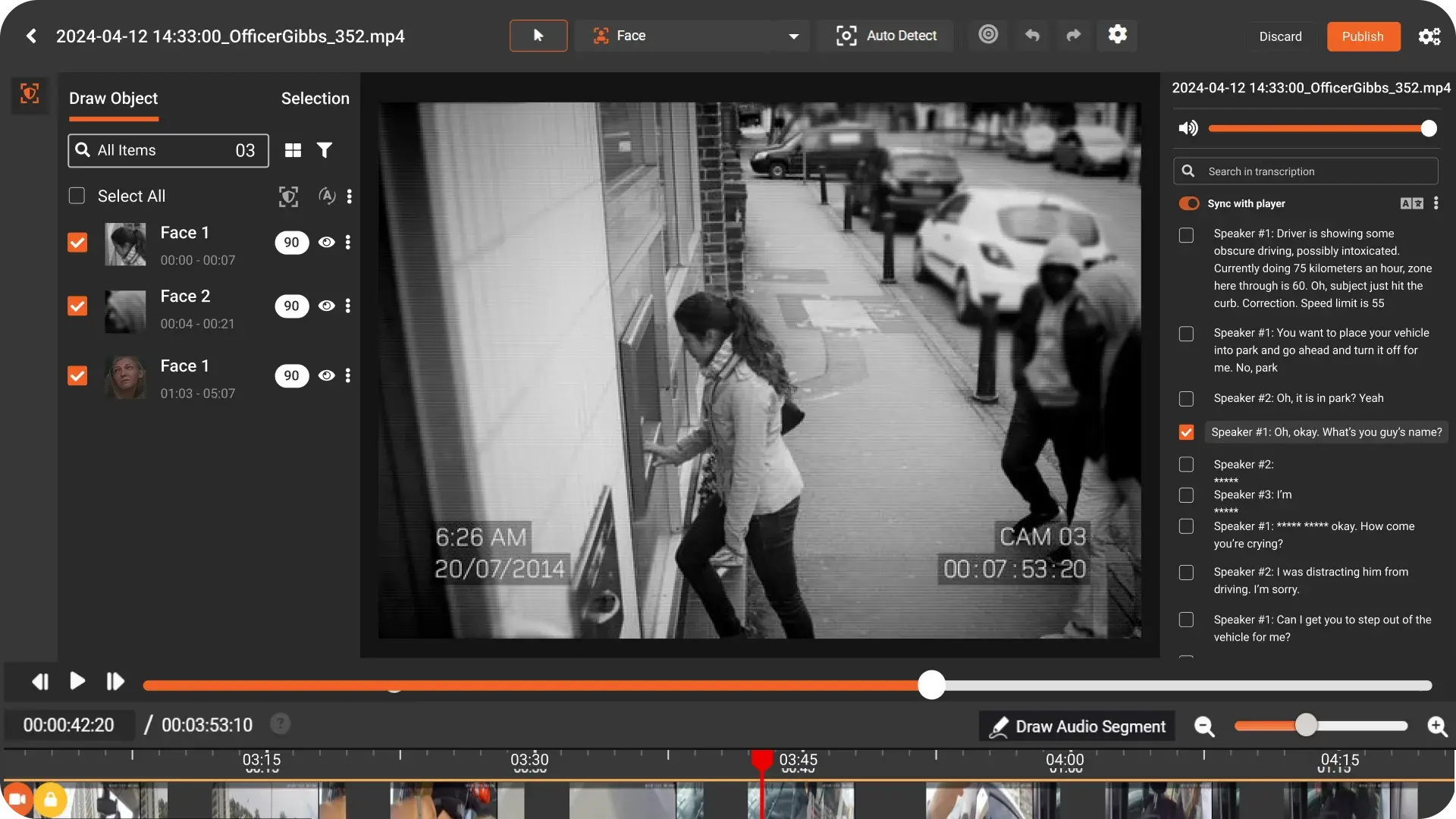
Modern video redaction software tackles this by treating the video file as a single unit of risk. It does not separate video frames from audio tracks or on screen content. Instead, it applies unified detection and review across all media types.
In practice, an integrated multi media redaction workflow looks like this.
Step 1: Ingest and analyze the full recording
The system ingests the video and runs automated video redaction analysis across:
- Visual layers for face redaction, license plates, screens, badges, and other objects
- Audio layers for spoken PII redaction, including names, locations, phone numbers, account IDs
- Text layers such as on screen text, forms, or whiteboards where PII may appear
AI redaction software uses computer vision and speech recognition models to detect potential PII across these layers concurrently. The outcome is not immediate redaction, but a structured map of all possible privacy exposure throughout the recording.
Step 2: Align detections on a unified timeline
Next, the system aligns all detections on a single master timeline of the video. This unified view lets reviewers see:
- Where a specific person appears and speaks at the same time
- Which timecodes contain both visual and spoken PII
- How PII clusters across an incident or interaction
This is where unified video redaction software changes the game. Instead of jumping between separate tools for audio redaction and face redaction, reviewers work from one timeline. They can apply or adjust redaction once and have it propagate across linked visual and audio elements.
Step 3: Configure policies for PII redaction
The platform then applies organization level policies for PII redaction. These policies define:
- Which categories of PII must always be redacted
- Which may be conditionally redacted depending on case type
- Exceptions where disclosure is permitted or required
For example, policies might specify that all bystander faces and spoken names are redacted by default in public disclosures. However, sworn officers may remain visible in some law enforcement use cases. The system uses these rules to generate recommended redactions that a human can review.
Step 4: Human review with a single control surface
Reviewers then validate or adjust AI suggestions. The key difference with unified video redaction software is that they do it in one interface. From a compliance and operations perspective, this matters because it allows:
- Consistent application of policy across visual and audio PII
- Faster spotting of missed context, like a blurred face whose name remains audible
- Centralized comments and decisions tied to specific timecodes
Reviewers can approve, reject, or refine redaction regions, including:
- Adjusting the blur box around a face for accuracy
- Extending an audio mute segment for an entire name phrase
- Flagging complex PII patterns for senior legal review
Step 5: Export consistent, auditable redacted outputs
Finally, the system exports a redacted version of the file and maintains an audit log. This log captures:
- What was detected automatically
- What was ultimately redacted, by whom, and when
- Which policies and presets were applied
This level of traceability is hard to achieve when you pass files through multiple specialized tools. Integrated video redaction software makes it achievable by design.
Designing a human in the loop video redaction workflow
Even the most advanced AI redaction software is not a set and forget solution. Human in the loop review remains non negotiable for high stakes disclosures. The opportunity is to use automation to handle the heavy lifting, so humans can focus on judgment.
A practical human in the loop workflow with unified video redaction software typically includes the following layers.
Automated pre tag and triage
First, automated video redaction runs once per file to pre tag potential PII across video and audio. This automated pass is not the final decision. It is the triage that makes human review manageable, even when volumes grow.
Reviewer validation and refinement
Second, trained reviewers validate the system output. They focus their attention on:
- Ambiguous detections such as partial faces or background conversations
- Context sensitive PII, for example, job titles or locations
- Edge cases that policy documents do not cover directly
Because audio redaction, face redaction, and other PII redaction are all surfaced in one view, reviewers spend less time navigating and more time on decisions.
Supervisory review for high risk productions
Third, high profile or sensitive matters route to a supervisor or counsel for final review. Unified audit logs and timelines help supervisors quickly understand:
- Where redaction was applied or overridden
- How policy exceptions were handled
- Whether visual and spoken PII align with the intended disclosure scope
Continuous improvement through feedback
Finally, corrections and overrides feed back into system tuning. Over time, AI redaction software can improve detection quality for your specific environment and policies. This feedback loop is easier to manage when everything runs through a single platform instead of scattered point tools.
Operational use cases for unified multimedia redaction
Unified multi media redaction is not a theoretical improvement. It changes how teams operate across several high volume workflows.
Incident review and internal investigations
During incident review, internal teams often need more visibility than external parties. Unified video redaction software supports this by allowing different redaction profiles for internal and external releases. For example:
- Internal review copy with minimal redaction for fact finding
- External disclosure copy with strict face redaction and spoken PII redaction
Because all PII handling occurs in one environment, you avoid version sprawl and keep a clear lineage between internal and external variants.
Public disclosure and FOI processes
Freedom of Information and public disclosure workflows are where fragmented redaction practices often break. Request volumes rise faster than headcount. Timeframes shrink. Public scrutiny increases.
Unified video redaction software helps by making it possible to:
- Apply consistent PII redaction criteria to all request types
- Handle mixed media sources like CCTV, interview recordings, and 911 calls
- Demonstrate a repeatable, documented process if challenged
Customer, patient, and citizen data disclosures
Organizations that handle sensitive customer or patient information need to share recordings without exposing identifiers. Examples include:
- Contact center calls used for training or vendor review
- Telehealth or consultation recordings shared for second opinions
- Citizen interactions used in policy analysis or research
Here, unified audio redaction and visual redaction prevent situations where a blurred face still has a name or account number spoken clearly in the audio track.
Key capabilities to look for in AI redaction software
Once you understand why unified handling of audio, faces, and PII matters, the next step is evaluating whether your current tools are fit for purpose. When assessing video redaction software, focus on capabilities that support integrated workflows, not just individual features.
End to end multi media redaction in one platform
- Native support for video, audio only files, and on screen text
- Unified timeline for all detections and redactions
- Single export process for final redacted assets
Robust detection for visual and spoken PII
- Face redaction, object redaction, and screen redaction for visual PII
- Spoken PII redaction using speech recognition and entity detection
- Configurable detection thresholds to match your risk tolerance
Configurable policies and templates
- Policy driven presets for different disclosure scenarios
- Granular control over which entities count as PII per use case
- Ability to reuse templates across departments and teams
Human review and auditability
- Role based access control for reviewers and approvers
- Detailed logs of automated and manual actions
- Evidence suitable for regulatory or legal scrutiny
Scalability for high volume workloads
- Batch processing for large sets of recordings
- Performance that does not degrade under heavy load
- Integration options with existing content or case systems
How a platform like VIDIZMO REDACTOR supports unified video and audio redaction
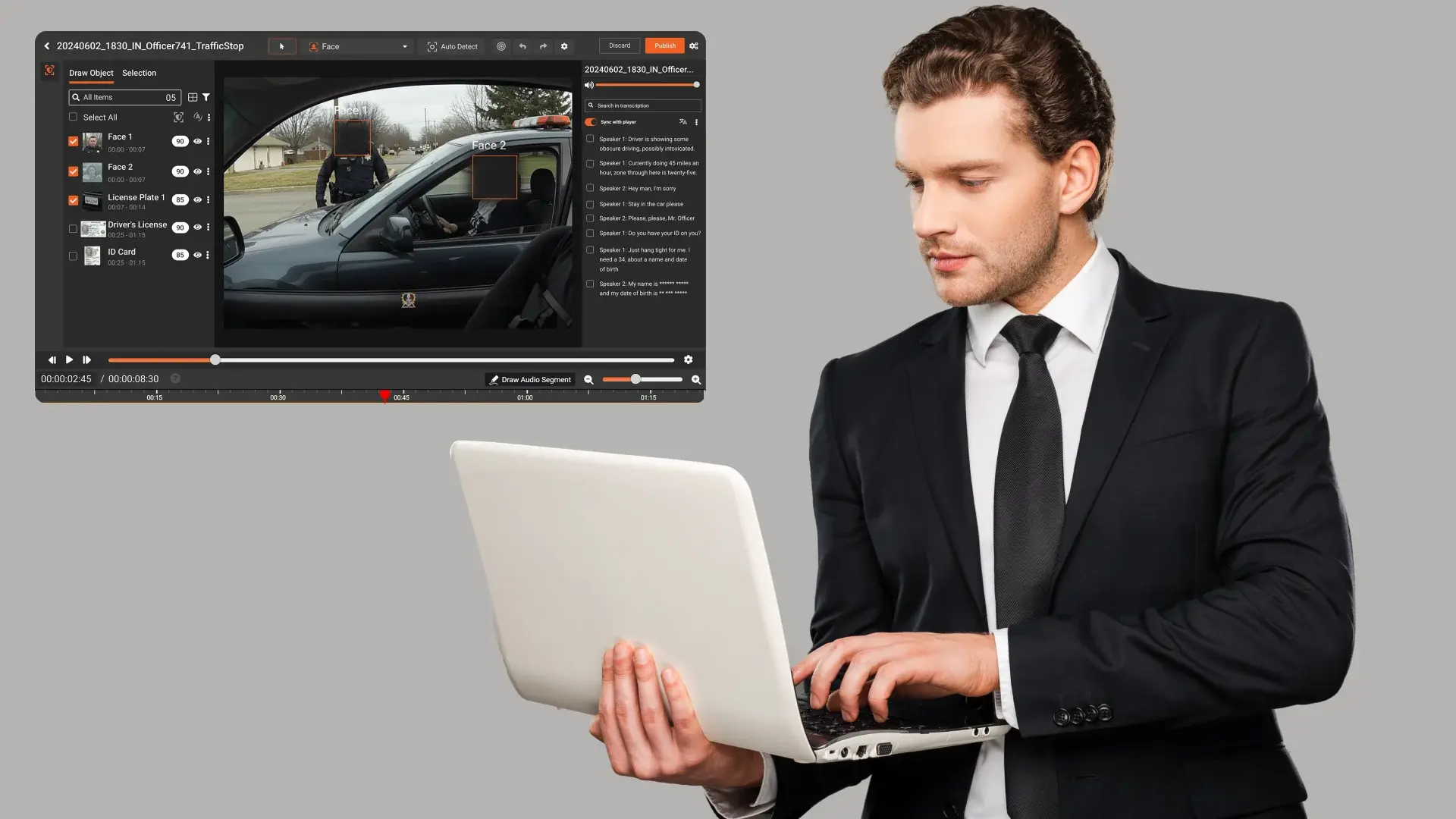
Platforms such as VIDIZMO REDACTOR illustrate what unified video redaction software looks like in practice. Instead of acting as one more point tool, they provide a single environment where teams can handle:
- Automated video redaction across visual and audio channels
- Human in the loop review and quality assurance
- Policy based PII redaction aligned with internal standards
- Audit ready logs across the full redaction lifecycle
For organizations that already understand the basics of redaction, the shift is less about learning new concepts and more about consolidating existing work. The goal is to reduce the risk, inconsistency, and manual effort created by fragmented tooling.
Instead of pushing the same file through separate workflows for face redaction, audio redaction, and spoken PII redaction, teams can work in one unified redaction workflow. That is where material gains in compliance, speed, and predictability appear.

Jump to
How Consulting Firms Can Redact PII from Client Demo & Presentation

HIPAA-Compliant Video Redaction Tools for Healthcare

No Comments Yet
Let us know what you think