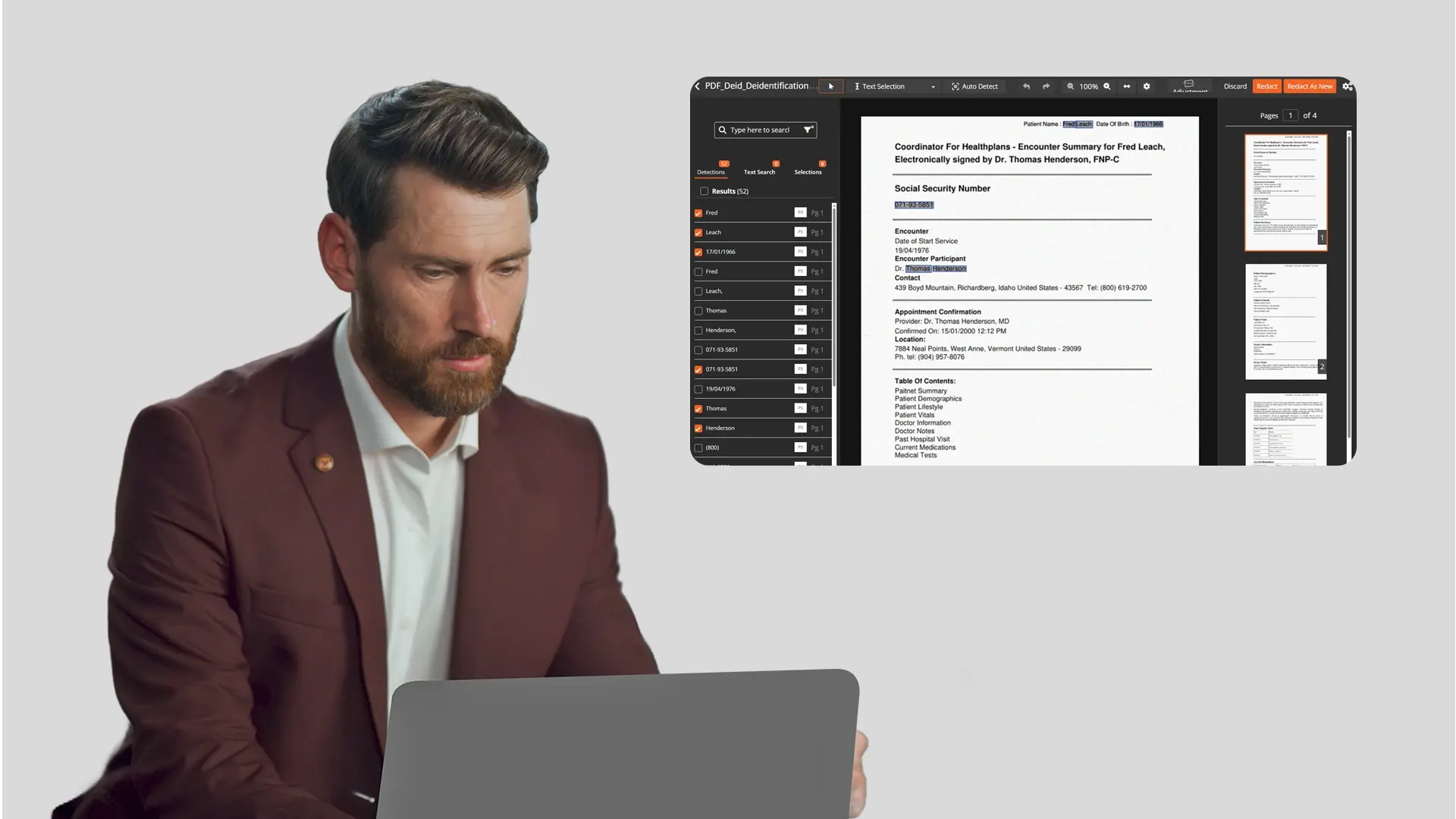
Legal professionals, healthcare administrators, and government staff are uploading documents to ChatGPT and Notebook LM every day. They use these tools to summarize case files, extract key data points, and speed up analysis that used to take hours.
The problem is what those documents contain. Most case files, medical records, and internal reports include personally identifiable information (PII) and protected health information (PHI): names, dates of birth, Social Security numbers, medical record numbers, addresses. Consumer AI tools are not HIPAA compliant. They may use uploaded content to improve their models. One unredacted file is a potential violation.
This guide covers what needs to come out of your documents before they go into any AI tool, and how to do it efficiently.
Why Consumer AI Tools Create a Privacy Risk
Three facts every professional should know before uploading documents to a consumer AI platform.
Consumer AI tools are not HIPAA compliant
Uploading documents containing PHI to ChatGPT or Notebook LM violates HIPAA regardless of your intent. These platforms have not signed Business Associate Agreements (BAAs) with your organization. The penalties for PII violations range from regulatory fines to loss of client trust, and HIPAA penalties alone can reach $50,000 per violation.
Your inputs may not stay private
Consumer AI tools may use uploaded content to train or improve their models. Data you upload does not disappear after your session ends. Even platforms that offer opt-out settings change their terms regularly.
Attorney-client privilege is at risk
Uploading unredacted client documents to a third-party platform can compromise privilege. If opposing counsel discovers that confidential case materials were processed through an external AI service, the privilege argument becomes difficult to defend. For a detailed look at how this applies to legal workflows, see HIPAA compliance and client data privacy for lawyers using AI.
What Information Must Be Redacted Before Uploading
Use this as a working checklist before any document goes into an AI tool.
- Full names and initials of clients, patients, witnesses, or opposing parties
- Dates of birth, treatment dates, admission dates that can identify individuals
- Social Security numbers in any format (full or partial)
- Medical record numbers and health plan IDs covered under HIPAA's 18 PHI identifiers
- Addresses, phone numbers, email addresses including partial addresses
- Financial account numbers including bank accounts, credit cards, and insurance policy numbers
- Case numbers and docket numbers where they could identify a client or patient
- Attorney names and firm details where the content is privileged
If the document is scanned rather than text-based, redaction also requires OCR (optical character recognition) to detect and remove PII embedded in images of text. For a full breakdown of PII redaction challenges including scanned documents and handwritten records, that guide covers what standard tools miss.
Not every identifier needs to be removed in every context. Selective PII redaction lets teams target only the data types that must come out without over-redacting content that still has analytical or legal value.
Three Ways to Redact Documents
Manual Redaction in a PDF Editor
Open the document in Adobe Acrobat or a similar PDF editor, highlight the sensitive text, and apply permanent redaction marks.
This approach works for a single document with a handful of items to remove. It breaks down fast at volume. Manual redaction is error-prone, time-consuming, and easy to miss embedded metadata that survives a visual redaction. It also does not work on scanned documents without a separate OCR step.
Best for one-off documents with low stakes.
AI-Powered Redaction Software
Upload your documents to a dedicated redaction platform. The software uses AI and natural language processing to detect PII and PHI automatically, applies redactions across the entire file set, and generates an audit trail documenting every change.
This approach handles bulk document redaction that would take hours manually. It catches items human reviewers miss, including PII in headers, footers, and metadata. The key decision is choosing a tool with the right compliance posture for your data type, especially for PHI redaction in healthcare records under HIPAA.
Best for legal and healthcare teams processing multiple files regularly.
Automated Redaction Pipeline
Documents flow from a source like OneDrive or cloud storage into a redaction platform automatically. The system processes files on ingest, applies PII detection and redaction without manual intervention, and returns redacted copies to an output destination.
This is the approach for teams processing high volumes on a recurring basis, where manual upload and review is not practical. It requires initial setup and workflow automation configuration, but once running, it removes the human bottleneck entirely.
Best for organizations with repeatable, high-volume redaction needs.
How to Choose the Right Approach for Your Workflow
Occasional use, one document at a time
Manual redaction in a PDF editor is adequate. The risk is low if you are thorough and the volume is small.
Regular use, multiple files per week
You need AI-powered redaction software with HIPAA compliance, audit trails, and OCR for scanned documents. This is where most legal and healthcare teams land once they recognize the volume problem.
High volume, recurring workflow
An automated pipeline with source folder integration and full audit logging is the only approach that scales. No manual steps, no bottleneck.
For the second and third scenarios, VIDIZMO Redactor handles both. It supports AI-powered PII detection across 40+ data types, bulk processing tested at over 1.1 million files, and automated workflows with OneDrive integration, all with a full audit trail.
Redacting a Document With VIDIZMO Redactor Before Uploading to an AI Tool
Here is the practical workflow for redacting documents before they go into ChatGPT, Notebook LM, or any other AI tool.
1. Upload your document or connect your OneDrive folder. VIDIZMO accepts PDFs, Word documents, spreadsheets, and scanned files. For recurring workflows, connect your source folder so new files are picked up automatically.
2. Select your redaction classes. Choose the PII categories to detect: names, dates of birth, Social Security numbers, addresses, medical record numbers, financial data. You can create custom detection rules for case-specific identifiers.
3. Run automated detection. The AI scans every page, including scanned documents via OCR, and flags all detected PII. Review the flagged items to confirm or adjust.
4. Apply redactions in bulk. Approve and apply redactions across the full document or file set in one action. Redactions are permanent and irreversible.
5. Download the redacted copy with audit trail. The audit log documents every redaction: what was removed, where, and when. This is your compliance record.
6. Upload the clean document to your AI tool. The redacted copy goes to ChatGPT or Notebook LMHub for secure, on-premises AI analysis. Your sensitive data never touches an external AI platform.
The original unredacted file stays in VIDIZMO with full chain of custody. The redacted version is the only copy that leaves your control.
Get Started
Start redacting documents before your next AI upload. Try VIDIZMO Redactor free or request a demo to process your first file set today.

FAQ
Frequently Asked Questions
Is it a HIPAA violation to upload patient records to ChatGPT?
Yes. ChatGPT and similar consumer AI tools have not signed Business Associate Agreements (BAAs), which are legally required under HIPAA before any vendor can process protected health information on your behalf. Uploading patient records to these platforms is a HIPAA violation regardless of intent.
What is the difference between visually hiding text and true redaction?
Visually masking text with a black box in a standard PDF editor does not remove the underlying data. The original text remains in the file and can be extracted by copying or inspecting the document. True redaction permanently deletes both the visible content and the underlying data, including metadata.
Do I need to redact scanned documents differently than digital ones?
Yes. Scanned documents are image files, so standard text-based PII detection cannot read them. Redacting scanned documents requires OCR to convert the image into machine-readable text first. Without OCR, sensitive information in scanned records goes undetected.
Can I use AI tools to analyze legal or medical documents without a compliance risk?
Yes, with the right workflow. Redact all PII and PHI from the document first, then upload the clean version to the AI tool. The redact-first approach gives you access to AI productivity gains without exposing sensitive data to third-party platforms.
What happens to data I upload to ChatGPT after my session ends?
Consumer AI platforms may retain uploaded content and use it to improve their models, depending on their current terms of service. Opt-out settings exist but change regularly. There is no guarantee that uploaded content is deleted after a session ends, which is why sensitive documents should be redacted before they reach any external AI platform.
Does VIDIZMO Redactor work on bulk document uploads or only single files?
VIDIZMO Redactor supports bulk processing across entire document sets in a single operation. It has been tested at over 1.1 million files and supports automated overnight queues, meaning large volumes can be processed without manual intervention file by file.
TopicsArtificial IntelligenceRedactionDocument RedactionRedactorLegal and Privacy

About the author
Ali Rind is a Product Marketing Executive at VIDIZMO, where he focuses on digital evidence management, AI redaction, and enterprise video technology. He closely follows how law enforcement agencies, public safety organizations, and government bodies manage and act on video evidence, translating those insights into clear, practical content. Ali writes across Digital Evidence Management System, Redactor, and Intelligence Hub products, covering everything from compliance challenges to real-world deployment across federal, state, and commercial markets.
You may also like

What Is a Real-Time Crime Center? A Guide for Cities and Counties
Somewhere in the last two years, someone probably asked your department whether it should have a real-time crime ...

Staffing a Real-Time Crime Center When Software Does the Watching
Most chiefs who hear a pitch for a real-time crime center ask the same question before any other, which is whether they ...

RTCC, EOC or Situational Awareness Center: What Each Room Is For
Walk into a real-time crime center, then into a city's emergency operations center, and you will see much the same ...