
by Hassaan Mazhar, Last updated: April 1, 2026

Quick Summary
Most organizations store thousands of hours of meeting recordings, training sessions, and operational video, but can't find what's inside them. This article breaks down a practical three-layer metadata framework: foundational metadata, structured custom attributes, and AI-powered enrichment. You'll learn how to design a smart indexing system, align metadata fields to real business questions, and govern your video content for auditability and compliance. Applicable to enterprise, government, healthcare, and any organization where video is becoming a primary knowledge asset.
The Real Cost of Unsearchable Video Archives
Consider this scenario: a compliance team at a regional health system needs to verify exactly what was communicated during a benefits enrollment webinar from Q3 last year. The recording exists. So do 847 others. Every file is named by date and speaker, no topic, no transcript, no chapter markers. Finding the right segment takes four hours.
This is not an edge case. It is the default state of most enterprise video libraries.
A 2024 analysis by IDC found that knowledge workers spend an average of 1.8 hours per day searching for information. For organizations where video has become a primary format for meetings, training, town halls, and operational briefings, that cost compounds rapidly. When the content inside the video is invisible to search engines, that time is effectively wasted.
Video metadata strategy, how organizations tag, structure, and enrich their video content, is the difference between a storage cost and an institutional knowledge asset. This article explains how to build one that actually works.
Why Folder Names and Upload Dates Aren't Enough
Most video platforms, including Microsoft Teams and SharePoint, store recordings with minimal default metadata: a title, a date, and a folder path. That's a reasonable starting point for a handful of files. It collapses completely at enterprise scale.
The problems are predictable:
- No topic-level search — a folder named "Q4 Board Meetings" contains no information about what was discussed in any given session
- No timestamp navigation — to find a specific agenda item, a viewer must scrub manually through the entire recording
- No cross-content querying — there's no way to ask "in which meetings did we discuss the infrastructure budget?" without watching every one
- No compliance traceability — auditors can't verify what was communicated, or when, without a manual review process
These aren't technology failures. They're metadata failures. The recordings exist. The information inside them does not.
A Three-Layer Metadata Framework for Video
Effective video indexing requires three distinct layers of metadata, each serving a different function. Understanding the distinction, and when each layer applies, is foundational to designing a system that scales.
Layer 1: Foundational Metadata
This is the baseline every video management system should capture:
- Title — descriptive, not just a date stamp
- Description — a plain-language summary of what the recording covers
- Category — a top-level organizational taxonomy (e.g., "Training," "Board Meeting," "Town Hall")
- Upload date / recording date — for time-based filtering and retention policy enforcement
- Owner / uploader — for access control and accountability
Foundational metadata is necessary but not sufficient for long-form or high-volume content libraries. It tells you what a video is about at a surface level. It cannot tell you what's inside it.
Layer 2: Structured Metadata (Custom Attributes)
Custom attributes are configurable metadata fields that organizations define to match their specific operational vocabulary. This is where metadata strategy starts delivering real business value.
Examples by sector:
Government / Public Sector
-
Committee Name
-
Meeting Type (Regular Session, Special Session, Public Hearing)
-
Fiscal Year
-
Agenda Item Number
-
Resolution Number
-
Public / Internal designation
Healthcare
-
Department
-
Content Type (Compliance Training, Grand Rounds, Patient Education)
-
CE Credit Hours
-
Accreditation Body
-
Speaker Credentials
Enterprise / Corporate
-
Business Unit
-
Project Code
-
Investment Category
-
Speaker Role
-
Audience (All Employees, Senior Leadership, Regional Teams)
Custom attributes enable faceted filtering, the ability to narrow a search by combining multiple criteria simultaneously. A compliance officer can filter by "Year: 2025," "Content Type: Mandatory Training," and "Completion Required: Yes" to generate a precise inventory of records needing audit attention.
VIDIZMO EnterpriseTube supports custom attributes following Dublin Core metadata standards, and allows these fields to be imported in bulk via spreadsheets, XML, or JSON, meaning organizations can apply structured metadata retroactively to existing archives without manual re-entry.
Layer 3: AI-Powered Enrichment
The first two layers require human input, someone decides what title to assign, what category to apply, what custom attribute value to enter. At scale, manual metadata entry becomes a bottleneck. AI enrichment closes that gap.
Here's what AI does to video content that human catalogers cannot do efficiently:
%20(2).webp?width=1632&height=1181&name=Table%20(1)%20(2).webp)
The result is a shift in how users interact with video content. Instead of searching for a file, users search for answers. "When did the pension allocation discussion happen?" becomes a query that returns a direct timestamp rather than an eight-hour recording to review manually.
This is what transforms video from storage into institutional memory.
Designing a Smart Indexing Framework
A metadata framework is only useful if it maps to the actual questions an organization needs to answer. The following workflow applies whether you're building from scratch or restructuring an existing archive.
Step 1: Define the Primary Business Questions
Start with the information retrieval needs of your specific organization. Some common patterns:
- "When did we approve [decision], and who was present?"
- "Which training sessions covered [topic], and who completed them?"
- "Where in the Q3 board meetings was the capital expenditure discussed?"
- "Which call center recordings from last quarter included a mention of [product issue]?"
- "What was communicated to employees about the policy change?"
Write these down as real queries. Your metadata fields should map to the terms that appear in those questions.
Step 2: Align Metadata Fields to Those Questions
Once the questions are defined, the required fields become apparent. If "who was present" matters, you need a Speakers or Attendees field. If "which fiscal year" matters, you need a Fiscal Year attribute. If "completion status" matters, you need a connection to your learning management system (LMS) or training records.
Avoid the trap of building metadata schemas based on what's easy to capture rather than what's useful to query.
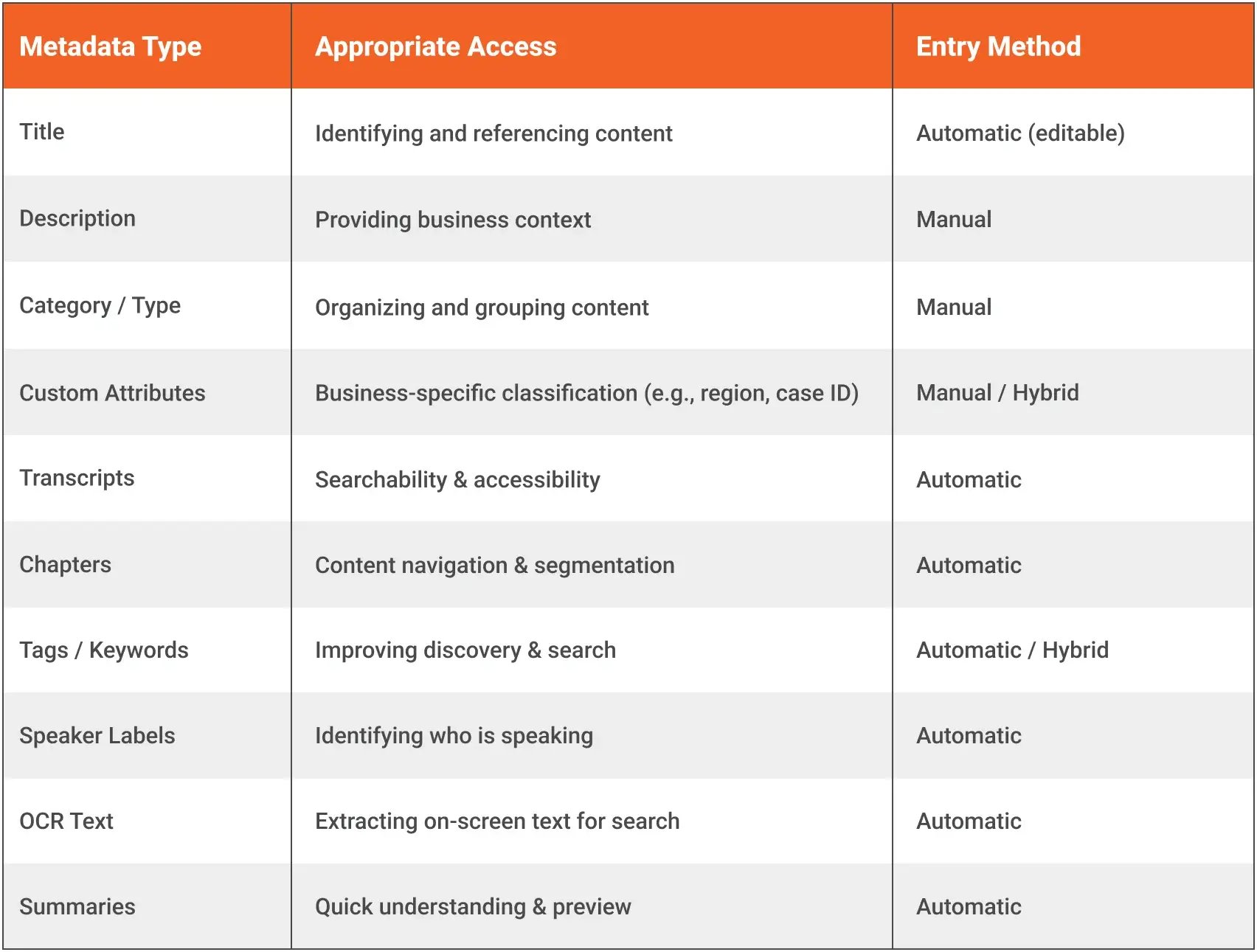
Step 3: Automate Enrichment Wherever Possible
Manual metadata entry should be reserved for fields that require human judgment, like categorization, audience designation, or compliance tagging. Everything that can be extracted automatically should be.
A practical division:
Step 4: Apply Role-Based Visibility
Not every piece of metadata or every recording should be accessible to every user. A well-governed video library applies role-based access control (RBAC) at both the content and the metadata level.
In practice, this means:
-
Public session recordings are discoverable externally; executive briefings are internal-only
-
Legal hold recordings are restricted to authorized counsel
- Training completion data is visible to managers and L&D, not to peer employees
VIDIZMO EnterpriseTube supports hierarchical permission inheritance, settings applied at the portal level cascade to collections and individual content items, reducing administrative overhead while maintaining granular control.
Governance and Compliance Considerations
Metadata strategy is also compliance infrastructure. For organizations operating under regulatory frameworks, the way video is indexed directly affects audit readiness, legal defensibility, and FOIA response capability.
Controlled Vocabulary
Ad-hoc tagging by individual users produces inconsistent, unsearchable data over time. A controlled vocabulary, a pre-approved list of terms for each custom attributes, ensures that "Annual Safety Training" is always recorded that way, not as "Safety Training 2025," "Annual Safety," or "SafetyTrain."
Implement controlled vocabularies through dropdown fields and validation rules within your video platform. This takes two hours to configure and saves months of search-and-cleanup work as the library grows.
Auditability
For legal, compliance, and government use cases, the ability to verify when content was uploaded, who modified it, and who accessed it is not optional. Audit logging should capture:
- Content upload and modification events
- Metadata changes with timestamps and user IDs
- View events (who watched, when, from where)
- Download and sharing events
VIDIZMO EnterpriseTube maintains audit logs tracking who viewed or shared content, supporting governance requirements across enterprise and regulated-sector deployments.
GDPR and Data Minimization
For organizations subject to GDPR requirements, AI enrichment capabilities like facial recognition, speaker identification, and PII detection introduce data processing obligations. Before deploying AI enrichment at scale:
- Document what personal data is extracted and where it is stored
- Apply data minimization principles, extract only what serves a defined business purpose
- Ensure retention policies apply to AI-derived metadata, not just the original recordings
- Provide mechanisms for data subject access requests that include AI-extracted metadata
VIDIZMO's AI processing does not train on customer data by default, and deployment configurations can be scoped to meet organizational data residency and processing requirements.
Public vs. Internal Segmentation
For government agencies and organizations publishing public-facing content alongside internal operational recordings, clear segmentation is critical. Public session recordings, public health communications, and FOIA-responsive materials require different access controls, retention policies, and discoverability settings than internal meetings.
A multi-portal architecture, where separate portals serve different audiences with independent security and metadata schemas, eliminates the risk of inadvertent disclosure and simplifies compliance reporting.
How This Works in Practice: Before and After
The business case for structured indexing becomes clearest through concrete examples.
Scenario: Municipal Government: Open Meetings Archive
Before
A city clerk's office maintains 64 hours of city council recordings from the current fiscal year. All recordings are stored in a SharePoint folder organized by meeting date. No transcripts exist. No agenda items are tagged. When a resident files a FOIA request asking for all discussions of a specific development project, staff must review each recording manually to identify relevant segments.
After
The same recordings are ingested into a centralized video platform with:
-
Custom attributes for Meeting Type, Committee Name, Agenda Item Number, and Resolution Number
-
Automatic AI transcription and chaptering on ingestion
-
AI-powered keyword extraction surfacing relevant topics per session
-
Faceted search enabling staff to filter by "Development & Planning" + "Fiscal Year 2025" + keyword "Ridgeline Development Project"
Result: FOIA response time drops from days to hours. Staff locate the four relevant agenda discussions, with timestamps and speaker labels, in a single search query. The audit trail documenting the search, the results, and the content provided is automatically generated.
Scenario: Enterprise Learning & Development
Before
A global financial services firm stores 200+ recorded training sessions on a shared drive. Completion is tracked in a separate spreadsheet. Compliance officers cannot verify which employees attended which sessions without cross-referencing three systems. Employees cannot search within recordings to review specific regulatory topics.
After
Training recordings are centralized in an enterprise video platform with:
-
Custom attributes for Course Code, Regulatory Topic, CE Credits, and Mandatory/Optional designation
-
AI transcripts enabling employees to search by keyword within any recording
-
LMS integration (via LTI 1.3) syncing completion status, quiz scores, and certification issuance
-
Automated certification upon content completion
Result: Compliance audits that previously required manual assembly across three systems are now exportable in minutes. Employees who need to review a specific regulatory section find the timestamp directly rather than rewatching a two-hour session.
How VIDIZMO EnterpriseTube Supports This Framework
VIDIZMO EnterpriseTube is a Gartner-recognized AI-powered enterprise video content management platform designed for organizations that need more from their video library than a place to store files.
Key capabilities that support the framework described in this article:
Structured metadata management
-
Custom attributes following Dublin Core standards
-
Bulk metadata import via spreadsheet, XML, or JSON
-
Controlled vocabulary enforcement through configurable field types
-
Metadata templates for consistent processing across content types
AI-powered enrichment
-
Automatic transcription in 82 languages with published Word Error Rate (WER) benchmarks
-
Automatic chaptering and topic segmentation for long-form content
-
Speaker diarization identifying and labeling individual voices
-
Keyword extraction and AI-generated tags for faceted search
-
Summarization for rapid content review
-
OCR extracting text from slides, screens, and documents within video
-
Conversational Q&A enabling natural language queries against video content
Enterprise search and discovery
-
Full-text search across keywords, metadata, transcripts, and visual content simultaneously
-
Faceted search filtering across multiple dimensions, content type, date, speaker, topic, custom attribute values
-
AI-powered search surfacing relevant timestamps, not just file names
Governance and access control
-
Role-based access control (RBAC) with hierarchical permission inheritance
-
Audit logging tracking view, share, download, and modification events
-
Multi-portal architecture with independent security settings for public and internal content
-
Content lifecycle policies for automated archival and retention
Compliance support
-
Supports HIPAA-compliant deployments
-
Supports FOIA compliance workflows
-
Supports Section 508 / WCAG 2.1 AA accessibility standards (via AI transcription and captioning)
-
Helps organizations meet GDPR data protection requirements
-
Available on Azure Government Cloud, supporting FedRAMP High and CJIS-compliant deployments
For a deeper look at how EnterpriseTube handles AI-powered discovery, explore the AI autotagging and classification features.
From Storage to Institutional Memory
The organizations that will lead in operational efficiency, compliance readiness, and knowledge retention over the next five years are not the ones with the most video storage. They're the ones that can find, navigate, and extract value from what's already been recorded.
Building that capability requires a deliberate metadata strategy, one that starts with foundational structure, adds domain-specific custom attributes, and activates AI enrichment to make the content inside every recording discoverable.
The framework outlined here applies whether you manage a municipal video archive, a corporate learning library, or an enterprise knowledge base. The specific fields change. The logic does not.
Video without metadata is storage. Video with AI-powered indexing becomes institutional memory.
Ready to see how a structured indexing framework works in practice? Explore VIDIZMO EnterpriseTube's AI capabilities or talk to a video platform specialist to discuss your specific use case.
Jump to

AI Monitoring vs Traditional Social Listening Tools: Which Does Your Brand Really Need?

How AI Transcription Makes Enterprise Video Searchable


No Comments Yet
Let us know what you think