
by Hassaan Mazhar, Last updated: April 1, 2026
Your learners have quietly changed how they learn, but your systems have not kept up.
Employees and students expect clear, searchable, on-demand video. Instead, they get choppy playback, locked files in an LMS, and videos buried three clicks deep in a course shell. You invest heavily in content, yet completion rates stall and support tickets keep coming.
The core problem is simple. Your LMS was not built to be a video platform. It manages enrollments, grades, and course logic well, but it strains under modern video delivery. At the same time, you cannot justify replacing a stable LMS just to improve video-based learning.
This is the gap. You need to start enhancing video-based learning without replacing your LMS. You need better streaming, control, and analytics, without touching course structures, workflows, or historical data.
In other words, you need a way to modernize your video stack while your LMS stays exactly where it is.
Why Video Is Now Central to Modern Learning Programs
Video is no longer a nice-to-have supplement. It is the default format for how people learn at work and in education.
Several shifts drove this change:
- Remote and hybrid work created global, asynchronous learning expectations
- Short, focused instruction videos outperformed static slide decks for engagement
- Subject matter experts preferred recording quick walkthroughs over writing long manuals
- New hires and students expected Netflix-grade viewing experiences, not file downloads
In this environment, video is not just content. It is the core learning medium that carries your onboarding, compliance, leadership, and customer education programs.
However, passive video hosting does not meet educational needs. When videos live in generic file stores or public platforms, you lose:
- Fine-grained control over viewing behavior
- Reliable tracking of who watched what and when
- Consistent access across regions and devices
- Integration with assessments and completion logic
To respond, organizations look for video-based learning platforms that work alongside their LMS. The challenge is doing this in a way that enhances video-based learning without replacing your LMS, not adding yet another system that fragments the learner experience.
The LMS Dilemma: Stability Versus Modern Video Capability
You may already feel this tension. Your LMS is stable and deeply embedded in your operations, but it is behind on video.
Replacing it is usually off the table. Here is why.
- Course logic is complex: You spent years designing course structures, prerequisites, and enrollment rules inside the LMS
- Assessments are tightly coupled: Quizzes, exams, and assignments live natively in the LMS, tied to gradebooks and completion rules
- Learner data is critical: Historical records, compliance proof, and transcripts cannot be risked in a migration
- Integrations are fragile: HR systems, SIS, SSO, and reporting tools all connect to the current LMS
Swapping the LMS to fix video limitations would be a multi-year project. It would introduce risk to compliance training, certifications, and accreditation. It would also divert budget and focus away from core learning outcomes.
Yet your stakeholders demand better video UX, deeper analytics, and secure global video delivery for e-learning. This is why enhancing video-based learning without replacing your LMS becomes the more realistic strategy. You protect the LMS as your system of record, while you decouple video infrastructure so it can evolve on its own pace.
Where LMS-Native and Public Video Tools Limit Learning Outcomes
To understand the path forward, you need to look closely at where current tools fall short.
LMS Video Limitations That Block Engagement
LMS-native video capabilities were built for an earlier era. Common pain points include:
- Large video files stored as attachments or basic assets inside the LMS
- Inconsistent compression and transcoding, leading to playback issues
- No granular playback control, so learners skip ahead without viewing key segments
- Limited support for interactive video experiences
These LMS video limitations directly affect learner engagement and completion rates. The content may be strong, but the delivery layer degrades its impact.
Public Video Hosting Risks in Learning Environments
To bypass LMS constraints, some teams move to public video platforms. This introduces new problems.
- Control: Public platforms rarely allow you to disable skipping or enforce viewing completion
- Analytics: Data is not tailored to learning outcomes, so you cannot align video analytics for learning with course objectives
- Governance: Content governance, retention, and access policies are not optimized for regulated training
- Brand and confidentiality: Sensitive internal content should not live on public endpoints
These platforms are built for reach and engagement at scale, not structured learning inside an LMS.
Accessibility And Global Delivery Gaps
Modern learning programs require:
- AI transcription for online learning, with accurate, time-synced transcripts
- Multilingual video learning through translated subtitles and audio tracks
- Reliable performance in firewall-restricted and bandwidth-constrained regions
Generic hosting does not handle this well. Learners in different regions experience buffering or blocked content. Learners with disabilities lack accessible transcripts or captions. In short, the combination of LMS-native tools and public hosting fragments your video ecosystem instead of enhancing video-based learning without replacing your LMS.
The Embedded Video Platform Approach For LMS Video Integration
The alternative is not another rip and replace project. It is an architectural shift.
You keep your LMS as the central hub for enrollments, courses, and grades. Then you embed a dedicated enterprise video platform for LMS directly into your existing workflows. The LMS remains the front-end experience for learners. The video platform works behind the scenes.
How LMS Video Integration Works at a High Level?
At a conceptual level:
- Video content is uploaded, stored, and processed in the enterprise video platform
- The LMS pulls videos into courses using secure embedding or LTI-based connections
- Learners play videos inside the LMS interface they already know
- Playback, streaming, analytics, and accessibility are handled by the video layer
This embedded video platform for education model keeps the LMS as your system of record. It introduces a specialized video service without disrupting existing course catalogs, user roles, or gradebooks.
The result is enhancing video-based learning without replacing your LMS. You do not change your primary platform. You simply extend it with the right infrastructure for video.
Required Capabilities in an Enterprise Video Platform For LMS
Not every video tool is suitable for this role. To truly support video-based learning platforms that integrate with an LMS, you need a focused set of capabilities.
Playback Control And Completion Tracking
For meaningful learning outcomes, you need to influence how learners interact with video content, not just whether they click play.
- Option to disable fast-forwarding or skipping on compliance or safety modules
- Configurable completion criteria, such as minimum watch percentage
- Automatic synchronization of completion status back to the LMS
This closes the gap between video consumption and course completion. It moves you one step closer to consistently enhancing video-based learning without replacing your LMS.
Deep Video Analytics For Learning Teams
You need more than view counts. You need video analytics for learning that answer practical questions.
- Where do learners drop off in critical modules
- Which regions or departments struggle with playback issues
- How engagement with specific videos correlates with quiz performance
Analytics data should integrate with LMS reports or BI tools, enabling instructional designers and L&D leaders to iterate content based on evidence, not guesswork.
Accessibility, Transcripts, And Multilingual Support
Accessibility is not optional in modern learning ecosystems. The embedded platform should offer:
- AI transcription for online learning with high accuracy for different accents
- Closed captions and downloadable transcripts attached to each asset
- Multilingual subtitles and audio to support multilingual video learning
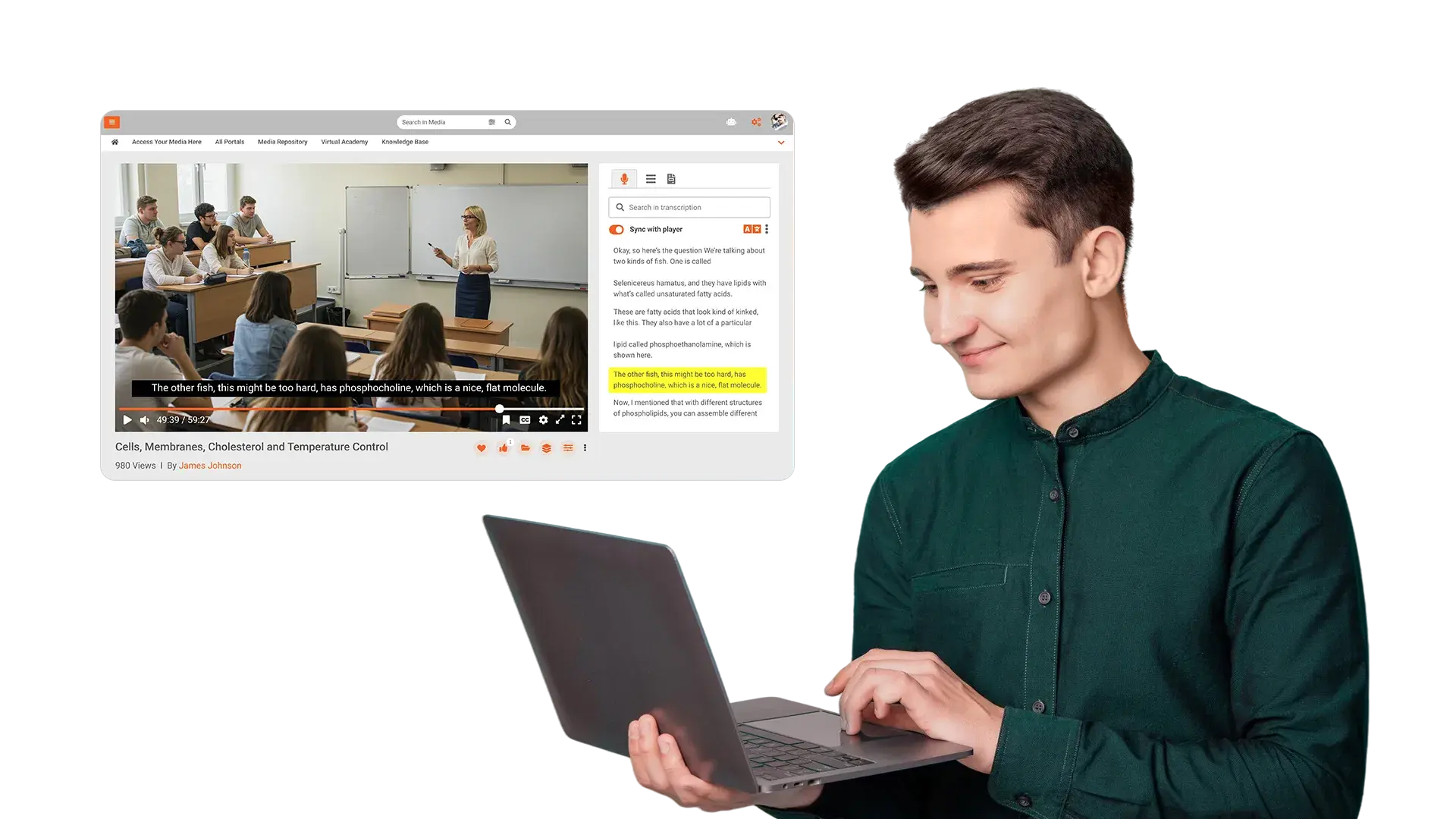
- Search within video using spoken words or on-screen text
This supports legal accessibility requirements and improves learning outcomes for global audiences.
Secure Video Delivery For E-Learning At Global Scale
Security and reach need to go together. Key capabilities include:
- Secure video delivery for e-learning through authenticated sessions and encrypted streaming
- Domain-restricted or LMS-only embedding to prevent content leakage
- Global video delivery for education through a distributed CDN with regional optimization
- Fine-grained access control and audit logs for regulated environments
This combination allows you to scale video across borders while maintaining control. It is a foundation for enhancing video-based learning without replacing your LMS, especially for large enterprises and universities with multi-region presence.
How EnterpriseTube Supports LMS-First Video-Based Learning
In an LMS-first architecture, EnterpriseTube functions as the specialized video layer that your current systems lack. It does not attempt to replace course management or assessments. Instead, it reinforces them.
LMS-Agnostic, Embedded Video Experience
EnterpriseTube integrates with major LMS platforms as an embedded video platform for education. Learners keep using the same LMS portals, but video experiences improve:
- Consistent player UX across courses and devices
- Secure LMS video integration using standards-based protocols
- Centralized video library, reused across multiple courses and programs
This approach scales video without fragmenting content or forcing a new learner-facing portal.
Education-Focused Playback Controls and Analytics
EnterpriseTube lets you configure playback logic by course or content type. Compliance modules can require full viewing, while general knowledge videos remain flexible. Completion events feed back to the LMS.
On the analytics side, you gain video analytics for learning that map to engagement, drop-off patterns, and performance metrics. This gives L&D and academic teams tangible insight for content improvement.
AI Transcription, Translation, And Accessibility
Through AI transcription for online learning, EnterpriseTube automatically generates transcripts in multiple languages. It supports multilingual video learning with translated subtitles, making content usable for diverse cohorts without separate production cycles.
These features help align your programs with accessibility standards while also making video searchable and easier to skim.
Secure, Global Video Delivery For Education
EnterpriseTube is built for secure video delivery for e-learning at enterprise scale. Video streams are encrypted and access-controlled. With global video delivery for education, users in different locations receive optimized playback via a distributed infrastructure.
As a result, you gain a more resilient video backbone without rearchitecting the LMS itself. It aligns directly with the goal of enhancing video-based learning without replacing your LMS, keeping risk low and impact high.
When Enhancing Video-Based Learning Without Replacing Your LMS Makes Sense
This embedded model is not for every organization. It is most effective when certain conditions are present.
Scenarios Where Embedding A Video Platform Is Ideal
- You operate an established LMS with significant course, assessment, and integration investments
- Video is a core medium in your curriculum, not an occasional add-on
- You deliver training or education across multiple regions or languages
- You face clear LMS video limitations such as poor streaming, weak analytics, or limited accessibility
- You need to prove content consumption for compliance, safety, or accreditation
In these cases, enhancing video-based learning without replacing your LMS creates a clear path forward. You improve learner experience, data quality, and governance with minimal disruption.
Scenarios Where This Approach Is Not A Fit
- You are already committed to replacing your LMS in the near term
- Video plays a minor role in your learning programs
- Your user base is small and local, with limited need for global delivery
Here, it may be better to finish the LMS transition first or to rely on simpler video solutions. The key is alignment between your content strategy and your infrastructure investments.
Final Perspective: Evolving Video Infrastructure Without LMS Disruption
Your LMS is not the enemy. It is simply not designed to be a modern video platform. Treating it as such creates friction for learners and administrators, and it masks the real problem.
By separating concerns, you can protect what works and upgrade what does not. You keep your LMS as the system of record and orchestrator of learning journeys. Then you introduce an enterprise video platform that specializes in streaming, control, accessibility, and analytics.
This is the practical route to enhancing video-based learning without replacing your LMS. You avoid large-scale disruption, gain measurable improvements in engagement and completion, and prepare your learning ecosystem for future formats and modalities.
Explore EnterpriseTube For LMS-Centric Video Learning
To see how EnterpriseTube can support enhancing video-based learning without replacing your LMS, request a tailored walkthrough with a solution specialist. Discuss your current LMS environment, video use cases, and global delivery needs, and explore integration options that match your existing workflows.

About the Author
Jump to

Video-First Learning at Scale: Accelerate Adoption & Usage
%20A%20Complete%20Overview.webp)
Enterprise Video Content Management 2026: Complete Guide

No Comments Yet
Let us know what you think