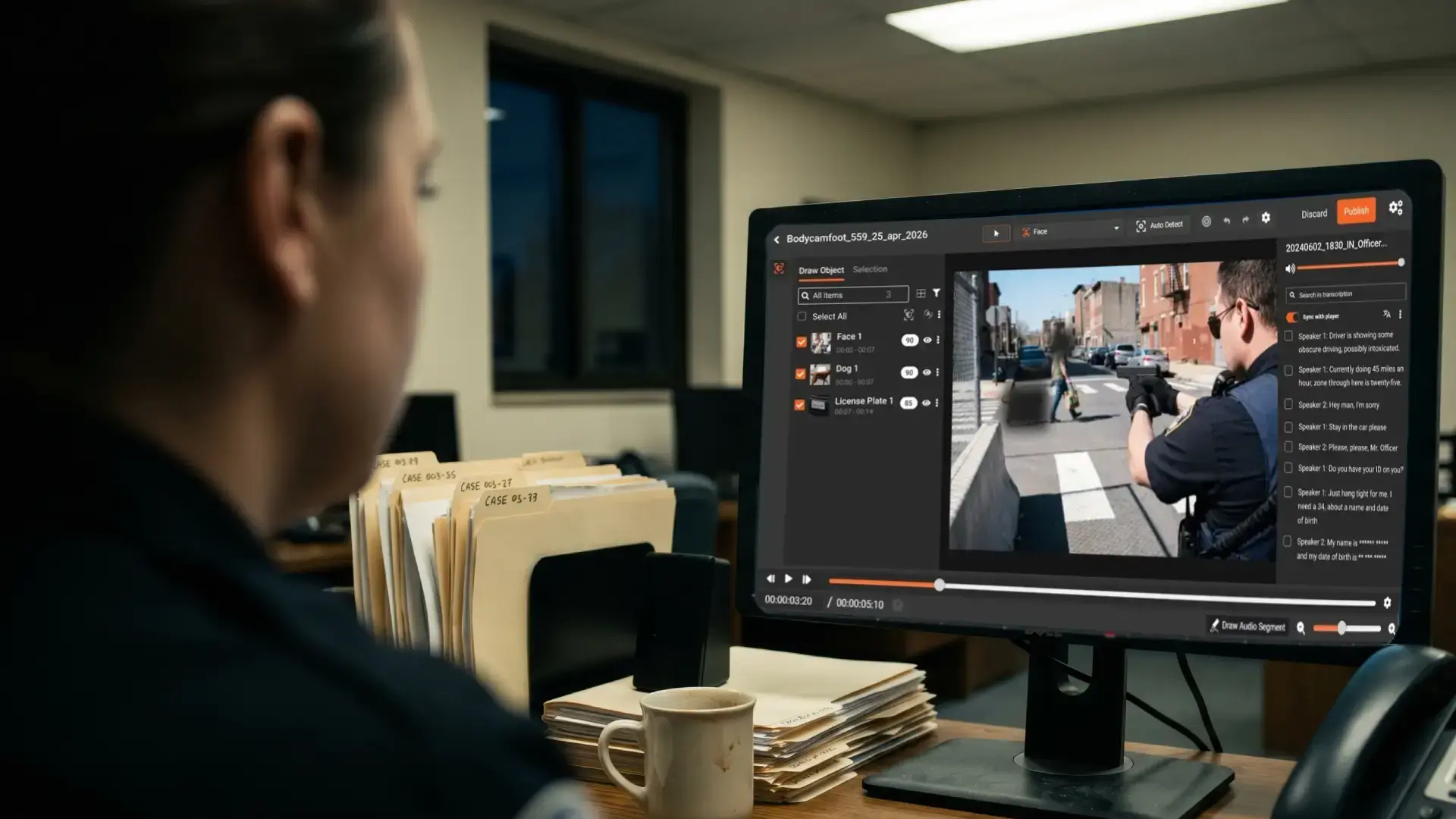
Audio redaction in body camera footage is where small-agency redaction quietly breaks down. This guide covers what audio PII has to be removed, how to handle dispatch radio chatter without losing officer speech, and how records clerks redact bodycam audio without missing FOIA deadlines.
A 45-minute traffic stop generates 45 minutes of audio that has to be reviewed alongside the visual layer. Names, addresses, dates of birth, dispatch radio runs, medical disclosures. Each is PII subject to redaction under state public records laws and FOIA exemptions. Records clerks who blur the faces but release the audio unmodified are releasing footage with PII still in it, and the legal exposure is identical to releasing an unblurred face.
This guide walks through how bodycam audio redaction actually works at the operational level. What counts as audio PII, why dispatch radio is the hardest part, where manual workflows break down, and what AI-assisted redaction changes about the records clerk's day.
Why Bodycam Audio Redaction Is the Hardest Part of FOIA Compliance
Most body-worn camera redaction conversations focus on the visual layer. Faces, license plates, in-car screens, bystanders. The audio track gets less attention because it does not show up in a thumbnail.
That is where the risk hides. Spoken PII carries the same legal weight as visual PII under FOIA exemptions and state public records laws. The audit work to remove it is denser per minute. The audio is also where the highest-density identifiers appear: dispatch traffic, name and DOB checks, address verifications, license plate runs.
For broader context on the legal stakes, see the legal and ethical implications of redaction in law enforcement.
What Audio PII Has to Be Redacted from Body Camera Footage
The categories that have to come out before release:
-
Personal identifiers spoken on scene: Names, addresses, phone numbers, dates of birth, social security numbers, driver's license numbers, license plate numbers read aloud.
-
Medical and protected information: Diagnoses, prescriptions, treatment details, mental health disclosures, anything covered by HIPAA when the recording captures medical context.
-
Juvenile identifiers: Spoken information that would identify a minor, including names of parents or guardians, schools, or addresses associated with juveniles.
-
Witness and victim information: Names, contact details, and identifying descriptions of witnesses and victims protected under state public records exemptions.
-
Dispatch and radio traffic: Information run over the shoulder radio or in-car radio. Names being checked, NCIC returns, license plate runs, address verifications.
-
Officer-identifying information in some jurisdictions: Some states require redaction of officer personal information, including home addresses and family names, depending on the request type.
How to Redact Dispatch Radio Audio Without Losing Officer Speech
This is where bodycam audio redaction gets hard, and it is the part most generic guides miss.
A bodycam microphone captures every audio source within range of the officer's chest. On any active call, that means at least two streams of audio playing at the same time. The officer is talking to a subject, a witness, or a dispatcher. The shoulder radio is playing dispatch chatter in the background. When dispatch runs a name, a date of birth, or a driver's license number, that PII goes onto the recording while the officer is mid-conversation with someone in front of them.
The audio cannot be muted wholesale because the officer's speech is responsive evidence. Muting the entire segment removes the officer's questions and statements that the public records request is asking to see. The clerk has to identify the specific dispatch segments and mute only those, while leaving the officer's speech and the subject's speech intact.
Manual workflows handle this by scrubbing the timeline at half speed, listening for radio segments, marking in and out points, and applying targeted mutes. For a one-hour bodycam clip, audio-only review can take longer than the visual redaction. A clerk handling one to three video requests a month spends a meaningful share of the week on this single layer of the work.
Why Manual Audio Redaction Does Not Scale for Small Agencies
The traditional workflow has four steps and a lot of repetition.
The clerk opens the file in an editor. They scrub the timeline, often at reduced speed, listening for spoken PII. When they hear something, they mark the in point and out point and apply a mute or bleep. They move on. After the full pass, they replay the redacted audio to verify the mutes landed in the right places and that no PII slipped through.
The math gets ugly fast. A single hour of audio can take three to five hours of clerk time depending on how dense the PII is and how many overlapping audio sources are present. A multi-officer incident with three officers each running an hour of bodycam is fifteen hours of redaction work before any visual review. For an agency with one records clerk and a statutory deadline, the math stops working at low volume.
For a workflow-level look at where this fits in the broader records request process, see how small police departments handle open records video requests.
How AI-Assisted Bodycam Audio Redaction Works
The shift is not about replacing the clerk. It is about reorganizing where the clerk's time goes.
AI-assisted audio redaction starts with full transcription of the audio track. Every spoken word is converted to text with timestamps. The transcript is the working surface. From there, the system runs detection across PII categories. Names, addresses, phone numbers, dates of birth, driver's license numbers, social security numbers, and other identifiers are flagged with timestamps and confidence scores.
The clerk reviews the flagged segments in the transcript instead of scrubbing the timeline. They confirm the catch, correct false positives, and apply selective muting or bleeping to the flagged segments. The audit log captures every redaction decision with timestamp, PII category, and operator.
The work shifts from listening to hours of audio to verifying machine detections in a transcript. The volume work is automated. The decision work stays with the clerk.
For a deeper look at the broader AI redaction story for police footage, see law enforcement AI redaction software.
Bodycam Audio Redaction Workflow for a One-Person Records Unit
A practical five-step workflow:
Step 1: Intake: Log the request with date, requestor, scope, and statutory deadline. Identify which clips, officers, and time windows are responsive.
Step 2: Ingest: Load the responsive clips into the redaction platform. Run automatic transcription on the audio track.
Step 3: Auto-detect: Run PII detection across the transcript. The system flags candidate segments with timestamps and category labels.
Step 4: Review: Move through the flagged segments in the transcript panel. Confirm correct catches, dismiss false positives, and add any segments the AI missed. Apply mute or bleep to confirmed PII.
Step 5: Release and log. Export the redacted audio alongside the redacted video. Retain the audit log of every audio redaction decision for the records file. If the request is challenged, the audit log defends the response.
For agencies running with one records officer and a statutory clock, see how small police departments clear FOIA backlogs.
Common Bodycam Audio Redaction Mistakes Records Clerks Make
Releasing audio unredacted while the visual layer is masked: A face is blurred and a plate is masked, but the same person's name and address are still audible. The redaction is incomplete and the legal exposure is identical.
Muting wholesale instead of selectively: Muting an entire two-minute segment because dispatch chatter appears for ten seconds inside it removes responsive evidence from the release. Selective muting preserves the officer's speech and the subject's speech.
Skipping the dispatch radio review: Treating background radio as ambient noise. Dispatch traffic frequently contains the highest-density PII in the clip.
Inconsistent treatment across similar requests: Redacting medical disclosures in one welfare check and not in another. Inconsistency creates legal vulnerability when responses are compared.
No audit log on audio decisions specifically: Logging visual redactions but not audio. The audit log has to cover the audio layer with the same detail as the visual layer.
How VIDIZMO Redactor Handles Body Camera Audio
VIDIZMO Redactor is built to handle the audio layer of body camera footage in the same workflow as the visual layer. The platform transcribes the full audio track, including overlapping sources like dispatch radio and bystander speech. AI detection flags spoken PII across categories. The clerk reviews flagged segments in the transcript panel and applies selective muting or bleeping with a single click per segment.
Every audio redaction is logged with timestamp, PII category, redaction styles, confidence score, reviewer identity, and exemption code. The audit log is exportable for court, compliance audits, and internal review. Deployment is available on-premises, in CJIS-aligned cloud, or hybrid, depending on agency policy.
Stop losing hours to bodycam audio review. VIDIZMO Redactor transcribes the full audio track, flags spoken PII automatically, and lets you mute dispatch radio without losing officer speech. Book a demo or talk to our team.

FAQ
Frequently Asked Questions
Do you have to redact audio in body camera footage?
Yes. Audio in body camera recordings is part of the public record and is subject to the same FOIA exemptions and state public records laws as the visual content. Personally identifiable information spoken on scene, including names, addresses, phone numbers, social security numbers, and medical information, has to be removed before release. Releasing footage with the visual layer redacted but the audio unmodified leaves the agency exposed to the same lawsuits and re-release obligations as failing to redact a face.
What audio PII has to be removed from bodycam footage?
Spoken PII covers names, addresses, phone numbers, dates of birth, social security numbers, driver's license numbers, license plate numbers, medical conditions, juvenile identifiers, and witness or victim information. Dispatch radio traffic almost always contains identifiers being run over the air. Some states also require redaction of officer-identifying information depending on the request type. Each category maps to specific exemptions under the state public records law that governs the request.
Can you redact dispatch radio audio without losing officer speech?
Yes. Selective muting allows the clerk to remove the dispatch radio segments while leaving the officer's speech and the subject's speech intact. The clerk identifies the specific timestamps where radio traffic contains PII and applies mute or bleep only to those segments. Transcript-based redaction makes this faster than scrubbing the timeline by hand. The result is a release that protects the PII without removing responsive evidence.
How long does it take to redact audio in body camera footage?
Manual audio review can take three to five hours per hour of footage depending on complexity. AI-assisted redaction reduces that to minutes of detection followed by clerk review of flagged segments, typically thirty to sixty minutes per hour of footage. The time saving compounds across multi-officer incidents and surge request periods after high-profile cases.
What is the difference between muting and bleeping audio in bodycam?
Muting replaces the audio with silence. Bleeping replaces it with a tone, typically a beep. Muting is harder to detect on playback but can be confused with audio dropout or technical failure. Bleeping is unambiguous and signals to the requestor that a deliberate redaction was applied. Most agencies use bleeping for evidentiary releases and muting for general public records responses.
Is bodycam audio considered evidence?
Yes. Body camera audio is part of the evidentiary record alongside the video and is subject to the same chain of custody requirements. Audio is admissible in court when the original file is preserved separately and the redacted version is released with a complete audit log of every redaction decision. The original unredacted audio remains evidence; the redacted version is the public release.
TopicsData SecurityRedactionFOIA RedactionRedactor

About the author
Ali Rind is a Product Marketing Executive at VIDIZMO, where he focuses on digital evidence management, AI redaction, and enterprise video technology. He closely follows how law enforcement agencies, public safety organizations, and government bodies manage and act on video evidence, translating those insights into clear, practical content. Ali writes across Digital Evidence Management System, Redactor, and Intelligence Hub products, covering everything from compliance challenges to real-world deployment across federal, state, and commercial markets.
You may also like

Document Review Training: Proving One Standard
The challenge, when it comes, is almost never that a reviewer was unqualified.

Compliance Training Tracking: What You Have to Prove
The question a regulator asks is narrower than the one most training programs are built to answer.

CLE Video: Delivering the Session, Proving the Credit
Recording the session is the easy half, and the hard half does not announce itself until roughly a year in.