Redaction, Video Redaction, Redactor, Security and Compliance, CIO and IT Leadership
 Updated August 18, 2026
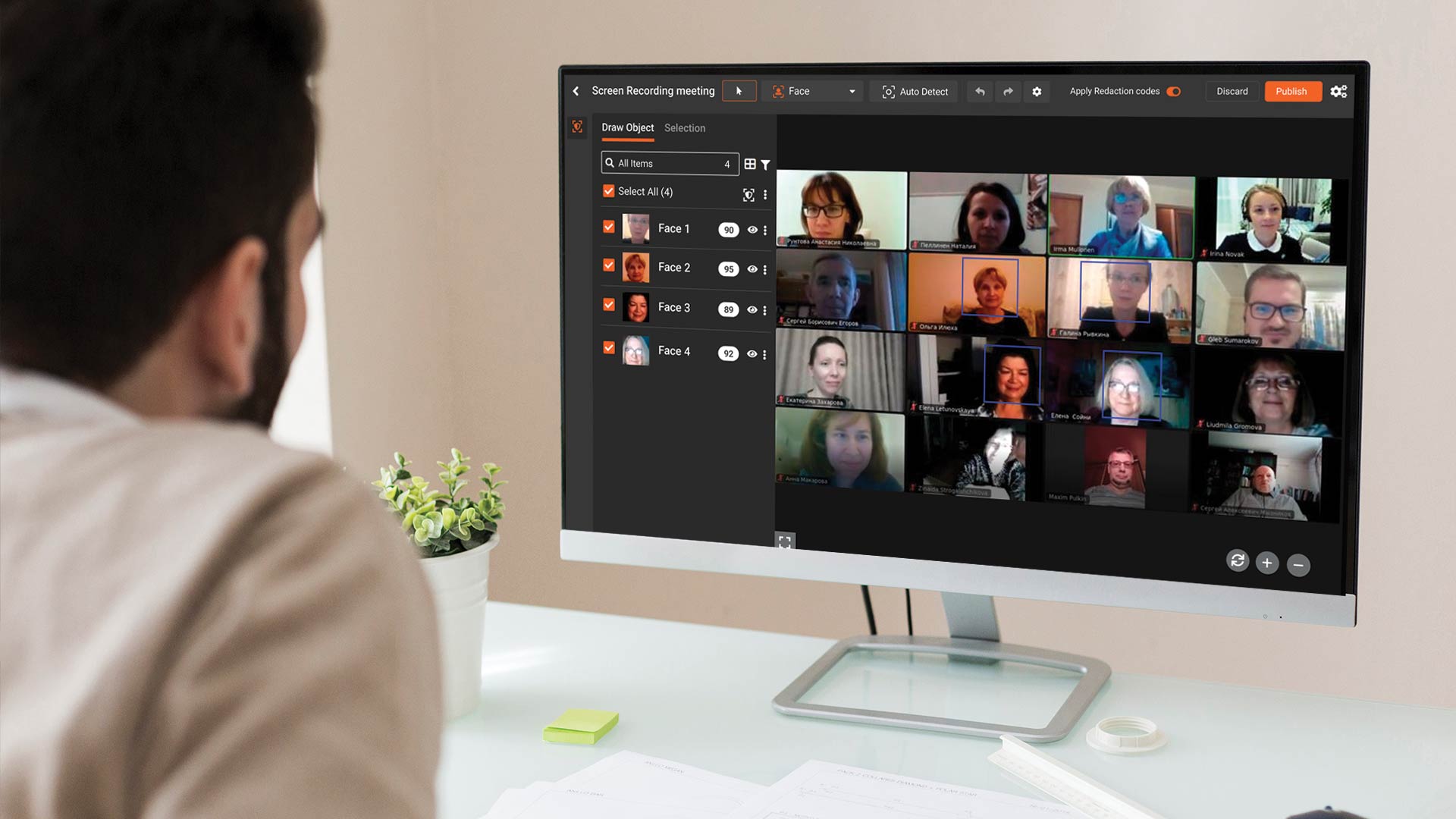
Most enterprise redaction programs do not fail at the tool selection step. They fail at the workflow step. The tool picks up sensitive content correctly, but recordings arrive in the wrong format, get routed to the wrong reviewers, sit in a queue past their response deadline, or get exported without a documented audit trail. The redaction itself works. The program around it does not.
Automating screen recording redaction at enterprise scale is about designing a workflow that moves recordings from upload to secure distribution with minimal manual handoff, clear review gates, and a complete audit record. The AI does the heavy lifting, but the workflow is what makes the AI useful. This piece walks through the end-to-end workflow, the configuration choices that shape it, and the measurement metrics that tell you whether it is working.
It builds on the broader screen recording redaction guide and on the comparison in AI vs. manual screen recording redaction, which covers the tradeoff between manual, AI, and hybrid approaches.
The End-to-End Screen Recording Redaction Workflow
A mature automated workflow has six stages. Each stage has a specific purpose, a set of inputs and outputs, and a set of configuration choices that determine how well it performs in practice.
Stage 1: Capture
Capture is where the recording is created, whether on a native video platform, a browser-based recorder, an in-app capture tool, or an AI meeting assistant. The workflow design starts here because capture settings shape everything downstream. Resolution affects OCR quality. Codec and container affect ingestion speed. Retention settings on the capture platform interact with the redaction platform's retention to produce the organization's effective retention.
The best practice at this stage is to standardize capture settings across the sanctioned stack so downstream processing is predictable. Recordings that arrive from unknown or unsanctioned sources should route to a separate triage queue for classification before entering the main workflow.
Stage 2: Upload and Ingestion
Upload brings the recording into the redaction platform. At enterprise scale, the reliable patterns are a watch folder monitored by the platform, an API endpoint that receives recordings from integrated systems, or a batch import from a video hosting platform. Manual upload via a web UI works for ad hoc cases and is not the right pattern for volume.
Ingestion should apply initial metadata: the source system, the recording category, the capture date, the operator, and any classification hints available from upstream. The metadata determines which workflow path the recording takes and is the foundation of the audit trail.
Stage 3: AI Detection
Detection is the core AI step. The platform processes each frame of the recording, extracts text and identifies objects, classifies candidates against the configured PII profile, and produces a list of proposed redaction regions with timestamps, coordinates, and confidence scores. Our deep dive on how OCR text redaction works in screen recordings covers the mechanics of this stage in detail.
Detection configuration is where most of the tuning happens. Confidence thresholds, the set of PII categories enabled, any custom regex or NER patterns, and the model variant all affect the output. For recurring recording types, the configuration should be set once per type and applied consistently. For ad hoc recordings, the workflow should fall back to a conservative default that favors recall over precision.
Stage 4: Review and QA
Review is where a human confirms the detections. At scale, this is the most operator-intensive stage, even in a heavily automated workflow. The review interface should support split-screen comparison of the original and redacted recording, frame-accurate navigation, easy accept or reject of individual detections, and manual addition of redactions the AI missed.
QA patterns that work well at enterprise scale include pair review for high-risk recordings, sample-only review for low-risk categories with a periodic deep-review audit, and queue prioritization by deadline. A simple rule that beats most custom logic: recordings with a hard deadline go to the top of the queue, and everything else is first-in-first-out.
Stage 5: Export and Distribution
Export produces the final redacted recording along with the audit record. The export step should enforce a default-deny posture: no export without reviewer confirmation, no export without audit log capture, no export to unauthorized destinations. Distribution then places the redacted recording in the system where the intended audience can access it.
Integration is what makes this stage efficient. A redaction platform that can push the output directly to the video hosting platform, evidence management system, knowledge base, or secure share eliminates the manual hand-off that is a common source of error.
Stage 6: Retention and Purge
The final stage is retention management. The original recording, the intermediate artifacts, the redacted output, and the audit log each have their own retention lifecycle. Originals often need to be kept for a short period for possible rework. Redacted outputs follow the retention policy of the destination system. Audit logs typically have the longest retention because they document compliance actions.
The workflow should enforce these retention periods automatically. Manual purge of original recordings is a common source of policy drift.
How Batch Processing and Watch Folders Handle Enterprise Volume
At enterprise volume, two patterns dominate.
Batch processing runs a defined set of recordings through the pipeline on a schedule, typically overnight. This works well for recordings that arrive throughout the day but do not have same-day deadlines. The batch model maximizes throughput because it can parallelize detection across many recordings at once.
Watch folders monitor a specific storage location and process recordings as they arrive. This works well for recordings that need fast turnaround, such as support captures that are shared with customers the same day. Watch folders can be configured per recording category, with different detection profiles for each.
Most programs use both. A watch folder handles the high-volume, predictable categories. A batch job handles backlogs, ad hoc uploads, and recordings from categories that do not need watch-folder treatment.
How to Configure Confidence Thresholds and Custom Patterns
Two configuration decisions shape the output more than any others.
Confidence thresholds control the tradeoff between false positives and false negatives. A lower threshold catches more sensitive content but flags more benign content. A higher threshold produces cleaner output but risks missed detections. The right threshold depends on the recording category. Legal or compliance productions typically warrant a lower threshold with more review. Marketing or training recordings on test data can run at a higher threshold.
Custom patterns extend the default PII catalog with organization-specific identifiers. Employee IDs, internal case numbers, proprietary product codes, and customer-specific reference numbers are common examples. Custom patterns can be expressed as regex with context word requirements, which reduces false positives on patterns that look like PII but are not.
Both configurations should be owned by the compliance team and documented in a configuration registry. Drift in thresholds and custom patterns is a common source of inconsistent redaction across recordings that should have been treated the same way.
Building a Redaction Workflow That Scales With Volume
The workflow should be designed for the volume the organization expects in two to three years, not just today. Screen recording volume grows in most enterprises, and redaction capacity usually lags until the growth is already uncomfortable.
Key capacity levers include parallel processing at the detection stage, queue-based review so reviewers are not tied to specific recordings, deadline-aware prioritization so time-critical recordings move first, and integration-driven automation so manual hand-offs do not grow linearly with volume.
Platforms designed for large volumes often advertise throughput figures based on ideal conditions. Real enterprise throughput depends on the recording mix, the detection profile, the review pattern, and the integration design. Pilot testing on representative recordings is the only reliable way to estimate real throughput.
Where to Go From Here
Teams ready to move from manual or ad hoc redaction to an automated workflow usually progress through a pilot on a single recording category, a production rollout to additional categories, and an integration phase that eliminates manual hand-offs.
VIDIZMO Redactor supports the full workflow described above. It handles video, audio, image, and document redaction, supports watch folders and batch processing, offers configurable confidence thresholds and custom patterns, provides split-screen review with frame-accurate navigation, generates a complete audit trail, and integrates with enterprise storage, video hosting, and evidence systems. It runs on shared SaaS, dedicated SaaS, government cloud, private cloud, and on-premises deployments.
To explore the tool for screen recording redaction, you can request a free trial.

FAQ
Frequently Asked Questions
What is an automated screen recording redaction workflow?
An automated screen recording redaction workflow is a configured pipeline that moves recordings from capture through detection, review, export, and retention without requiring manual file handling at each step. The AI handles content detection and masking. Humans handle review and final approval. The platform handles movement between stages, logging, and enforcement of retention and access policies. The automation is what makes the workflow scalable; the human review is what makes it defensible.
How long does it take to implement an automated workflow?
Implementation timelines vary with scope, but a focused pilot can typically be completed in a few weeks, with a production rollout over the following quarter. Integration with upstream and downstream systems often extends the timeline. Organizations with complex recording stacks or strict deployment requirements should plan for a longer ramp. The biggest determinant of timeline is usually clarity of the governance policy, since implementation stalls when the rules are still being debated.
Can the workflow handle multiple recording types with different rules?
Yes. Mature platforms support per-category configuration, including different confidence thresholds, different custom pattern sets, different review paths, and different integrations. The workflow engine routes each recording based on its category and applies the corresponding configuration. Centralized configuration management is important here, because drift between categories creates inconsistent redaction and weakens the audit story.
What is the audit trail supposed to contain?
A complete audit trail should include the source and upload metadata, the detection configuration in effect at the time, every detection proposed by the model with its confidence score and category, every reviewer decision including accepts, rejects, and manual additions, the final export destination, and the retention disposition for each artifact. The trail should be queryable by recording, by reviewer, and by time range to support compliance reporting.
How do we handle recordings that contain content the AI cannot redact?
Recordings with content the AI does not cover (novel identifiers, handwritten content in unusual layouts, synthetic content generated by specific applications) should route to a manual review path. The workflow should flag the content explicitly rather than passing the recording through with missed redactions. Custom pattern configuration and model tuning can close some of these gaps over time. Manual review is the fallback for the rest.
TopicsRedactionVideo RedactionRedactorSecurity and ComplianceCIO and IT Leadership
About the author
Ali Rind is a Product Marketing Executive at VIDIZMO, where he focuses on digital evidence management, AI redaction, and enterprise video technology. He closely follows how law enforcement agencies, public safety organizations, and government bodies manage and act on video evidence, translating those insights into clear, practical content. Ali writes across Digital Evidence Management System, Redactor, and Intelligence Hub products, covering everything from compliance challenges to real-world deployment across federal, state, and commercial markets.
You may also like
Fire and Smoke Detection as a Second Set of Eyes in Schools
Let the first sentence of this article do the compliance work: nothing described here replaces, modifies, or competes ...
Weapon Detection in Schools: Detection, Verification, Response
No school safety technology carries more emotional weight than weapon detection, and no school safety technology is ...

School Safety Grants: What the Money Can Buy
School safety improvements have a funding problem that is really a sequencing problem: the need is continuous, the ...