
To present video evidence in court effectively, follow these five steps:
-
Maintain an unbroken chain of custody — document every person who accessed the footage, when, and what actions they took
-
Present the original, unedited recording — edited footage invites authenticity challenges that can get evidence thrown out
-
Implement strict access controls — only authorized personnel should handle or view the evidence
-
Provide context and a written transcript — many courts require one, especially when audio quality is poor or dialogue is in a foreign language
-
Redact protected identities — faces, names, and any personally identifiable information must be removed before presentation
Getting these five steps right is the difference between evidence that lands and evidence that gets excluded before the jury sees a frame.
Video is now the most persuasive form of courtroom evidence — body-cam footage, surveillance recordings, dashcam clips, and smartphone videos routinely determine case outcomes. But the same footage that proves guilt or innocence can be excluded entirely if it's improperly handled, presented without context, or challenged on chain-of-custody grounds.
For legal professionals — lawyers, paralegals, and law enforcement officers — the stakes are incredibly high. Presenting video evidence isn't just about hitting play; it's about constructing a narrative that supports your case. The sections below walk through each of the five steps in detail, the most common pitfalls, and how requirements differ by evidence type.
Is Video Evidence Admissible in Court?
Yes — video can be used as evidence in court, but only if it meets three legal requirements under the Federal Rules of Evidence:
-
Relevance — the footage must directly relate to facts in dispute (FRE 401)
-
Authenticity — you must establish the video accurately depicts what it claims to show and has not been altered (FRE 901)
-
Admissibility — the footage must clear hearsay rules and not be subject to exclusion (FRE 802, FRE 403)
Failing any one of these three tests is grounds for exclusion — before the jury ever sees a frame.
Is Video Evidence Hearsay?
This is one of the most common objections raised against video evidence. The answer depends on what the video contains.
Pure surveillance footage — no hearsay. Video that passively records events (CCTV, dashcam, body cam capturing actions) is not hearsay because it is not an out-of-court statement made by a person. Courts admit this under the silent witness theory — the video "speaks for itself" and can be authenticated through system reliability (maintenance logs, metadata, chain of custody) without requiring a witness to testify to everything captured.
Video containing spoken statements — may be hearsay. If the footage includes someone making a verbal assertion offered to prove the truth of that assertion, the statement portion is hearsay. However, several exceptions routinely apply:
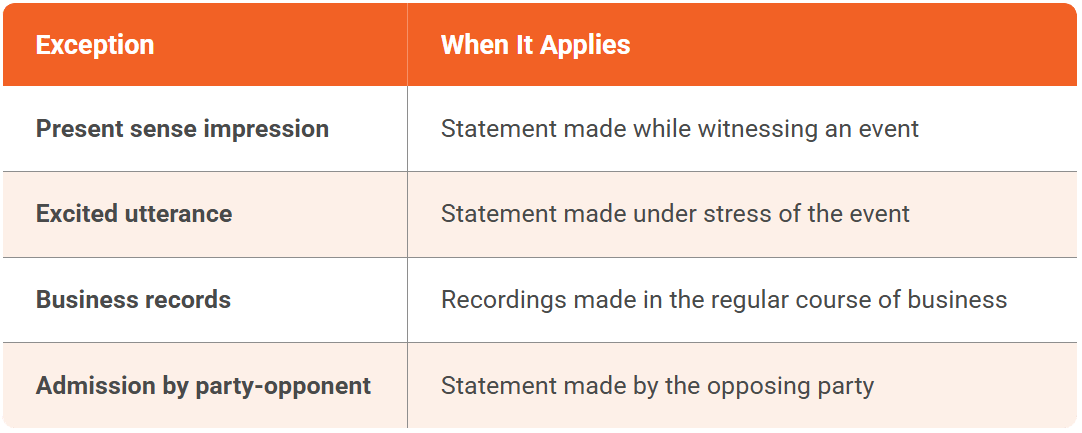
In most law enforcement and surveillance contexts, the footage itself clears hearsay — it's the spoken words within that require a foundation.
Can Illegally Obtained Video Be Used in Court?
Generally, no. Under the Exclusionary Rule, evidence obtained through an unlawful search or seizure — including video surveillance conducted without proper legal authority — may be suppressed on motion. This applies most directly to law enforcement.
For civilian-recorded video, the admissibility question shifts to consent and wiretapping laws. Two-party consent states (California, Florida, Illinois, among others) require all parties to consent to being recorded. Video obtained in violation of those laws faces exclusion and potential civil liability.
Practical implication: Before presenting any video, confirm the recording was lawful in the jurisdiction where it was captured, and document authorization or consent.
Common Pitfalls in Presenting Video Evidence
Presenting video evidence can be fraught with challenges that can undermine your case:
Technical Hurdles
Equipment failures, compatibility issues, and playback problems can disrupt the presentation of your video evidence, causing confusion and frustration in the courtroom.
Admissibility Standards
The legal framework surrounding the admissibility of video evidence is complex. If your video fails to meet specific criteria, it may be deemed inadmissible, significantly affecting the case outcome.
For a deeper understanding of admissibility, authentication, and chain of custody requirements, see our guide on legal standards for presenting video evidence in court.
Maintaining Audience Engagement
Capturing and holding the attention of the judge and jury is critical. A poorly presented video can lose the audience’s focus, undermining the significance of your evidence.
Misinterpretation of Content
Without adequate context, jurors may misinterpret the footage, drawing incorrect conclusions that can skew their judgment.
Emotional Reactions
Video evidence can provoke strong emotional responses. While this can be beneficial in some cases, it may also cloud judgment and lead to biased perceptions of the evidence.
The Real Cost of Poor Video Evidence Presentation
When video evidence fails to meet admissibility standards or is presented ineffectively, the consequences extend far beyond a single ruling.
Case outcomes suffer dramatically
Evidence that could prove your client's innocence or establish liability never reaches the jury. Judges and jurors are left to make decisions without crucial information, often resulting in verdicts that don't reflect what actually happened.
Resources are wasted
The hours spent collecting, storing, and preparing video evidence become meaningless if procedural errors render it inadmissible. For prosecutors' offices and law firms already stretched thin, this represents a significant drain on time and budget.
Professional credibility erodes
Legal professionals who repeatedly fail to get evidence admitted develop reputations that follow them. Opposing counsel may become more aggressive in challenging evidence, and judges may view future submissions with increased skepticism.
Client relationships deteriorate
Clients trust their legal teams to handle evidence competently. When critical footage is excluded due to preventable errors, that trust—and the attorney-client relationship—suffers lasting damage.
5 Expert Tips for Presenting Video Evidence in Court
1. Ensure an Unbroken Chain of Custody
Maintaining a clear chain of custody is essential for establishing the credibility of your video evidence:
Document Everything: Keep detailed records of who accessed the video, when, and what actions were taken. This documentation should start from the moment the video was recorded until it is presented in court.
Protect Against Tampering: Given the prevalence of video editing software, it is vital to demonstrate that your footage has not been altered. Employ secure storage solutions that track all changes to the evidence.
Use Proper Labeling: Clearly label all evidence to avoid any confusion about its origin and handling throughout the legal process.
Cellphone and mobile footage carries its own chain-of-custody risks — see our step-by-step framework for ensuring cellphone video evidence is admissible in court for device-specific guidance.
2. Present the Original Video
Whenever possible, present the original video recording rather than a modified version:
Authenticity Is Key: Courts may be hesitant to accept edited footage. Presenting the original recording helps establish authenticity and reduces the risk of challenges regarding the integrity of the evidence.
Preemptive Preparation: Anticipate potential objections to the evidence and be prepared to justify the use of the original recording over any edited versions.
3. Implement Strong Security Measures
Security is critical when it comes to handling video evidence:
Access Controls: Ensure that only authorized personnel have access to video evidence. Use robust security protocols to protect against unauthorized alterations.
Audit Trails: Maintain comprehensive logs of all access and modifications to the video evidence. This ensures compliance and bolsters your case by demonstrating proper handling.
4. Provide Clear Context and Transcriptions
Providing context is essential for the jury to understand the significance of the video evidence:
Introduce the Video: Before showing the video, explain its relevance and what the jury should focus on. Highlight key moments that support your case.
Transcribe the Content: Many courts require a transcript to accompany video evidence. This ensures all parties can access and understand the content, especially if audio quality is an issue.
Translate if Necessary: If the video features dialogue in a foreign language, providing a translated transcript can help eliminate ambiguity and enhance comprehension.
5. Protect Privacy with Redaction
Protecting the privacy of individuals in your video evidence is essential:
Redact Sensitive Information: Before presenting video evidence, ensure that any personally identifiable information (PII) is redacted. This includes faces, names, and any other identifying details.
Compliance with Regulations: Familiarize yourself with data protection laws, such as GDPR and CCPA, to ensure that your handling of video evidence complies with legal standards.
How to Submit Video Evidence in Court
Presenting the video is only half of it. The submission process — how the video formally enters the court record — is a separate procedural requirement that varies by jurisdiction and case type.
Step 1: Mark It as an Exhibit
Before the hearing or trial, submit your video to the clerk's office as a proposed exhibit. You'll receive an exhibit number or letter. Every reference to the footage during proceedings should use this designation.
Step 2: File the Supporting Documentation
Along with the video file, submit:
-
Chain of custody log — documenting every person who accessed the footage from capture to submission
-
Certification of authenticity — a sworn statement from the custodian or submitting party that the video is unaltered
-
Transcript — required in many jurisdictions; strongly recommended in all
-
Metadata report — file creation date, device ID, GPS data where available
Step 3: Notify Opposing Counsel
Most courts require disclosure of exhibits in advance — typically through a formal exhibit list filed before trial or via discovery. Surprise video introductions are routinely objected to and excluded.
Step 4: Lay the Foundation at Trial
When the time comes to play the video, you must establish foundation before it's admitted:
- Identify the exhibit by number
- Authenticate it — testimony from the officer who collected it, the system custodian, or through metadata/hash verification
- Establish relevance — explain to the court what the footage depicts and why it matters
- Move for admission — "Your Honor, we move to admit Exhibit 4 into evidence"
- Play the footage only after the court grants admission
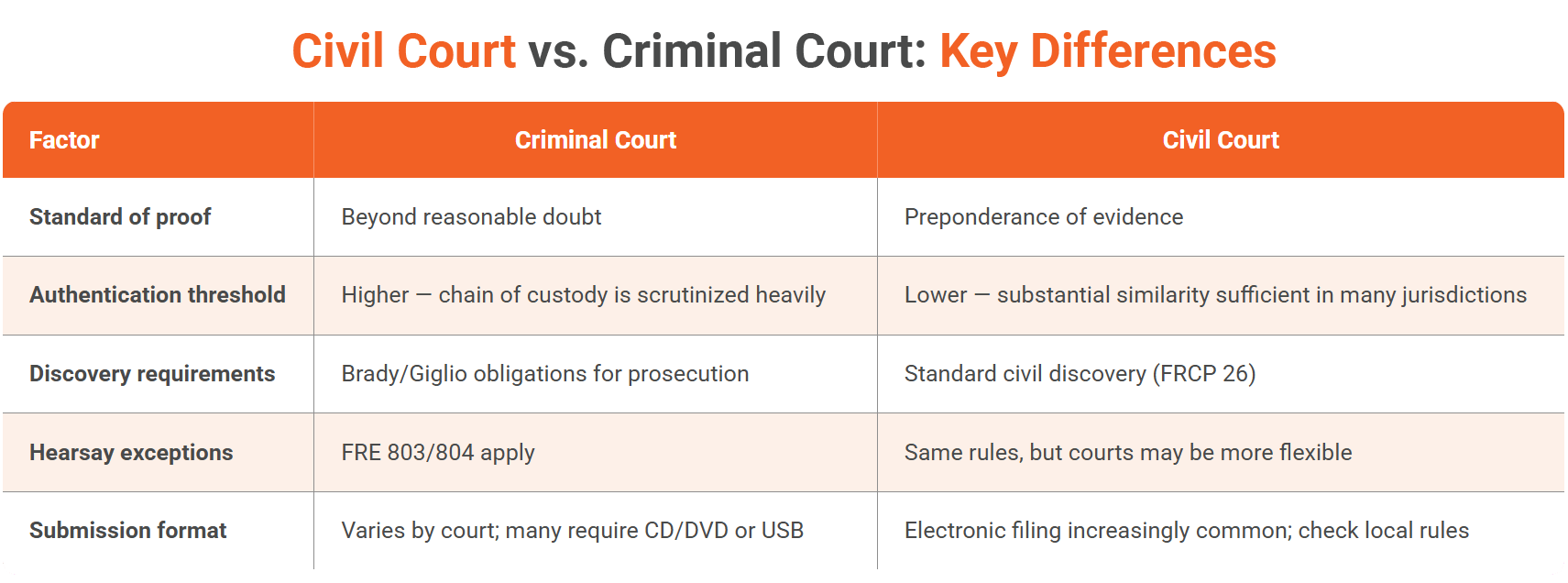
Special Considerations by Evidence Type
Body-Worn Camera Footage
Authentication relies on department policies, device metadata, and officer testimony about activation. Be prepared to address recording gaps, limited camera angles, and synchronization with other evidence.
Surveillance and CCTV Footage
Systems vary widely in quality and format. Obtain footage promptly since many systems overwrite automatically. The silent witness theory of authentication is particularly relevant for unmanned recordings.
Dashcam and Vehicle Recordings
GPS data, timestamps, and vehicle telemetry can corroborate authenticity. Note that evidentiary rules may differ for law enforcement dashcams versus civilian devices.
Smartphone and Personal Device Videos
Original device examination, cloud backups, and metadata analysis help establish authenticity. Social media uploads compress files and strip metadata, so always obtain original files.
Mastering the Art of Video Evidence Presentation
Effectively presenting video evidence in court is a multifaceted endeavor that requires careful planning and execution. By following these five tips (maintaining a clear chain of custody, presenting the original video, implementing strong security measures, providing context and transcriptions, and protecting privacy through redaction) you can enhance your presentations and improve the chances of a favorable verdict.
Managing these requirements manually is complex and error-prone. VIDIZMO Digital Evidence Management System (DEMS) simplifies the process by automating chain of custody documentation, maintaining tamper-proof audit trails, enabling secure storage with role-based access, and providing built-in redaction tools for privacy compliance.
Remember that presenting video evidence is not just about showing footage; it's about telling a story that resonates with the jury and supports your client's case. With the right tools and techniques, you can become a more effective advocate and contribute to the pursuit of justice in the courtroom.

FAQ
Frequently Asked Questions
Can a video recording be used as evidence in court?
Yes. Video evidence is admissible when it meets three requirements: it must be relevant to the facts in dispute, authenticated as accurate and unaltered, and free from hearsay or other exclusionary issues. A documented chain of custody and proper submission procedure are essential for admissibility.
Body cam, CCTV, dashcam, and smartphone video are all regularly admitted across criminal and civil proceedings.
Is video evidence hearsay?
Surveillance and security footage that passively records events is generally not hearsay, courts admit it under the silent witness theory without requiring a witness to narrate every moment. Video containing spoken statements may be hearsay, but exceptions (excited utterance, business records, party admission) frequently apply.
Does video evidence need a transcript to be admissible in court?
Not always, but courts strongly recommend transcripts when audio quality is poor, dialogue is in a foreign language, or accessibility accommodations are required. Transcripts also reduce the risk of jurors mishearing key dialogue, which can be as damaging as having the evidence excluded.
How do you submit video evidence in court?
Mark the video as a numbered exhibit, file chain of custody documentation and a transcript with the clerk, disclose it to opposing counsel during discovery, lay proper foundation at trial (authentication + relevance), then move for admission before playing it.
How should body-worn camera footage be authenticated in court?
Authentication requires the recording officer's testimony about activation and handling, device metadata confirming timestamps and location, and department policy documentation showing proper storage protocols. Gaps in recording, angle limitations, or deviations from department policy will be raised by defense counsel and should be addressed proactively.
What information must be redacted from video evidence before it is presented in court?
Any personally identifiable information not relevant to the case must be redacted, including faces of uninvolved bystanders, minors, and confidential informants. Redaction must be documented to show the underlying footage was obscured, not altered. Failure to redact properly can expose agencies to violations under GDPR, CCPA, or applicable state privacy statutes.
What makes video evidence inadmissible?
The four most common grounds for exclusion: (1) broken or undocumented chain of custody, (2) evidence of tampering or editing, (3) unlawful recording in violation of consent or surveillance laws, (4) failure to disclose to opposing counsel before trial.
What is the silent witness theory?
The silent witness theory allows video from a properly maintained automated system (CCTV, body cam, dashcam) to be admitted without a human witness testifying to everything captured. Authentication is established through system reliability, maintenance logs, metadata, and custody documentation rather than eyewitness testimony.
Can illegally obtained video be used in court?
Generally no. The Exclusionary Rule bars evidence obtained through unlawful search or seizure. For civilian recordings, admissibility depends on whether recording was lawful under the jurisdiction's consent laws. Two-party consent states (CA, FL, IL, and others) require all parties' agreement.
How does VIDIZMO DEMS help with video evidence in court?
VIDIZMO DEMS automates chain of custody documentation, generates tamper-proof audit trails, enables role-based access control, and provides built-in redaction for PII compliance, addressing the procedural requirements that determine admissibility before the footage ever reaches the courtroom.
TopicsDigital Evidence ManagementData SecurityLegal and Privacy
You may also like
What Is a Real-Time Crime Center? A Guide for Cities and Counties
Somewhere in the last two years, someone asked your department whether it should have a real-time crime center. Maybe a ...
Staffing a Real-Time Crime Center When Software Does the Watching
Most chiefs who hear a pitch for a real-time crime center ask the same question before any other, which is whether they ...
RTCC, EOC or Situational Awareness Center: What Each Room Is For
Walk into a real-time crime center, then into a city's emergency operations center, and you will see much the same ...