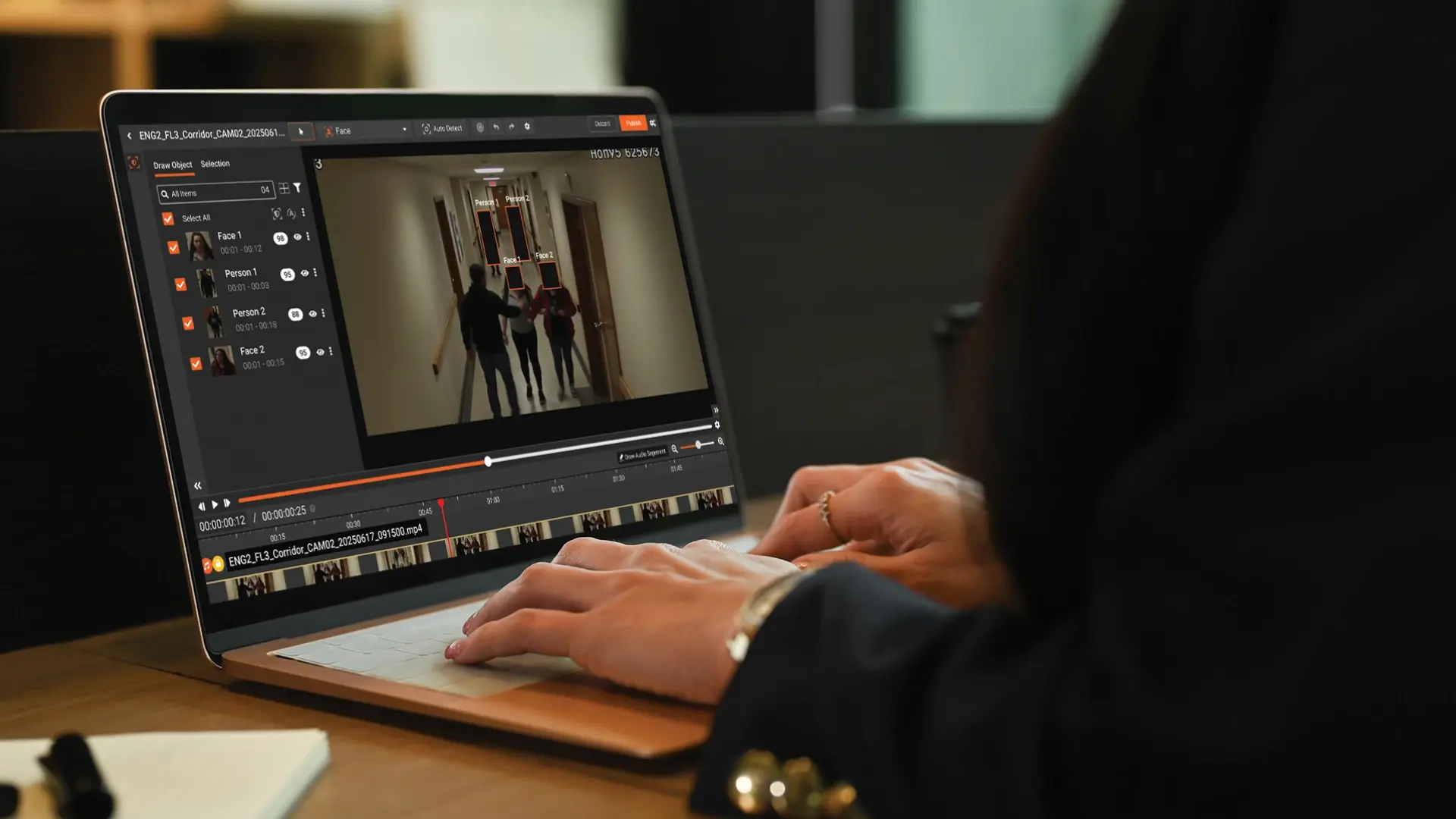
The standard image of legal redaction is a paralegal moving through a deposition transcript with a PDF editor, applying black boxes over Social Security numbers and minor names. That image was accurate ten years ago. It is not accurate now.
A 2026 paralegal handling a typical civil litigation matter is redacting a body-worn camera clip subpoenaed from a police department, a Zoom deposition recording, a stack of scanned medical records returned in response to a subpoena, a school surveillance clip in an education matter, a deposition exhibit, and a payroll record. Five different formats. Five different redaction profiles. PDF editors cover one of them.
This post is for paralegals and litigation support staff who feel that gap every week. It is not an attorney's piece on AI. It is a working paralegal's view on why PDF tools have stopped being enough, and what AI redaction software actually changes about the job.
What PDF Editors Do Well, and Where They Break
Acrobat and similar PDF editors are good at native PDF redaction within a reasonable scope. A short document, low PII density, native digital file, single-format production. Apply redaction marks, save the redacted version, deliver. The tool works. Paralegals who use Acrobat well know how to remove the underlying text layer rather than just visually overlay it, which is the difference between defensible redaction and a recoverable security failure.
Where PDF editors break:
-
Single-format scope. PDF editors handle PDFs. They do not handle MP4, MP3, MOV, WAV, or the proprietary formats produced by body camera systems and Zoom recordings. A production that includes video and audio requires separate tools for the non-PDF content, which means context-switching, multiple audit logs, and inconsistent redaction approaches across the production.
-
Manual detection. The reviewer finds every instance of every identifier visually. Hundred-page documents with names recurring across many pages require eye-scanning every page. Inevitably, an instance on page 47 gets missed when the same name was caught on page 3. Consistency is the most common manual failure.
-
No audit trail by default. Acrobat's redaction is applied. The redaction history is not preserved in a defensibility artifact. When a release is challenged or when a court asks how the redaction decisions were made, the reviewer's recollection is the record.
-
No video or audio handling. Visual content in video, audio tracks containing spoken PII, and scanned content embedded as image pixels are outside the tool's scope.
-
No OCR-based detection. Scanned PDFs (older case files, copies of paper records) contain text only as image pixels. PDF editors without OCR cannot detect or redact that text. Either the reviewer re-types it, or it stays in the released document.
These failures are not edge cases. They are the modal redaction work in 2026.
Why 2026 Is the Tipping Point for Paralegal Redaction Workflows
Three trends have made the PDF-only workflow unsustainable
Body-worn cameras are now standard equipment for most US law enforcement agencies. Civil cases involving police interactions almost always include BWC footage in discovery. School district matters include surveillance video. Personal injury cases include dashcam, security camera, and increasingly home doorbell camera footage. The video itself is admissible. The redacted version is what gets produced. The paralegal handling the matter has to be able to produce that redacted version.
Remote depositions produced video and audio recordings as standard. A deposition no longer ends with a transcript. It ends with a transcript plus the video file. Redaction of identifying content in the recording (when redaction is required) cannot be done in a PDF tool.
Federal Rule of Civil Procedure 5.2 requires redaction of personal identifiers (Social Security numbers, taxpayer IDs, financial account numbers, dates of birth, names of minors) in federal court filings. State courts have parallel rules. Courts have become more rigorous in flagging filings that miss identifiers, with sanctions and strike orders becoming more common. Mixed-format filings (with attached video or audio exhibits) require redaction across all formats. The rule does not exempt non-PDF content.
Discovery sophistication has shifted alongside this. Opposing counsel and judges are increasingly familiar with the technical realities of redaction. Reversible black-box redaction, missed identifiers in scanned content, and inconsistent application across pages get caught. The cost of a redaction failure has gone up.
The combination is what makes 2026 different from 2016. The expectations have moved. The tooling has to move with them.
Five Redaction Jobs Paralegals Cannot Do With a PDF Editor
Bulk document redaction. A production of 500 documents with consistent PII categories (medical records, employment files, financial statements). PDF editors require document-by-document work. AI redaction platforms run the batch, flag every detected identifier across the whole production, and let the reviewer approve at scale.
Video face redaction. BWC footage, surveillance clips, deposition video. Non-party faces, minors, bystanders, license plates. Persistent tracking across frames means a face that turns or briefly occludes is still tracked. Manual frame-by-frame redaction is not viable. This is automated work with reviewer confirmation.
Audio name muting. Spoken names, addresses, Social Security numbers, medical content captured in audio tracks of recorded interviews, depositions, BWC, and 911 calls. Audio redaction tools detect spoken PII and apply mute or bleep at specific timestamps. PDF editors are silent on audio entirely.
OCR on scanned files. Scanned medical records, older case files, attached exhibits that are images of text. OCR extracts the text, detection runs across the extracted content, redaction applies at the pixel level of the image. Without OCR, scanned content has to be re-typed or ends up in releases without redaction.
Defensible audit logs. Every redaction logged with operator, timestamp, and basis. Stored in tamper-proof storage. Exportable as a defensibility artifact when a release is challenged. PDF editors typically log nothing meaningful for defensibility purposes.
These five jobs are the modern paralegal redaction reality. A workflow that handles all five from a single tool is the upgrade. Multiple tools strung together for these jobs is what most teams have today.
How AI Redaction Software Changes Paralegal Workflows
Why paralegals are replacing PDF editors with AI redaction software in 2026
The standard image of legal redaction is a paralegal moving through a deposition transcript with a PDF editor, applying black boxes over Social Security numbers and minor names. That image was accurate ten years ago. It is not accurate now.
A 2026 paralegal handling a typical civil litigation matter is redacting a body-worn camera clip subpoenaed from a police department, a Zoom deposition recording, a stack of scanned medical records returned in response to a subpoena, a school surveillance clip in an education matter, a deposition exhibit, and a payroll record. Five different formats. Five different redaction profiles. PDF editors cover one of them.
This post is for paralegals and litigation support staff who feel that gap every week. It is not an attorney's piece on AI. It is a working paralegal's view on why PDF tools have stopped being enough, and what AI redaction software actually changes about the job.
How AI Redaction Software Changes Paralegal Workflows
Three concrete changes show up in the day-to-day after a team moves to AI redaction software.
Time savings on detection. The biggest hour-by-hour change. Paralegals report that document redaction work that took five hours in Acrobat takes one to two hours when AI handles detection and the paralegal reviews and approves. On video work, the savings are larger because manual video redaction is so labor-intensive that it often gets outsourced or refused. Bringing video work in-house with AI is a capability change, not just a time savings.
Fewer errors. Consistency across pages, across documents in a production, and across a multi-hour video clip. Detection completeness is set by the tool, not by the reviewer's attention budget. The errors that remain are judgment errors (whether a specific item is privileged, whether it falls under FRCP 5.2), not detection errors (a name on page 47 was missed).
Courtroom-defensible output. The audit log is the artifact courts look for when a redaction is challenged. With it, the paralegal can show that a reasoned process was followed. Without it, the team is reconstructing from memory.
Less reliance on IT. Most AI redaction platforms run as SaaS. The paralegal logs into a browser, ingests files, runs redaction, downloads output. No server, no install, no per-machine licensing. For litigation support teams in firms without dedicated IT resources for paralegals, this changes who can use the tool.
For redaction-heavy practice areas (immigration, eDiscovery, civil rights, education law, employment, healthcare litigation), the change is structural. The paralegal who used to handle four matters at once handles eight. The team that used to outsource video redaction does it in-house.
What Paralegals Should Look for in AI Redaction Software
Format coverage. Documents (PDF, Word, Excel, PowerPoint, scanned PDF), audio (MP3, WAV, M4A, common call recording formats), video (MP4, MOV, H.264 from body cameras and CCTV). Confirm the specific formats your matters produce.
Ease of use. Trainable in a day, not a week. Paralegals are doing redaction work alongside other matter responsibilities, not as their full-time role.
No-IT setup. Browser-based access. SaaS deployment with per-user authentication. No server install, no firewall configuration, no IT ticket required to onboard a new paralegal.
Audit trail. Operator, timestamp, action type, and basis logged for every redaction. Tamper-proof storage. Exportable as a defensibility artifact.
Deployment options. SaaS for most matters. Private cloud or on-premises for sensitive matters where the firm or client requires data residency.
OCR and ICR. OCR for scanned text, intelligent character recognition for handwritten content. The tools that lack ICR cannot handle handwritten witness statements or older legal records.
Bulk processing. Multi-file productions handled as batches. The tool should not require document-by-document upload and processing.
Compliance posture. ISO 27001 certification, SOC 2 reporting, HIPAA support for healthcare matters, applicable state privacy compliance. Verifiable through cert documents, not vendor claims.
How VIDIZMO Redactor Fits the Paralegal Workflow
VIDIZMO Redactor is a multi-format redaction platform covering documents (PDF, Word, scanned with OCR, 250-plus formats), audio (with spoken PII detection across 33-plus categories), and video (with face, license plate, person, and vehicle detection plus persistent tracking). It runs as SaaS with optional dedicated, private cloud, and on-premises deployments. Audit logs are tamper-proof and stored with operator, IP, timestamp, and action type per event. The platform holds ISO/IEC 27001:2022 certification.
For paralegals, the practical fit is in the format coverage and the audit trail. A single login covers BWC video redaction, deposition audio cleanup, scanned medical record redaction, and bulk document productions. The audit artifact attaches to the matter file as defensibility evidence. Bulk processing has been tested at 1.1 million recordings in deployment, well beyond any realistic single-firm volume.
The use cases that paralegals find most valuable are mass tort medical record redaction (see bulk document redaction for law firms), school district matters with CCTV footage, civil rights matters with BWC footage, and employment matters with mixed-format productions. The product fit is more about "all your formats in one tool" than about any single feature.
For broader context, see the best AI redaction software for legal teams, video evidence in eDiscovery, and redaction software guide for secure data disclosure.
PDF Editor vs AI Redaction Software: Quick Comparison
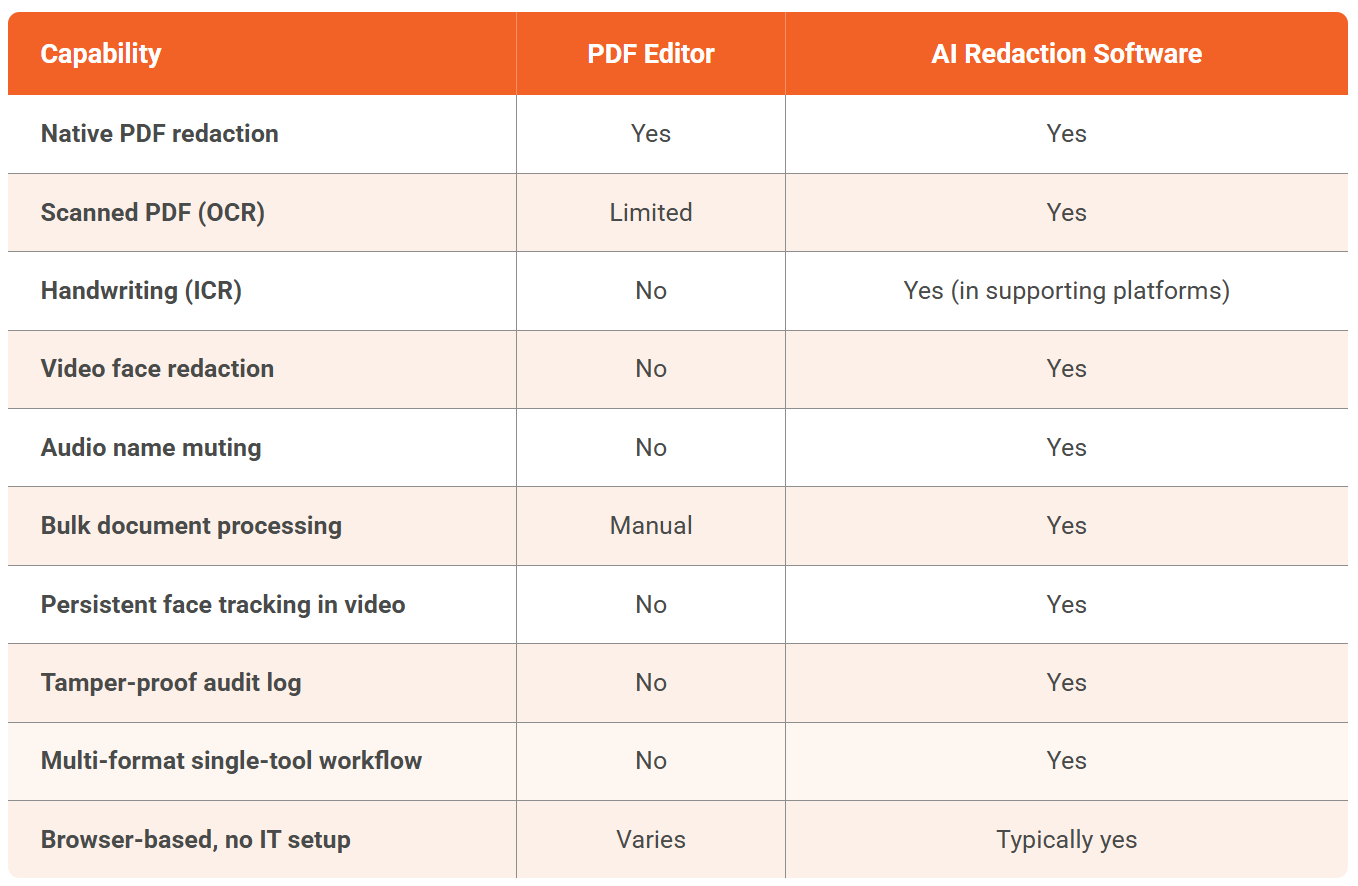
This is not a recommendation to abandon PDF editors entirely. They remain useful for low-complexity native PDF work. The question is whether the paralegal's redaction workload still fits inside that scope, and for most paralegals in 2026, it does not.
FAQ
Frequently Asked Questions
Why are paralegals moving off Acrobat for redaction?
Modern paralegal work involves video, audio, and scanned content alongside native PDFs. Acrobat handles native PDFs well but does not handle video or audio at all and has limited OCR support. Productions involving BWC footage, deposition recordings, or scanned medical records require either multiple tools or a single multi-format platform. The shift to AI redaction is a workflow upgrade.
Is AI redaction defensible in court?
Yes, when paired with human review and audit trails. AI handles detection (finding every identifier consistently); the paralegal handles judgment (deciding what to redact and why). The audit log captures the full workflow. Courts evaluate the process, not the tool, and AI-assisted redaction with logging is more defensible than manual redaction without one.
How long does it take to learn AI redaction software?
Basic operation is learnable in a day for platforms built with paralegals in mind. Full proficiency develops over the first few matters. Tools requiring extensive training are usually built for enterprise compliance teams, not paralegals. Evaluate ease of use during a pilot.
Can AI redaction software handle scanned medical records?
Yes, when the platform includes OCR. The tool extracts text from the scanned image, runs PII detection on it, and redacts at the pixel level. ICR adds the same capability for handwritten content. Scanned medical record redaction is a common use case in mass tort and personal injury work.
Does AI redaction work for video evidence?
Yes. Platforms detect faces, persons, license plates, and vehicles across video frames with persistent tracking, so objects stay redacted even when they turn or briefly leave the frame. Audio tracks are handled separately with spoken PII detection. BWC, dashcam, surveillance, and deposition recordings are common inputs.

About the author
Ali Rind is a Product Marketing Executive at VIDIZMO, where he focuses on digital evidence management, AI redaction, and enterprise video technology. He closely follows how law enforcement agencies, public safety organizations, and government bodies manage and act on video evidence, translating those insights into clear, practical content. Ali writes across Digital Evidence Management System, Redactor, and Intelligence Hub products, covering everything from compliance challenges to real-world deployment across federal, state, and commercial markets.
You may also like
Deploying a Low-Latency Surveillance Pipeline: An Architecture Guide
"Real-time" is one of those phrases that gets used loosely, and in a video analytics pipeline it hides a lot of ...
Choosing a GPU for Real-Time Video Analytics
Capacity planning tells you how many GPUs a deployment needs. This is the other half of the question: which GPU to ...
GPU Capacity Planning for Real-Time AI Video Analytics
Ask a vendor how many cameras their AI runs on one GPU and you will usually get a single confident number with no ...
On-prem vs Cloud for Real-Time AI Video Analytics
For most software written this decade, the cloud is the default and running your own hardware needs a justification. ...
See it on your own content
Tell us what you are trying to solve and we will show you how it works on your infrastructure.