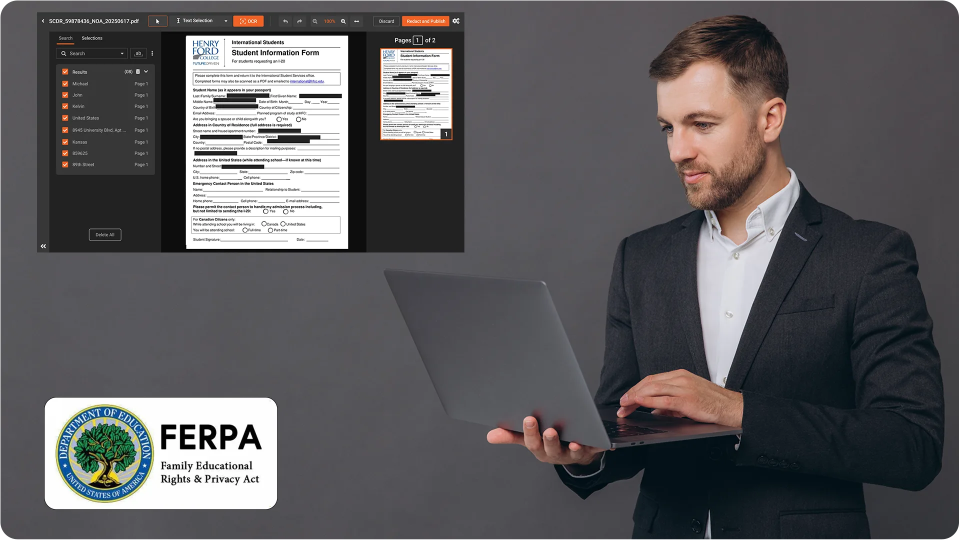
Business Pain of High-Volume Redaction Without the Right Tools
You already know the risk is not theoretical. One missed Social Security number, one unredacted medical note, one exposed email thread, and you are no longer discussing efficiency. You are explaining a data breach to regulators and opposing counsel.
For many legal, compliance, and public records teams, redaction work has quietly become a bottleneck and a liability. Requests keep rising, deadlines keep shrinking, and the only thing that scales is manual effort. The pain is not just volume. It is the constant fear that something slipped through.
Typical patterns look like this:
- FOIA or public records teams are racing against statutory deadlines with thousands of pages per month
- Legal teams handling large matters and eDiscovery productions across multiple custodians and formats
- Compliance and privacy teams are processing recurring batch redaction for recurring reports and exports
Under pressure, teams fall back on quick visual fixes. Draw a black box. Save. Move on.
This feels fast, but at scale it creates fragile, inconsistent work. Different reviewers apply different rules. There is no clear audit trail. Nobody has time to recheck every page.
The result is a stressful tradeoff. You either slow everything down with meticulous manual review, or you accept higher risk and hope nothing critical is exposed. Neither approach is sustainable when high-volume redaction becomes a core operational task.
This is where bulk redaction software becomes essential. Not because it lets you click faster, but because it imposes consistent rules, workflow, and verification across every file you release.
What Is Bulk Redaction Software and Why Is It Essential for High-Volume Redaction
Bulk redaction software is a class of tools that apply redaction operations across large sets of documents and media using defined rules, patterns, and workflows. It is essential for high-volume redaction because it standardizes how you identify, redact, review, and verify sensitive information when you are working under strict timelines.
In other words, bulk redaction is not just about doing more files at once. It is about applying the same defensible process to every item in a batch:
- Consistent rules for what must be redacted across cases, projects, or request types
- Automated detection and batch redaction of recurring patterns like SSNs, dates of birth, or account numbers
- Structured review steps so human reviewers validate, override, or add redactions before finalization
- Quality checks that run across entire batches before release
- Audit trails that show who did what, when, and why
For FOIA and public records units, bulk redaction software supports standardized exemptions and codes across thousands of pages, while allowing reviewers to make contextual decisions. For legal discovery teams, it enables consistent treatment of privileged information across productions, even when multiple reviewers are working in parallel. For compliance and privacy teams, it reduces the risk of ad hoc decisions that break internal policy or regulatory guidance.
When implemented correctly, high-volume redaction becomes a predictable process with known controls, rather than a scramble where every deadline feels precarious.
True Redaction vs Improper PDF Redaction in Bulk Workflows
One of the most important distinctions in any high-volume redaction program is the difference between true redaction and improper PDF redaction. This becomes critical when you use bulk redaction software, because any flaw in the method is multiplied across every file in your batch.
True redaction permanently removes or obfuscates the underlying content from the file structure. After finalization, the sensitive text, images, comments, and associated metadata are no longer present in a recoverable form.
Improper PDF redaction often happens when teams rely on visual hiding instead of content removal. For example, overlay redaction techniques simply place a black rectangle over sensitive text. The text still exists underneath the overlay. It may be accessible via copy and paste, text search, screen readers, or simple PDF inspection tools.
This leads directly to the recurring concern many teams raise. Can redactions be removed. If you use overlay redaction or similar visual-only techniques, the answer is often yes. Third parties can:
- Remove the overlay box using PDF editing tools
- Access hidden layers or objects in the PDF structure
- Search for and copy text from behind the black box
By contrast, true bulk redaction software modifies the file so that the sensitive content is actually removed or irreversibly destroyed. That includes the visible text or image, but also related elements like comments, form fields, attachments, and OCR text layers where applicable.
In high-volume workflows, this difference is not a technical nuance. It is a core legal and operational risk. If your teams use inconsistent methods or rely on overlay redaction in a rush, you can end up with thousands of pages that appear redacted but still leak sensitive information under basic scrutiny.
Common PDF Redaction Failure Modes in High-Volume Processing
Even with experienced teams, improper PDF redaction tends to show up in the same failure modes, especially when volume increases. Understanding these patterns helps you design bulk redaction software workflows that prevent them by default.
Common failure modes include:
- Overlay rectangles: Black boxes or shapes are drawn over text, but the text remains selectable or searchable underneath
- Hidden layers or objects: Content is moved to hidden layers instead of being removed, and can be revealed by toggling layer visibility or editing structure
- OCR text layer remaining: Scanned documents are OCR processed, and only the image is redacted; the invisible OCR text layer still exposes the content
- Copy or select reveals text: Users can select and copy text from the redacted region to a clipboard, revealing supposedly hidden data
- Annotations and comments: Sensitive information remains in comments, sticky notes, or tracked changes, even if the main text is redacted
- Embedded files and attachments: Redacted PDFs still contain original unredacted documents as embedded attachments
- Failure to remove PDF metadata: Author names, document history, internal IDs, and other sensitive attributes are left in metadata fields
Each of these issues is difficult to catch manually across thousands of pages. That is why bulk redaction software must handle content layers, annotations, and metadata systematically, rather than relying on individual reviewers to remember every edge case under deadline pressure.
How Bulk Redaction Software Supports a Defensible Process at Scale
Regulators, courts, and oversight bodies focus on more than outcomes. They care about your process. When you release redacted information, particularly in high-volume redaction scenarios, you need to show not only that sensitive data was removed, but that you used a reasonable, consistent method to do so.
Bulk redaction software helps create this defensible process in several ways.
- Standardized rules: You define policies for what must be redacted across categories like PII, PHI, financial data, and privileged communications, then enforce those rules consistently in every batch
- Repeatable batch redaction: The same search patterns, detection logic, and redaction templates apply to each group of files, reducing discretionary variation between reviewers
- Role-based review workflow: Reviewers, approvers, and quality control roles are separated, with clear handoffs and checkpoints
- Comprehensive logging: Every automated or manual redaction action is recorded, creating an audit trail that can be produced if the process is challenged
- Integrated verification steps: Verification is part of the workflow, not an optional step that can be skipped when deadlines tighten
When internal stakeholders, auditors, or courts ask how you manage high-volume redaction, you can describe a structured system, not a collection of individual decisions. That difference matters when you need to demonstrate diligence, consistency, and reasonableness under scrutiny.
Key Capabilities to Look for in Bulk Redaction Software
Not all tools that claim to support batch redaction or high-volume redaction provide the same level of control. When you evaluate bulk redaction software, focus on capabilities that directly reduce risk and increase throughput in your environment.
Important capabilities include:
- True content removal: Supports real redaction of text, images, and objects, not just overlay redaction or visual hiding
- Pattern-based search and redact: Handles regular expressions and standard patterns for PII and other sensitive data across entire collections
- Support for multiple formats: Works across PDFs, images, and potentially audiovisual formats, so you do not need separate tools and workflows
- OCR integration: Performs or consumes OCR output so scanned documents can be reliably searched and redacted, and does not leave the OCR text layer exposed
- Template-driven batch redaction: Lets you define reusable redaction templates by case type, jurisdiction, or regulation and apply them across entire batches
- Review and approval workflow: Provides structured review queues, dual control options, and role-based access to ensure oversight
- Automated integrity checks: Checks for common failure modes like selectable text under boxes, remaining annotations, or unresolved metadata
- Metadata control: Offers granular control to remove PDF metadata fields, embedded objects, and attachments during finalization
As you assess tools, pay attention to how they handle edge cases and failure scenarios, not just the basic demonstration. Effective bulk redaction software makes it hard to perform improper PDF redaction by accident, even when users are working quickly.
Verification Checklist to Verify Redaction Before Release
No matter how strong your tooling, a verification step is essential before releasing documents externally. This is especially important for high-volume redaction, where even a small percentage of errors can represent a significant exposure.
Use a consistent verification checklist on a sample basis at a minimum, and on all high-risk productions where feasible. A basic checklist to verify redaction should include:
- Search for sensitive terms: Run keyword and pattern searches across the final redacted set to ensure expected terms do not appear
- Select and copy test: Attempt to select and copy text from redacted areas; confirm nothing is copied or revealed
- Text extraction test: Use a text extraction tool on redacted files to confirm that sensitive content is not present in the output
- Inspect layers and objects: Open files in a PDF inspection tool that reveals layers and objects; confirm no hidden content remains under overlays or in alternate views
- Check annotations and comments: Verify that comments, notes, and tracked changes have been removed or sanitized
- Review embedded files: Confirm that there are no attachments or embedded files that contain unredacted versions
- Remove PDF metadata: Inspect document properties and metadata to ensure sensitive information like author details, revision history, or internal tags is removed where required
Bulk redaction software can automate parts of this checklist, but leadership should still treat verification as a formal step in the release process. Documentation of these checks also strengthens your defensibility if a redaction is ever questioned.
VIDIZMO REDACTOR
VIDIZMO REDACTOR supports bulk redaction by helping teams apply consistent redaction rules across large volumes of content without relying on file-by-file manual effort. It is designed for high-throughput workflows where speed must be balanced with defensibility, enabling teams to process batches of documents and media with standardized detection, review, and release controls. Instead of treating redaction as an individual editing task, VIDIZMO REDACTOR supports a repeatable workflow that scales across collections while reducing the risk of inconsistent decisions and missed sensitive data.
- Bulk-oriented processing to handle large sets of files in a single workflow
- Consistent application of redaction rules across batches for repeatable outcomes
- Automated detection to accelerate the identification of sensitive content before review
- Review and refinement step so teams can validate, override, or add redactions in context
- Support for mixed content types (documents and media) to reduce tool sprawl and handoffs
- Workflow and traceability features to support defensible releases under audit or scrutiny
You Can Start Your Free Trial Today - No Credit Card Needed

FAQ
Frequently Asked Questions
How is bulk redaction software different from manual PDF editing tools?
Bulk redaction software is designed for scale and consistency. It allows you to define rules, run batch redaction across large collections, and enforce workflow and audit controls. Manual PDF tools focus on individual documents and usually rely on user-by-user practices, which become inconsistent and risky under high-volume redaction workloads.
Can redactions be removed from a PDF once applied?
If redaction is performed as a visual overlay, redactions can often be removed or bypassed by deleting shapes, accessing hidden layers, or copying underlying text. If you use bulk redaction software that performs true redaction, the underlying content is removed from the file structure, so redactions cannot be reversed through typical PDF editing or inspection methods.
What are the main risks of improper PDF redaction in high-volume workflows?
The main risks include inadvertent disclosure of personal data, privileged information, or confidential business details. At scale, improper PDF redaction can lead to regulatory penalties, court sanctions, reputational damage, and the need to reprocess large volumes of material under tight deadlines.
How does bulk redaction software handle OCR and scanned documents?
Effective bulk redaction software either integrates OCR or consumes existing OCR layers to make scanned documents searchable. It then redacts both the visible image and the OCR text layer. This prevents scenarios where the redacted area appears blacked out, but the hidden OCR text remains accessible through search or copy and paste.
Why is it important to remove PDF metadata in high-volume redaction?
PDF metadata can contain sensitive information such as author names, internal system IDs, document history, or confidential project codes. In high-volume redaction projects, leaving this metadata in place can expose patterns about your systems, people, or matters, even if main content is properly redacted. Removing PDF metadata as part of your standard workflow reduces that exposure.
Does bulk redaction software support both batch redaction and manual review?
Most mature solutions combine automated batch redaction with manual review layers. Automated rules and pattern detection handle repetitive work at scale, while reviewers validate, refine, or override redactions in context. This hybrid model allows teams to maintain speed without giving up judgment on sensitive or ambiguous content.
What is the difference between PDF redaction vs black box methods?
PDF redaction, when performed correctly, removes or irreversibly destroys sensitive content within the file structure. Black box or overlay redaction only hides the content visually by placing an object over it. In many cases, the underlying text or image remains accessible, which makes overlay redaction inappropriate for sensitive or regulated data.
How should teams verify redaction before releasing documents?
Teams should use a structured verification checklist. At minimum, they should search for sensitive terms, attempt to copy from redacted areas, run text extraction tests, inspect layers and objects, review annotations and embedded files, and confirm that required PDF metadata fields have been removed. These checks can be integrated into a formal sign-off step before release.
Can bulk redaction software handle high-volume redaction across multiple content types?
Some bulk redaction platforms focus only on PDFs, while others can process images, video, and audio as well. For organizations with diverse content, a unified tool that supports high-volume redaction across formats can simplify training, reduce handoffs, and improve overall control and traceability.
TopicsRedactionRedactorSecurity and Compliance
About the author
Zain Noor is a Product Marketing Executive at VIDIZMO with expertise in AI redaction technology. He focuses on how public safety agencies, government bodies, and commercial organizations adopt and operationalize video intelligence at scale.
You may also like
Fire and Smoke Detection as a Second Set of Eyes in Schools
Let the first sentence of this article do the compliance work: nothing described here replaces, modifies, or competes ...
Weapon Detection in Schools: Detection, Verification, Response
No school safety technology carries more emotional weight than weapon detection, and no school safety technology is ...

School Safety Grants: What the Money Can Buy
School safety improvements have a funding problem that is really a sequencing problem: the need is continuous, the ...