When someone submits a GDPR Subject Access Request (SAR), they often ask for call recordings. That is where things get tricky. A single MP3 can contain the requester’s personal data and personal data about other people, such as an additional passenger, a family member, or even details about another case.
Your job is to disclose the requester’s personal data while protecting the rights and privacy of others. In practice, that means you often need to redact third-party data. But you also must avoid a common mistake: redacting the requester’s own name and details, which makes the response less useful and creates complaints.
This guide shows a clear way to redact third-party data in SAR call recordings while keeping the requester’s data intact. It is written for privacy teams, legal teams, and contact centre operations.
What counts as third-party data in SAR call recordings
In a SAR call recording, the “third party” is usually anyone other than the requester. This can include:
- Additional passengers or companions mentioned on a booking
- Family members, friends, or emergency contacts
- Other customers mentioned during the call
- Customer service agent names, depending on your policy and what is reasonable to disclose
- Background voices that identify someone else
- Any identifiers that belong to someone other than the requester
Third-party data in audio is often unstructured. It is not neatly separated like a database field. It appears in greetings, confirmations, small talk, complaints, and background chatter.
Why is it hard to redact third-party data without redacting the requester
Most automated detection works by finding “names” or “emails” as a category. If you apply full automatic redaction for the “name” category, you will usually redact every name mentioned in the call, including the requester.
That is exactly the problem many SAR teams face:
- They want to remove third-party names
- They want to keep the requester’s name
- They need accuracy without spending an hour listening to every file
The solution is a workflow where you detect broadly, then selectively apply redaction.
The simplest way to redact third-party names without redacting the requester
Use this practical three-step method.
Step 1: Confirm who the requester is for each recording
Before you redact, capture the requester identity for that call:
- full name (and common variations or nickname)
- booking reference or account ID
- phone or email used on the call if relevant
This matters because the requester’s name can be spoken in different ways.
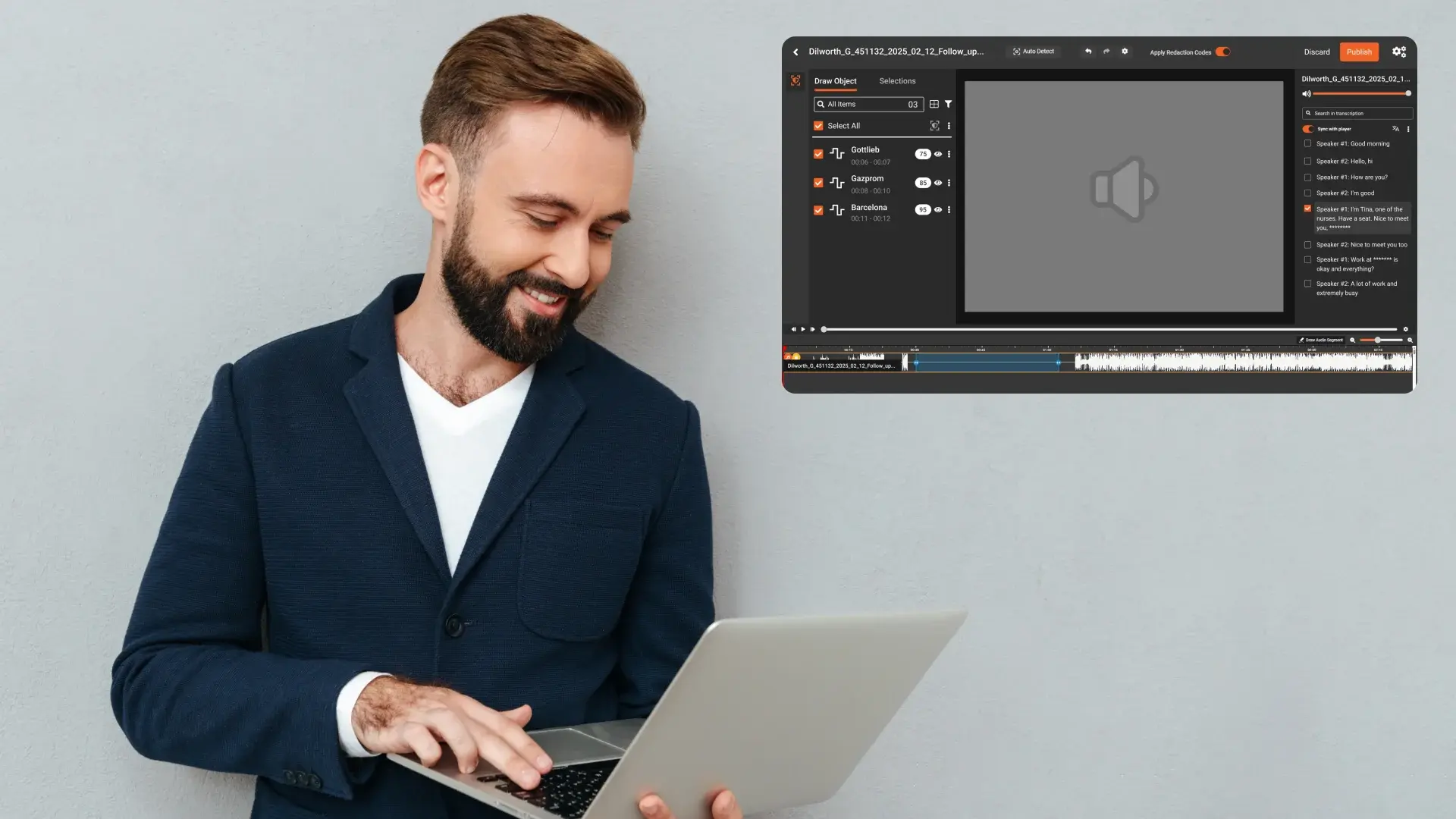
Step 2: Detect all names and identifiers, then review before applying redaction
Instead of automatically redacting “all names,” do this:
- run detection for names, emails, phone numbers, booking references, and other identifiers
- Review the detected items and mark only third-party items for redaction
- keep the requester’s name and details unredacted
This approach is faster than fully manual work, but still gives you control.
Step 3: Apply redaction only to selected items and generate the redacted copy
Once you have selected the third-party items, apply redaction to:
- the audio segments
- the transcript (if you provide one)
This produces a disclosure-ready MP3 that protects third parties while preserving the requester’s information.
What to redact in third-party SAR call audio (a practical checklist)
Use this checklist when reviewing detections.
Third-party names
Redact:
- additional passengers, companions, or family members
- any non-requester full names
Do not redact:
- the requester’s name
- company names or generic references that do not identify a person
Third-party contact details
Redact:
- phone numbers and emails of other individuals
- home addresses or postcodes for other individuals
Do not redact:
- the requester’s own contact details when they are part of their personal data
- general business contact details that are not personal
Booking references and account identifiers
Redact:
- booking references that belong to other people
- account IDs or ticket numbers for other customers
Do not redact:
-
the requester’s booking reference if it is the basis of the call and part of their personal data
Payment and security information
Redact:
- any spoken card number fragments, CVV, passwords, PINs, security answers
- one-time codes or verification phrases
Even if you “do not store” full payment details, they can still be spoken during identity verification.
Background voices and unrelated conversations
Redact:
- background voices that identify another person in a meaningful way
- Unrelated customer conversations captured in the recording
If a call contains overlapping audio that is clearly not about the requester, treat it as high risk and increase QA.
How to handle customer service agent names in SAR recordings
Many teams ask: “Do we need to redact agent names?”
A practical way to handle this is to set a consistent internal rule:
- If the agent is acting in a professional capacity and the name is part of the service interaction, some organizations choose not to redact it.
- If disclosing the agent’s identity creates a privacy or security risk, organizations may redact it.
Whatever your policy is, apply it consistently and document it in your SAR playbook. Inconsistency creates rework and complaints.
How to avoid the biggest mistakes when redacting third-party data in audio
Mistake 1: Redacting every name automatically
This is the most common error. It removes the requester’s name and makes the response feel incomplete.
What to do instead:
- Detect all names
- selectively redact only third-party names
Mistake 2: Relying on the transcript only
Transcripts can miss words when audio quality is poor or when people speak over each other.
What to do instead:
- Use transcripts to speed up review
- validate high risk areas by listening
High-risk areas include greetings, identity checks, payment discussions, and escalations.
Mistake 3: Missing “small” third-party mentions
Short mentions like “your wife,” “your friend,” or “I spoke to John earlier” can reveal third-party personal data.
What to do instead:
- Create a list of common phrases and patterns used in your calls
- train reviewers to look for them
- Use keyword patterns to flag them for review
A simple QA plan for third-party redaction in SAR call recordings
You do not need an overly complex QA process. You need one that catches leaks reliably.
Recommended QA steps:
- Listen to every redacted segment to confirm the sensitive detail is fully covered
- Check a few minutes before and after each redaction in long calls to ensure you did not miss nearby identifiers
- sample unredacted sections in typical risk areas:
- greeting and identity verification
- booking details and passenger names
- payment or refund talk
- complaint escalation or notes summary
- Increase QA for noisy calls, multiple speakers, or long hold music sections where people talk in the background
Document who reviewed and who QA checked. Keep a redaction log with timestamps and categories.
How VIDIZMO Redactor helps you redact third-party data without redacting the requester
To solve this use case well, you need three things:
- accurate detection of identifiers
- the ability to choose what to redact and what to keep
- a clear output that you can disclose confidently
VIDIZMO Redactor supports a workflow where you can:
- generate transcripts for audio recordings to speed up review
- Detect common identifier types like names, emails, and phone numbers
- Review detected items and redact only the third-party ones
- produce a redacted MP3 with your preferred redaction style, such as mute or bleep
- Keep a consistent process across multiple recordings so you can clear SAR backlogs faster
This selective approach is especially useful in travel and booking scenarios, where calls often mention multiple passengers but the SAR requester is the lead passenger. You can keep the requester’s data intact while removing additional passenger details.
Start a free trial of VIDIZMO Redactor to redact third-party data in SAR call recordings, and selectively remove other people’s details while keeping the requester’s data intact.

Final takeaway
Redacting third-party data in SAR call recordings is mostly about control. You need to protect other people’s information without stripping out the requester’s own data.
A safe, efficient approach is:
- Confirm the requester's identity for the call
- detect names and identifiers broadly
- selectively redact only third-party items
- validate with a simple QA pass
- disclose the redacted MP3 with a clear redaction log
VIDIZMO Redactor supports this workflow so privacy teams can move faster, reduce rework, and respond to SARs with confidence.
FAQ
Frequently Asked Questions
How do I redact other people’s names in a SAR call without redacting the requester?
Detect all names first, then review the detected list and redact only the names that belong to third parties. Keep the requester’s name unredacted. This is faster than manual editing and avoids the common “everything got redacted” problem.
What is the fastest way to find third-party data in long call recordings?
Use transcript-assisted review and identifier detection to jump directly to likely sensitive moments. Then confirm by listening around those timestamps before finalizing redactions.
Should I redact the customer service agent’s name in the audio?
It depends on your internal policy and risk. The safest operational approach is to set a rule, apply it consistently, and document it so decisions do not change case by case.
Can I rely on a transcript for third-party redaction?
A transcript helps, but do not rely on it alone. Always listen to high-risk moments and do a quick QA pass, especially when audio is noisy or multiple people speak.
What should I do if the call includes the background voices of other people?
Treat it as high risk. Redact the parts where the background voice is identifiable or reveals personal information, and increase QA because transcripts often struggle with overlapping voices.
TopicsRedactionRedactorSecurity and ComplianceLegal and Privacy
About the author
Zain Noor is a Product Marketing Executive at VIDIZMO with expertise in AI redaction technology. He focuses on how public safety agencies, government bodies, and commercial organizations adopt and operationalize video intelligence at scale.
You may also like
Fire and Smoke Detection as a Second Set of Eyes in Schools
Let the first sentence of this article do the compliance work: nothing described here replaces, modifies, or competes ...
Weapon Detection in Schools: Detection, Verification, Response
No school safety technology carries more emotional weight than weapon detection, and no school safety technology is ...
School Safety Grants: What the Money Can Buy
School safety improvements have a funding problem that is really a sequencing problem: the need is continuous, the ...