
by Hassaan Mazhar, Last updated: June 11, 2026
.webp)
A Video Content Management System (Video CMS) is an enterprise platform used to ingest, store, organize, secure, and distribute video content at scale. Unlike basic file storage or consumer video hosts, a video CMS provides AI-powered search across transcripts, role-based access control, adaptive bitrate streaming, and detailed viewer analytics. Core components include automatic transcoding, metadata tagging, lifecycle storage policies, integration with LMS and identity systems, and live streaming.
This guide covers what a video CMS does, the features that separate enterprise platforms from basic hosting, how the leading vendors compare, and the questions that prevent most selection mistakes.
Key Takeaways
- A video CMS handles the full lifecycle of business video: ingestion, transcoding, storage, search, delivery, and analytics.
- Generic file storage and consumer platforms like YouTube fail at three things enterprises need: granular access control, transcript-level search, and audit-ready analytics.
- Standards-based integration with LMS, identity, and meeting tools matters more than feature counts. Look for SCORM 1.2/2004, LTI 1.3, SAML 2.0, and OAuth 2.0 support.
- AI transcription, multilingual translation, semantic search, and frame-level engagement analytics are baseline expectations, not differentiators.
- Deployment flexibility (SaaS, on-premises, hybrid, government cloud) is the biggest filter for regulated industries.
- Total cost runs well beyond licensing. Storage tiering, bandwidth, professional services, and integration work add up over a multi-year horizon.
What Is a Video Content Management System?
A video content management system is software that handles every stage of a video's life inside an organization: upload, transcoding, storage, security, search, delivery, and analytics. It is purpose-built infrastructure for video, not a folder with a play button bolted on.
The distinction matters once your library grows past a few hundred files. A 50MB PDF and a 50GB video file may both live on the same drive, but only one of them needs transcoding into a dozen output formats, adaptive streaming to varied devices, and searchable transcripts to be useful at scale. General-purpose systems like SharePoint or Google Drive cannot do any of that.
Why Do Organizations Need a Video CMS?
Video is now the default medium for business communication. Training, town halls, product demos, compliance recordings, customer education, marketing content. All of it gets recorded, all of it needs to live somewhere, and most of it needs to be findable and governable.
According to Forrester research, knowledge workers spend a meaningful portion of their week searching for information. Video is among the hardest content to find because traditional search engines cannot index what is spoken or shown inside a video file.
A video CMS closes that gap. Training teams can track which employees completed compliance videos and passed in-video assessments. Communications teams can measure how many people watched a town hall and where they dropped off. IT can enforce SSO, encryption, and geographic restrictions automatically. Marketing can run branded portals without YouTube ads or competitor recommendations appearing next to their content.
Without one, teams default to workarounds: YouTube uploads (public by default, with ads), email download links (no tracking, no security), shared drive dumps (no transcoding, no search). Each workaround creates risk, friction, or both.
How Is a Video CMS Different from a Traditional CMS?
Traditional content management systems like WordPress, SharePoint, and Drupal were built for text and images. They can host an MP4 file. They cannot transcode it, stream it adaptively, index what is spoken inside it, or tell you whether anyone actually watched.
A video CMS adds the missing layer:
- Ingestion and transcoding for hundreds of source formats, converted automatically into web-friendly outputs
- Adaptive bitrate streaming that adjusts quality to each viewer's bandwidth
- Searchable transcripts generated automatically from spoken content
- Role-based access control with viewer, editor, and admin tiers
- Engagement analytics at the per-user level, not just aggregate view counts
- Lifecycle automation for archival, retention, and deletion
How Is a Video CMS Different from YouTube or Vimeo?
Consumer platforms were designed for public distribution. Enterprise video has different requirements.
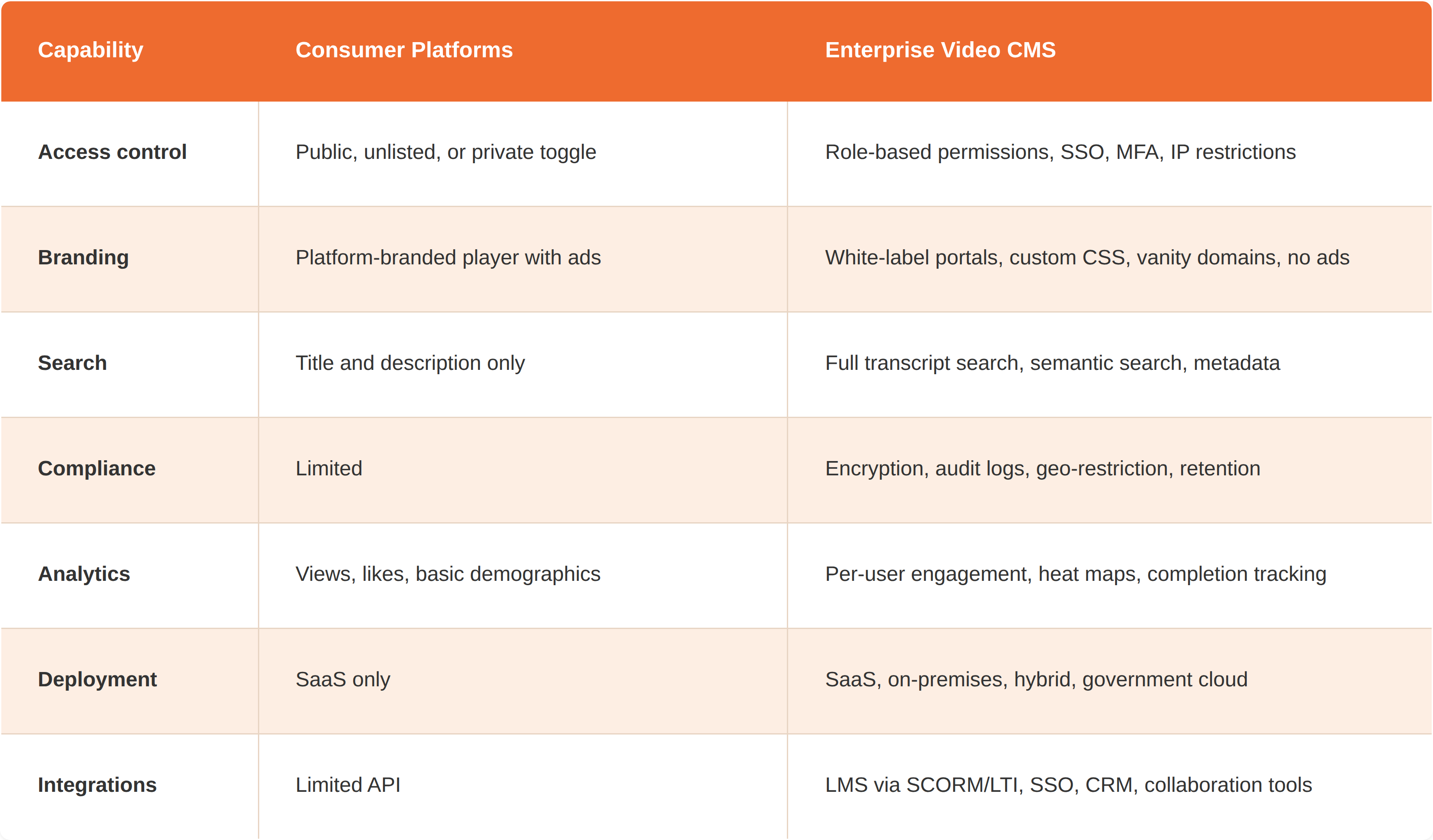
The gap matters most in regulated industries. Healthcare bound by HIPAA cannot host patient education on a public platform. Government with FedRAMP requirements needs encryption and audit trails consumer tools do not offer. For more detail on this comparison, see the list of YouTube alternatives for enterprise streaming.
What Features Should an Enterprise Video CMS Have?
When comparing platforms, focus on these categories. Feature lists are easy to fake. Specifics are not.
Ingestion and Storage
A capable video CMS accepts video from any source: direct uploads, bulk imports, API ingestion from Zoom, Microsoft Teams, and Webex, and automated capture from cameras and encoders. Look for support for 100+ input formats at minimum (some platforms support 255+).
Storage should be tiered. Hot storage keeps frequently accessed content available instantly. Cold and archive tiers move aging content to cheaper storage automatically, based on policies you define. The cost difference between hot and archive tiers can be 10x or more on major cloud providers.
Confirm the platform supports your required deployment model: SaaS for simplicity, dedicated cloud for performance, on-premises for data sovereignty, hybrid for a mix, or government cloud for FedRAMP and CJIS.
Transcoding and Adaptive Delivery
A good video CMS transcodes uploads automatically into multiple resolutions (1080p, 720p, 480p, lower for mobile). Adaptive bitrate streaming (HLS or DASH) then adjusts quality to each viewer's network conditions, preventing buffering on a poor connection without forcing everyone down to standard definition.
For global audiences, look for built-in CDN delivery. For corporate networks where thousands of employees might watch a town hall at once, an enterprise CDN with peer-to-peer edge caching prevents bandwidth saturation by serving viewers from local peers.
AI-Powered Search
As libraries grow, findability becomes the gating problem. A 500-video library without transcript-based search becomes a digital graveyard.
Modern platforms solve this with AI:
- Speech-to-text transcription generates time-synced transcripts at upload
- On-screen text recognition (OCR) extracts text shown in slides or signage
- Object and face detection adds another searchable layer
- Semantic search finds content by meaning, not just keywords
For global organizations, language coverage is a real differentiator. Vendor support ranges from under 10 languages to more than 80. Ask for published word error rate benchmarks, not marketing claims.
Security and Access Control
Enterprise video often contains sensitive information: contracts, executive communications, patient data, evidence recordings, proprietary training. A video CMS needs to protect it.
Baseline expectations:
- AES encryption at rest and in transit
- Single sign-on via SAML 2.0, OAuth 2.0, or OpenID Connect
- Multi-factor authentication
- Role-based access at the folder, category, and individual video level
- IP and geographic restrictions
- Time-limited and view-count-limited share links
- Digital rights management for high-value content
- Audit logs covering every access and admin action
- Compliance with GDPR, HIPAA, FERPA, CJIS, SOC 2, and industry-specific frameworks
In regulated verticals, verify the platform's actual deployment certifications, not just marketing claims.
Analytics and Reporting
View counts are not analytics. Useful video analytics answer questions that affect decisions:
- Where do viewers drop off in a 45-minute compliance module?
- Which regions experience playback quality issues?
- Did new hires finish onboarding, or click play and walk away?
- Which segments do learners rewatch (a signal of either confusion or genuine interest)?
Look for per-user engagement data, video heat maps showing rewatch and skip patterns, quiz performance by question, and exportable reports for audits. For a deeper view of what good metrics look like, see this breakdown of video engagement for enterprises.
Integrations
A video CMS should not operate in isolation. The value multiplies when it connects to the tools your teams already use.
- LMS: SCORM 1.2/2004 and LTI 1.3 (with Advantage services like Names and Role Provisioning, Assignment and Grade Services, Deep Linking) enable direct embedding in Canvas, Moodle, D2L Brightspace, and Blackboard with automatic grade passback. For background, see enhancing video-based learning without replacing your LMS.
- Meetings: Native ingestion from Zoom, Microsoft Teams, Webex, and Google Meet so recorded meetings flow into the library automatically.
- Identity: SSO across Okta, Azure AD, Active Directory, Ping. SCIM provisioning automates user lifecycle.
- Business systems: REST APIs and webhooks for CRM, marketing automation, and BI tools.
Live Streaming
If your organization hosts town halls, training sessions, or webinars, built-in live streaming should be in scope. Look for adaptive bitrate live streams, interactive features (chat, polls, Q&A), automatic recording to on-demand, and concurrent viewer capacity that matches your largest expected audience. Some platforms cap at a few hundred viewers; others support tens of thousands. For more on what to expect, see enterprise virtual event streaming.
Learning and Training Support
For L&D teams, basic video hosting is not enough. Look for in-video quizzes at specific timestamps, SCORM packaging, completion certificates tied to watch thresholds and quiz scores, structured learning paths with prerequisite gating, and downloadable handouts attached to videos.
Branding and Multi-Portal
Your video portal should look like your organization, not the vendor's. Look for white-label branding (custom logos, colors, fonts, vanity domains, custom CSS) and multi-portal architecture for organizations supporting multiple audiences (departments, regions, languages, external partners) from a single instance.
How Is a Video CMS Used Across Industries?
The features that matter shift by industry.
-
Corporate training and L&D: LMS integration via SCORM or LTI, in-video quizzes, individual completion tracking, certificate generation, audit-ready analytics.
-
Corporate communications: Reliable live streaming, secure distribution, mobile access, engagement analytics across regions and time zones. See how secure corporate video streaming works.
-
Marketing: SEO-friendly embeds, lead capture forms, brand consistency, integration with HubSpot, Marketo, or Salesforce.
-
Healthcare: HIPAA compliance with a signed BAA, strict access controls, data residency options, EHR integration, PHI redaction.
-
Higher education: LMS integration, ADA/Section 508/WCAG 2.2 AA accessibility, student authentication, scalable streaming for both seminars and large lectures.
-
Government and public sector: FedRAMP authorization, CJIS compliance, on-premises or government cloud deployment, audit trails, public records redaction for FOIA responses.
How Do You Choose the Right Video Video Content Management System?
Vendor selection on this category goes wrong in predictable ways. A clear framework prevents most of them.
Step 1: Document Your Requirements
Before evaluating vendors, get specific on content volume and growth, user base (internal, external, multilingual), use cases, compliance requirements (HIPAA, FedRAMP, CJIS, GDPR, SOC 2), required integrations (LMS, SSO, CRM, meeting tools), and deployment preference (cloud, on-premises, hybrid, government cloud). If you cannot answer these in writing, you are not ready to evaluate.
Step 2: Evaluate Core Capabilities
Compare platforms against the features above. Build a scorecard weighted by your actual requirements, not by what looks impressive in demos.
Step 3: Assess Vendor Credibility
Look for analyst recognition (Gartner, IDC, Forrester), named customer references in your industry, financial stability, real implementation and support resources, and a recent release cadence. A flashy demo from a vendor with no track record in your industry is a high-risk choice.
Step 4: Run a Proof of Concept
Test with your actual content and workflows. Verify transcoding output, configure security to match your standards, test the LMS or SSO integration, and measure streaming performance in the conditions your users actually face.
Step 5: Calculate Total Cost of Ownership
Licensing is one cost line. Model the full three-year picture: licensing model, tiered storage, bandwidth and CDN delivery, implementation, custom integration work, training, and support tier costs. The cheapest licensing tier often has the highest total cost.
How Do the Top Video CMS Platforms Compare?
The market has a handful of established platforms, each with a different center of gravity.
VIDIZMO EnterpriseTube: Built for organizations that need deployment flexibility and advanced security. Stands out for flexible deployment (SaaS, on-premises, hybrid, government cloud), 82-language AI transcription, multi-portal architecture, and native SCORM/LTI integration. Gartner-recognized in the EVCM market guide. For a full feature breakdown, see the enterprise video platform buyer's guide.
Panopto: Strongest in higher education and lecture capture, with solid LMS integration and AI search. Focus narrows outside academic use cases.
Kaltura: Highly customizable with strong developer tools and virtual events. Flexibility comes with complexity that often requires dedicated administration.
Brightcove: Built for marketing and media publishing, with monetization tools and marketing integrations. Less natural fit for internal use cases, and pricing reflects the marketing focus.
Microsoft Stream: The default for organizations committed to Microsoft 365. Native Teams integration is the main draw; features are limited compared to dedicated platforms.
What Are the Most Common Mistakes in Video CMS Selection?
A few patterns come up repeatedly:
Choosing based on consumer familiarity: "Everyone knows YouTube" is not an enterprise strategy. Evaluate based on security, compliance, and governance needs first.
Ignoring deployment requirements: If your security team requires on-premises hosting or government cloud, eliminate SaaS-only vendors at the start. Discovering this in week six is expensive.
Underestimating search needs: A 500-video library without transcript-based search becomes unusable. AI-powered search is no longer optional at enterprise scale.
Forgetting accessibility: WCAG 2.2 AA compliance is not optional for government, education, or public sector. Verify before you buy.
Treating analytics as a nice-to-have: If you cannot prove employees watched and understood training content, your compliance program has a documented gap. Auditors will find it.
What Are Video CMS Best Practices?
Once you have a platform, a few governance habits make the difference between a useful library and a content swamp.
Establish governance: Who can upload? What approval workflows are required? How long do different content types stay live before archival? Write these down before users start uploading.
Develop a taxonomy: Standardized categories, naming conventions, required metadata fields, and tagging guidelines. Without a taxonomy, search and discovery break as the library scales.
Make accessibility the default: Captions on every video. Transcripts available for download. Accessible video players. Test with assistive technologies.
Lean on AI: Automatic transcription, translation, tagging, and chapter generation save hours of manual work. Most platforms do this at upload without admin intervention.
Measure and optimize: Review analytics regularly. Identify drop-off points. Retire underperforming videos. A/B test format and length for high-volume content like onboarding.
How Does a Video CMS Fit Into the Broader ECM Picture?
Video content management is a specialized layer within the broader enterprise content management framework. ECM covers documents, emails, records, multimedia, and video as a single governance domain. A video CMS handles video specifically, because the technical demands of transcoding, streaming, transcription, and adaptive delivery are different enough to need dedicated infrastructure.
The two are complementary, not competing. Most mature organizations run ECM for documents and contracts, and a separate video CMS for media. For the broader framework view, see this overview of enterprise content management.
Bring Your Video Content Under Control
If your organization is still spreading video across shared drives, consumer platforms, and one-off tools, a dedicated video CMS brings the chaos under control. The right platform makes content findable, governable, and measurable in ways those workarounds never will be.
To see how VIDIZMO EnterpriseTube fits your environment, request a walkthrough with a solution specialist. Bring your current setup, your compliance requirements, and your top three video use cases, and we will map out what an integration would actually look like.

About the Author
Jump to

The Most Recommended 5 Enterprise Video Platforms
.webp)
10 Best VOD Platform Providers for Enterprise & Business (2026 Comparison)


No Comments Yet
Let us know what you think