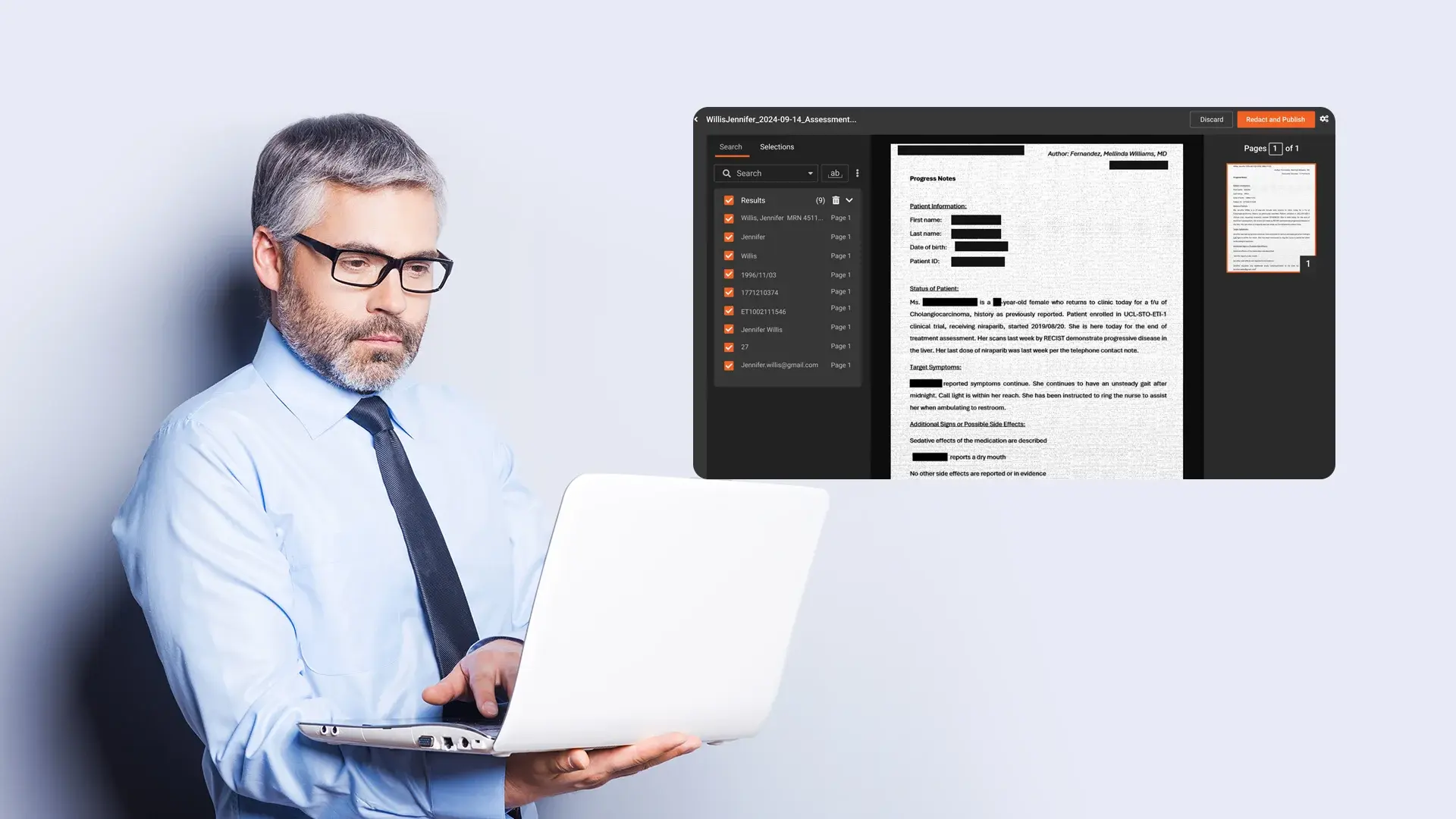
The short answer is yes; AI can redact sensitive information automatically.
The more accurate answer is yes, but not in a fully hands-off way.
Modern automatic redaction combines AI detection, confidence scoring, and masking with human-in-the-loop workflows. The AI finds likely sensitive data across video, audio, and documents, applies redaction based on defined rules, and routes edge cases to human reviewers for final approval.
In regulated environments, this hybrid model is not a compromise. It is the only approach that scales without breaking accountability.
Automatic redaction works best as an assistive system, one that accelerates PII and PHI redaction while keeping humans responsible for accuracy, policy interpretation, and legal defensibility.
Manual Redaction Risk: The Work You Avoid Is the Risk You Accept
You already know certain files should never leave your environment without redaction.
Yet they do.
Not because your teams do not care, but because the volume of content and the pace of requests make thorough manual review nearly impossible.
The same patterns appear across most organizations:
- Analysts fast-forward through hour-long recordings and hope they catch every name and face
- Paralegals scrub PDFs under deadline pressure
- Security teams approve urgent sharing requests after a quick spot check
Every skipped frame and unchecked page becomes a potential exposure incident.
That incident is not abstract. It is a data subject complaint. An audit finding. A regulator inquiry. A headline. It is also a late-night war room explaining how a minor redaction step failed.
This is the real business pain behind the question “Can AI redact sensitive information automatically?”
It is not curiosity about AI. It is the reality that manual redaction no longer scales, and many teams are already operating beyond safe limits.
What Is Automatic Redaction and Where Does It Fit in Your Workflows?
Automatic redaction uses AI to identify and mask sensitive information across unstructured content at scale. It is not a magic filter and not a single feature. It is a set of capabilities embedded into specific workflows to reduce manual effort and exposure risk.
Teams typically use automatic redaction in scenarios such as:
- Video and audio recordings with bystander faces, license plates, and spoken names
- Call center recordings containing credit card numbers or customer identifiers
- Case files and medical records mixing PHI, PII, and operational data
- Training and compliance content that must exclude real client or patient details
In each case, the goal is the same:
Redact sensitive information automatically where the AI is confident, and let humans focus on judgment, context, and exceptions.
That is where automatic redaction delivers value, not by replacing experts, but by pulling them out of high-volume, low-complexity work.
Enterprise platforms such as VIDIZMO’s AI-powered redaction software are designed around this model, combining automation with governance rather than treating redaction as a black box.
How AI Redaction Works: From Detection to Human Review
To understand what automatic redaction can and cannot do, it helps to see the full pipeline. Effective AI redaction follows a consistent sequence:
- Ingest and preprocess content
- Detect candidate sensitive information
- Score each detection by confidence
- Apply automated redaction using policy rules
- Route selected items for human-in-the-loop review
Automatic redaction is the outcome of a well-designed pipeline, not a toggle you flip on.
Ingesting Video, Audio, and Documents for AI Redaction
Before any redaction occurs, the system must understand what it is processing. This ingestion step is often overlooked, but it heavily influences accuracy.
For video, audio, and document redaction, platforms typically perform:
- Video preprocessing: Frame extraction, scene detection, motion stabilization
- Audio preprocessing: Automatic speech recognition to generate time-coded transcripts
- Document preprocessing: OCR and layout parsing for scanned pages, tables, and forms
Good ingestion gives AI models structured, high-quality input. Poor ingestion leads to blurred faces, missed words, and unreadable text.
When evaluating AI redaction software, ask how it handles low-quality recordings, mixed formats, and multilingual content. Automatic redaction quality depends on this foundation.
Detecting PII and PHI Across Content Types
Once content is ingested, AI models begin identifying sensitive information. This detection layer usually combines multiple techniques:
- Computer vision for faces, license plates, and on-screen identifiers
- Named entity recognition for names, locations, and organizations
- Pattern-based detection for SSNs, card numbers, MRNs, and IDs
- Domain-specific logic for healthcare, public sector, or financial services
Accurate automatic redaction correlates these signals. A patient name may appear in speech, on screen, and in a scanned document within the same case file. Mature platforms surface these as related items, simplifying review.
Confidence Scoring: Turning AI Output Into Policy Decisions
Detection alone is not enough. The system must express how confident it is.
Every detection receives a confidence score. Enterprise-ready redaction platforms expose this score and let organizations set a single threshold, VIDIZMO REDACTOR supports a configurable range from 25% to 90%, so only detections above the chosen cutoff are applied automatically. Set the threshold higher for conservative, review-heavy workflows, or lower to catch more candidates at the cost of more manual review.
For example:
Public records teams may set a lower threshold to catch more candidates before disclosure
Legal teams may set a higher threshold to avoid over-redacting responsive content
Applying Automatic Redaction Across Modalities
After detection and scoring, the system applies redaction differently depending on content type:
- Video: Blurring or boxing faces and objects frame-by-frame, tracking movement
- Audio: Muting, beeping, or replacing sensitive words in sync with timestamps
- Documents: Applying irreversible masks over text or regions
Effective AI redaction is surgical, not heavy-handed. Viewers should still follow a redacted bodycam video. Readers should still understand a redacted medical report.
For a deeper look at how this works across formats, see this guide to digital content redaction.
Human-in-the-Loop Redaction for Regulated Teams
For most enterprise and public sector use cases, fully automatic redaction is not acceptable.
Human-in-the-loop redaction remains non-negotiable and typically appears at three stages:
- Pre-configuration: Legal and privacy teams define policies and exceptions
- Review: Analysts verify AI detections using streamlined interfaces
- Audit: Every decision is logged for defensibility and compliance
This keeps subject matter experts focused on ambiguity and policy interpretation, while AI handles repetitive detection work at scale.
Solutions similar to VIDIZMO REDACTOR follow this model, combining AI detection, configurable policies, and human review in a single workflow rather than isolating AI as a standalone tool.
Accuracy, Limitations, and Realistic Expectations
AI redaction is powerful, but it is not perfect.
Common limitations include:
- Low-light or fast-motion video
- Overlapping speech and background noise
- Industry-specific language and acronyms
- Context-dependent sensitivity
Any claim of perfect, fully automatic redaction should be treated with skepticism.
The right question is not “Can AI be flawless?”
It is “Can AI reduce our risk surface while improving consistency and speed?”
In most organizations, the answer is yes, when paired with human oversight.
How to Evaluate Automatic Redaction Tools
Once you understand the pipeline, evaluation becomes practical.
Key criteria include:
- Coverage: Video, audio, and documents in one workflow
- Detection quality: Performance on your real data
- Policy controls: Custom PII and PHI rules
- Confidence thresholds: Adjustable automation levels
- Human review: Efficient interfaces and audit logs
- Security and compliance: Retention, access control, and deployment options
- Integration: Compatibility with existing systems
Enterprises often compare multiple platforms, including VIDIZMO REDACTOR, during proof-of-concept evaluations to assess governance fit alongside accuracy.
A structured evaluation guide can help translate these requirements into selection criteria. This AI redaction software buyer guide is a useful starting point.
From Firefighting to Controlled Automatic Redaction
Many teams today operate in firefighting mode. Every request to share content triggers urgency and uncertainty.
When automatic redaction with human-in-the-loop workflows is implemented, several shifts occur:
- Speed: AI handles first-pass detection at scale
- Consistency: Policies replace ad-hoc judgment calls
- Traceability: Audit logs support investigations and reviews
- Coverage: Redaction expands to content that previously slipped through
Automatic redaction does not remove responsibility.
It gives teams the tools to meet that responsibility at the scale of modern data.
Final Thought
So, can AI really redact sensitive information automatically?
Yes, but responsibly, with controls, and with humans in the loop.
Platforms like VIDIZMO demonstrate how automated detection, policy-driven redaction, and human oversight can work together to reduce risk while keeping organizations compliant, efficient, and confident in how they share data.
If you want to see how this works in practice, explore the step-by-step redaction workflow in VIDIZMO.

FAQ
Frequently Asked Questions
How accurate is automatic redaction in real world use?
Accuracy varies by content type, recording quality, and domain. On clear video and audio, automatic redaction can detect common PII with high reliability. On noisy calls, bodycam footage, or handwritten documents, performance drops. That is why human in the loop redaction is essential. The AI should handle bulk detection and easy cases, while reviewers focus on ambiguous items and policy decisions.
Can AI handle PII redaction and PHI redaction for compliance standards?
Modern ai redaction software can support both PII redaction and PHI redaction, but compliance depends on how you configure and govern the system. You need clear policies, appropriate confidence thresholds, human review for sensitive workflows, and audit trails. Regulators care less about the specific technology and more about whether your process is documented, repeatable, and monitored.
Does automatic redaction work on live streams or only on recordings?
Some platforms support near real time automatic redaction for live or rapidly published content, especially for faces and audio segments. However, accuracy constraints and latency requirements make this more complex than redacting stored recordings. Many organizations still prefer to record, run ai redaction post processing, and then publish a redacted version for wider access.
How does human in the loop redaction work in practice?
In a human in the loop redaction model, the AI first scans the file and marks potential sensitive items with confidence scores. Reviewers then open a workspace that lists all detected items, grouped by type and location. They can approve, reject, or modify each redaction, apply bulk actions, and add manual redactions where needed. The system records every decision. This approach combines the speed of automatic redaction with the judgment of experienced staff.
What types of files can AI redaction handle?
Most enterprise ready tools support video audio document redaction. This usually includes common video formats, call recordings, and document types such as PDF, Word, and scanned images. The exact list varies by vendor. The important factor is whether you can run a consistent automatic redaction workflow across your primary content channels instead of managing separate tools for each format.
Will automatic redaction replace my legal or compliance reviewers?
No. Automatic redaction reduces the manual workload of searching, scrubbing, and tracking redactions, but it does not replace the need for expert judgment. Legal and compliance teams remain responsible for defining what must be redacted, handling edge cases, and signing off on final outputs. In practice, ai redaction lets specialists focus on higher value analysis while the system takes care of repetitive detection tasks.
How do we prevent over redaction that harms usability?
You can control over redaction by tuning confidence thresholds, customizing detection rules, and enforcing human review for sensitive document types. Many organizations start with conservative automatic redaction settings and expand automation as they build trust in the models. Reviewer interfaces also make it easy to restore context by unmarking non sensitive items before finalizing the redacted file.
Is AI based automatic redaction secure for sensitive evidence and records?
Security depends on the specific solution and its deployment model. You should evaluate encryption, access controls, logging, data residency, and options for on premises or private cloud deployment. For sensitive evidence and regulated records, it is also important that the platform supports role based access, retention controls, and clear separation between original and redacted versions.
How do we get started with AI redaction in a low risk way?
Many teams start by piloting automatic redaction on a narrow, internal workflow. For example, they use ai redaction software to process training recordings or internal call reviews before rolling it out to public records or legal disclosures. This controlled introduction lets you calibrate detection performance, refine policies, and prove value without exposing high stakes content on day one.
TopicsRedactionRedactorSecurity and Compliance
About the author
Hassaan Mazhar is a B2B SaaS content strategist at VIDIZMO specializing in AI redaction, compliance technology, and enterprise content marketing. He builds trust-driven narratives for legal, public sector, and enterprise audiences navigating data privacy and video intelligence challenges.
You may also like

What Is a Real-Time Crime Center? A Guide for Cities and Counties
Somewhere in the last two years, someone probably asked your department whether it should have a real-time crime ...

Staffing a Real-Time Crime Center When Software Does the Watching
Most chiefs who hear a pitch for a real-time crime center ask the same question before any other, which is whether they ...

RTCC, EOC or Situational Awareness Center: What Each Room Is For
Walk into a real-time crime center, then into a city's emergency operations center, and you will see much the same ...